
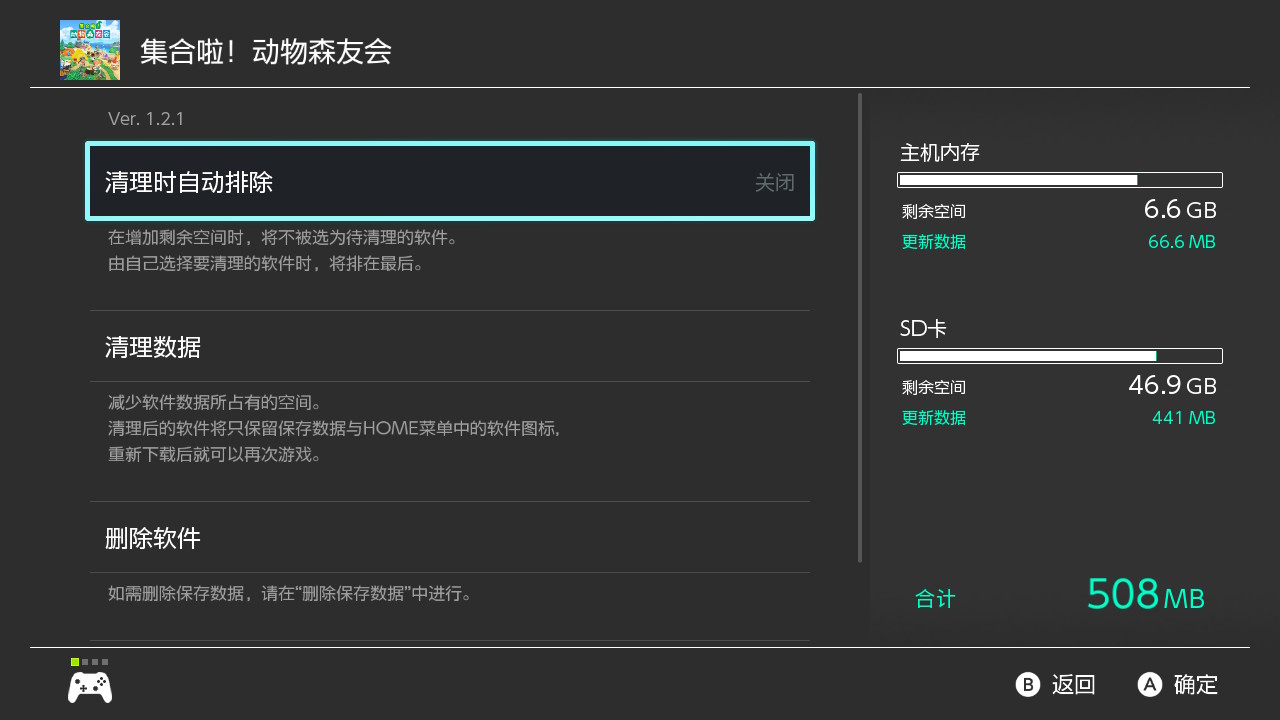
I had Claude Code help me figure out why Animal Crossing: New Horizons wouldn’t open. It went back to HOME on its own, went through “All Software,” entered “Detailed Management” for the software in System Settings, and finally told me: the console only had 508 MB of update data left, and the base game was gone, so the system was asking me to insert the game card.
I didn’t touch the controller the entire time. The thing that did it was switch-use, an open-source Rust command-line tool of about 1 MB.
How it connects to the Switch
The console needs to run Atmosphère and have the sys-botbase system module installed. sys-botbase opens TCP port 6000 on the console and accepts line-by-line text commands: buttons, sticks, touch, and screenshots. switch-use is a client for that protocol. As long as the computer and console are on the same Wi-Fi network, that’s enough—no USB cable and no resident process required.
curl -fsSL https://raw.githubusercontent.com/leeguooooo/switch-use/main/install.sh | sh
switch-use discover    # Scan the local network, find the console, and remember its address
switch-use status      # Battery, sys-botbase version, currently running game
The Switch has no accessibility tree, so OCR fills the gap
I previously made iphone-use. iPhone has an accessibility tree, so the text and coordinates of every button can be read directly, and an agent can operate it by reading text. The Switch system does not expose such a layer. All sys-botbase can provide is screenshots.
So switch-use uses Apple’s Vision framework on Mac to recognize screenshots, listing each line of text and its center point. The coordinates are touch coordinates, so they can be tapped directly:
$ switch-use elements
[1] Animal Crossing: New Horizons  (425,64)
[4] Software Information  (240,192)
[9] Data Management  (240,351)
[18] OK  (1085,685)
On top of that, there are three commands, all modeled after iphone-use’s usage:
tap Data Management: find that text and tap it. If there are multiple places with the same name on screen, it lists them for you to choose from; if it can’t find it, it shows the closest matches.wait Continueandpress A see:Continue: wait for a piece of text to appear before moving on, without hard-codingsleep 1.5.--observe: add it after any operation. After the operation finishes, it waits for the screen to stabilize and returns the text from the new screen directly. The agent needs one fewer separate screen-reading step.
It can recognize Chinese, Japanese, and English. Pixel fonts and cover art inside games are recognized poorly; those results are marked with a question mark.
Pitfalls found on real hardware
The HOME button is a toggle. If the console is already on HOME and you press it again, it switches back to the running game. My first version of home just pressed it directly, and during testing it brought Contra back up. Now home first uses OCR to check whether there is a clock in the top-right corner, which only appears in the HOME menu. If it is already on HOME, it does nothing.
Button presses can be swallowed during screen transitions. I used DRIGHT*12 to try to move the cursor to “All Software,” but several right presses were lost, and A landed on Battle City. Another game was still open, so the system popped up “The currently running software will be closed,” with focus conveniently sitting on “Close.”
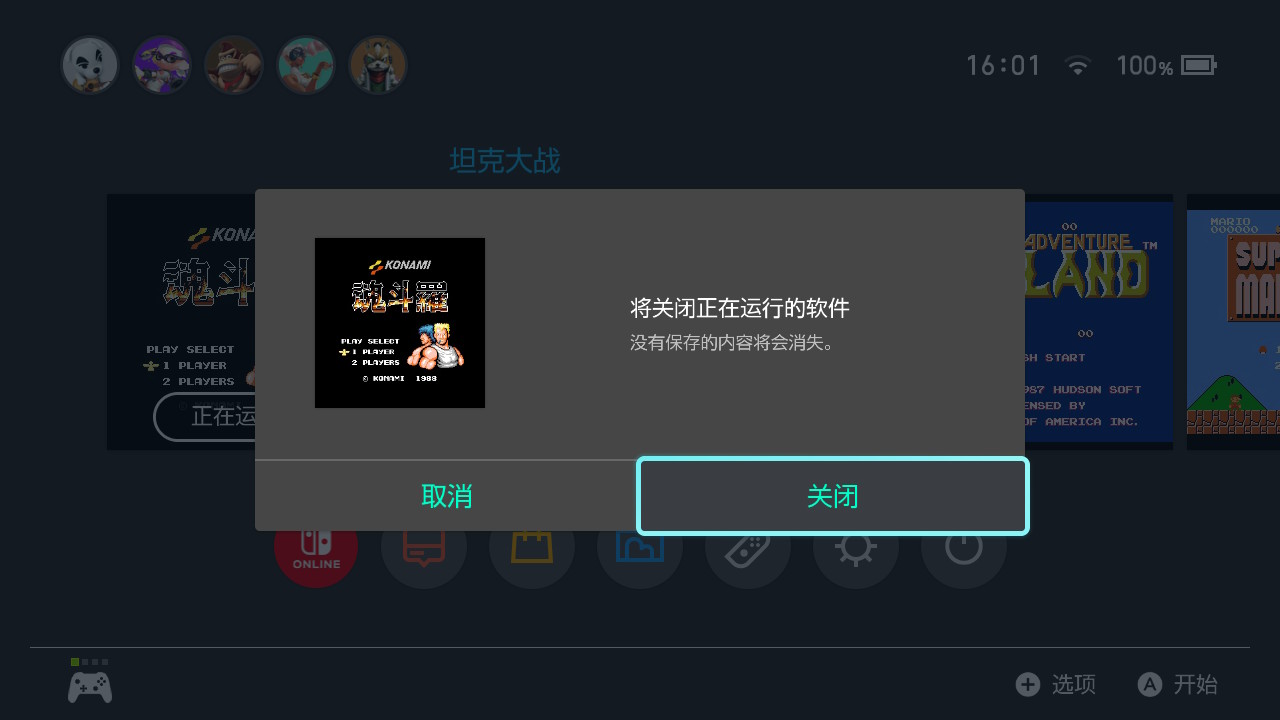
I pressed B to cancel, and nothing happened. After that, the skill gained another rule: before pressing A on HOME, first read the name of the item under the cursor—the name is only shown above the selected item—and press only if it matches.
A loading spinner is not text. The first time entering “All Software,” the page was spinning. Two OCR passes before and after both only read the title bar, so --observe thought the screen was stable and returned early. Later I added pixel comparison: shrink the screenshot into a 160×90 grayscale grid and count how many cells differ by more than 60 between consecutive frames. Measured on the console, the breathing highlight effect of the selected HOME item changes at most 5 cells, while a loading page changes more than 1700 cells in one frame, so the threshold is set at 8 cells. Now the screen only counts as stable once both text and pixels stop moving; for screens that keep moving, such as animations or very long loads, it returns after 4 seconds and notes in the output that “the screen is still changing.”
The first touch on HOME only selects. For a while I thought touch didn’t work in docked mode, because tapping the Settings icon didn’t open it. In reality, the first tap only moved the cursor onto the icon; a second tap opened it. sys-botbase’s virtual touch works in docked mode too. Now touch and tap compare the screen before and after tapping; if nothing changes, they report an error, so the agent won’t think the tap succeeded.
For agents
The repository includes a SKILL.md with operating procedures and the pitfalls above. Claude Code can install the plugin:
/plugin marketplace add leeguooooo/plugins
/plugin install switch-use@leeguooooo-plugins
It is also part of the use family; installing use-family brings it along. The skill hard-codes several rules: ask before interrupting a running game; don’t change system settings, delete data, or buy anything unless the user explicitly requests it; don’t let the console connect to Nintendo services. Ideally, the console should be in a virtual system, emuMMC, and use Atmosphère’s hosts to block Nintendo servers.
Want to play with it yourself: Pocket Gamepad
The sys-botbase port is not only useful for agents. I also made a Mac app called Pocket Gamepad, which follows the same path: connect to the console’s sys-botbase and turn the Mac keyboard or an idle phone into a Switch controller. The phone doesn’t need anything installed; scan the QR code on the Mac and play in landscape.
When friends come over and there is only one pair of Joy-Con, the third person uses it. It has a 7-day free trial, then a one-time purchase of US$1.99. Setup and button mapping are described in Not enough Switch controllers? Use a Mac keyboard and phone to add another controller.
The two tools can run together: sys-botbase accepts multiple connections at the same time, so you can play with Pocket Gamepad while the agent can still take screenshots and read the screen.
What it still cannot do
- OCR is only available on macOS. On Linux, buttons, touch, and screenshots all work, but you need to read the screen yourself from the image.
- OCR cannot tell where the cursor is. Most Switch menus are navigated with the directional buttons, and the selected item is indicated by a highlighted frame, not text. After moving the cursor, you still need to check the screenshot to confirm.
- Screenshots are slow. sys-botbase sends JPEGs as hexadecimal. A HOME screen takes about 0.45 seconds, while an “All Software” screen full of cover art takes around 1.4 seconds.
Code and installation instructions are on GitHub, dual-licensed under MIT or Apache-2.0.
 WeChat Pay
 Alipay
Comments
Replies are public immediately and may be moderated for policy violations.