
I wanted hermes — my agent running on another machine — to log into accounts by itself. Not with me logging in first and feeding it cookies, but with it logging in from scratch on its own.
There are basically two kinds of login. One is username and password: the agent pulls the username, password, and 2FA code from my Bitwarden vault, fills them in, and that’s it. I got that path working with bitwarden-use, logging into GitHub with zero human intervention. Even passkeys work: the private key is pulled from the vault and WebAuthn is signed locally, with no need to pull out a phone or touch a fingerprint sensor. The other kind is third-party OAuth, like “Sign in with Google.” That path kept me stuck for most of a day.
Here’s why it is hard, and how chrome-use finally got through it.
One Click, Three Windows Talking Underneath
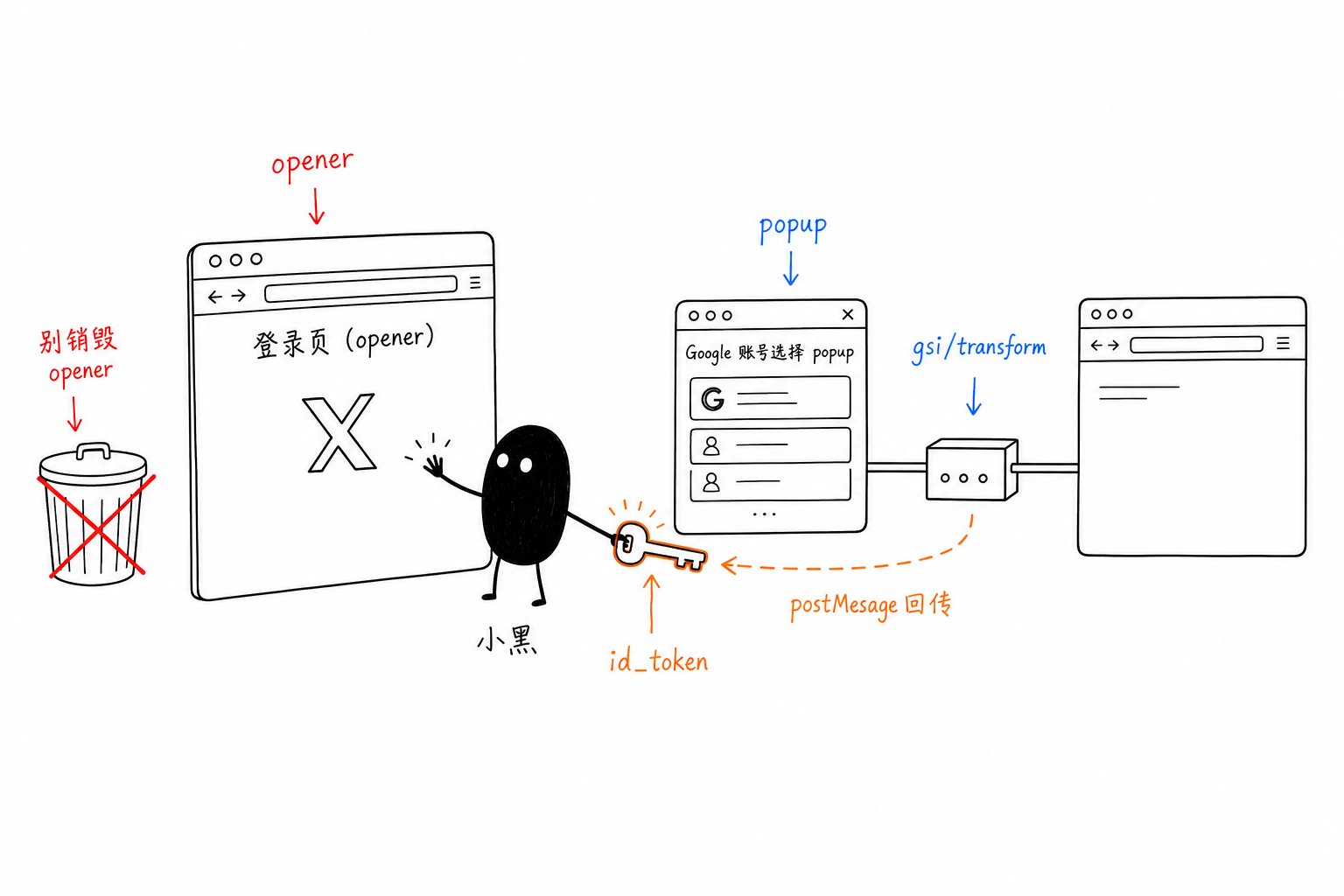
When you click “Sign in with Google” on X’s login page, it looks like one action, but underneath it works like this:
- The Google button is not drawn by X itself. It is a cross-origin iframe from
accounts.google.comembedded into the page. - Clicking it opens a popup window, where you choose an account.
- After you choose, Google does not write the token into the URL. Instead, it redirects the popup to an intermediate page:
accounts.google.com/gsi/transform. gsi/transformdoes exactly one thing: it useswindow.openerto postMessage the id_token back to the original login page, the opener, and then closes itself.- Once the opener receives the token, X considers the login successful and redirects to
/home.
The key is step 4: the token is shouted back from the popup across windows to the opener, relying on the window.opener relationship. Once that relationship breaks, the token is shouted into the void. The popup sits dumbly on gsi/transform without closing, X never receives anything, and a few seconds later it bounces back to the login selection page.
Why Automation Breaks as Soon as It Touches It
I use chrome-use to drive my real Chrome. It takes control of tabs through a browser extension, in what it calls relay mode. The problem was in three places.
First, the opener was killed by our own side. The relay used tabId as the key for each tab’s debugging session. When X’s login page navigated once — a cross-process navigation — Chrome gave that tab a new tabId, making the old key invalid. Worse, the “recovery” logic at the time handled an invalid session by directly destroying that tab and opening a new blank tab in its place. The tab being destroyed was exactly the opener waiting to receive the token. I stared at the logs for ages. Every time it got stuck right when the token was being passed back: the opener had been killed by our own recovery logic.
Second, the relay could not see the Google button. In Chrome, a cross-origin iframe is a separate rendering process, an OOPIF. When chrome-use connects directly to CDP, it automatically drills into it and can see the real “Continue as Li” button inside the iframe. In relay mode, the extension only attaches to the top level of the tab, so the iframe is a black box. I could only click blindly by coordinates, and what came up was still the generic “use another account” flow, not the personalized one-click login.
Third, the relay could not attach to the popup. When the Google account selection popup opened, I switched over to click the account, and the extension reported “tab not responding.” It waited until the popup finished loading before leisurely attaching to it. For a fleeting OAuth window, that was too late.
There was also a hidden pitfall that took me a long time to uncover: the native-messaging host used by the extension pointed to an installed old binary, not the newly built local one. So all those “patched tests” I had been running were actually still running the old logic. Once I pointed the wrapper script at the newly built binary, the patches finally entered the active path.
Three Cuts
Against the three issues above, I made one cut each.
Preserve the opener. When a session becomes invalid, stop destroying the tab. Switch to non-destructive reconnection: the same targetId is still there, only the sessionId has rotated, so just reattach and get the new sessionId. For commands like reading and clicking, tolerate a few retries when they hit an invalid session, waiting for the extension side to recover the session instead of hard-failing on the first attempt.
Pierce through the iframe. Have the extension proactively enable Target.setAutoAttach({flatten:true}) when attaching, forwarding events from the Google iframe’s child session to the daemon. Commands are then routed into that iframe by child sessionId. That lets snapshots enter the iframe, exposing “Continue as Li” as a clickable ref — on par with direct CDP.
Follow the popup. The extension uses chrome.tabs.onCreated to attach to the popup as soon as it is created. It only accepts popups whose opener is a tab it manages, to avoid affecting unrelated windows. The daemon stores it as a secondary tab, but does not steal the main tab: the opener stays pinned there, waiting for its token.
It Worked
After applying the patches and reloading the extension, I ran it again:
- Snapshot: “Continue as Li, leeguooooo@gmail.com” inside the GSI iframe appeared, and I clicked it;
- The account selection popup opened; I switched to it — this time without “not responding” — and selected the account;
- After selecting, I did not touch anything, letting
gsi/transformpostMessage the token back to the opener by itself; - The opener was not destroyed, received the token, and X jumped to
/homewith a logged-in session.
Not a single manual click in the whole flow. This hard bone was finally chewed through.
Wrapping Up
At this point, both paths for letting an agent log into accounts by itself work: chrome-use can click through third-party redirects like OAuth, while bitwarden-use pulls credentials from your vault and fills in username/password, 2FA, and passkeys.
- chrome-use: github.com/leeguooooo/chrome-use
- bitwarden-use: github.com/leeguooooo/bitwarden-use
 微信
微信 支付宝
支付宝
Comments
Replies are public immediately and may be moderated for policy violations.