
In-Depth Analysis of Claude Code Workflows: After Moving Orchestration into Scripts
This thing was only released yesterday (May 28, 2026), together with Opus 4.8, and it is still a research preview. It solves an old problem: one conversation window cannot direct too many agents. Below, I will not discuss source code; I will only explain what it actually changes, when it is worth using, and when it is purely a waste of tokens.
First, Put It Back into the Coordinate System
Before workflows, Claude Code already had two ways to do "multi-step work": subagents and skills. All three can run multi-step tasks; the real difference comes down to one sentence—who holds the plan.
| Subagent | Skill | Workflow | |
|---|---|---|---|
| Essence | A worker sent out by Claude | A set of instructions Claude reads and follows | A script executed by the runtime |
| Who decides the next step | Claude, deciding round by round | Claude, following the prompt | The script itself |
| Where intermediate results go | Claude's context | Claude's context | Variables in the script |
| What can be reproduced | The worker definition | That set of instructions | The entire orchestration logic |
| Scale | A few delegations per round | Same as the left | Dozens to hundreds of agents each time |
| If interrupted | Redo the whole round | Redo the whole round | Can resume within the same session |
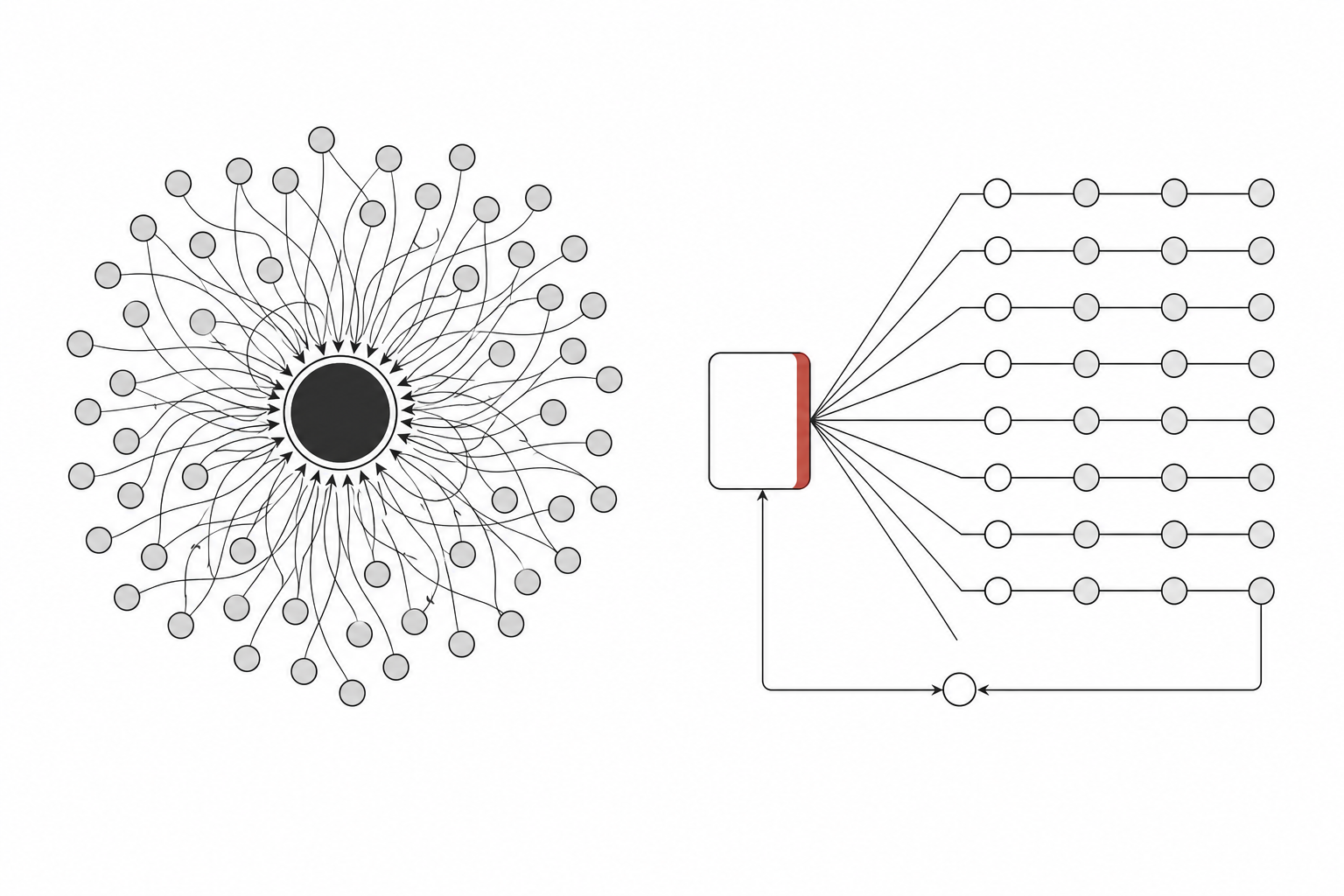
When using subagents and skills, Claude is the dispatcher: it decides round by round what to spawn next, and every result flows back into its context. Once the window gets long, the context gets bloated by intermediate artifacts, and Claude itself starts losing track of whom it sent out before and what they returned.
Workflows move scheduling out of the conversation and into code. Loops, branches, and intermediate results all stay in script variables, and Claude's context only receives the final answer. This is the most essential difference between workflows and the first two, and it is also why workflows can scale to hundreds of agents without becoming chaotic.
What Do You Get by "Writing the Plan into Code"?
Besides keeping the context clean, moving orchestration into code brings two things you cannot get simply by piling on more agents.
First, reproducibility.The script is the orchestration itself. A piece of logic like "each branch runs on its own first, then everything is summarized and deduplicated at the end" is the same code this run and the next run, rather than Claude improvising it again on the spot. After each branch's review finishes one item, it immediately continues verifying the next one; the slow branch does not hold back the fast ones.
Second, you can enable quality patterns, not just run more.Because the orchestration is code, you can have several mutually independent agents review one another's findings adversarially—a conclusion only counts if it passes a majority vote; you can also have it produce several versions of a plan from different angles, compare them, and then pick one to submit. That is a level of confidence a single pass cannot provide.
Pipeline or Parallel: Do Not Add Barriers Right Away
When actually writing scripts, this is the judgment people most often get wrong. There are two ways to run:
- pipeline(default): each item independently passes through all stages, and there is no barrier between stages. Item A may already be in stage 3 while item B is still in stage 1. Wall-clock time is roughly equal to the slowest chain, not "the sum of the slowest item in each stage."
- parallel(barrier): wait until all tasks finish before moving on.
The default for multi-stage tasks should be pipeline. A barrier only makes sense when "stage N truly needs all results from stage N-1 to be ready together"—for example, doing expensive downstream verification after full deduplication, or skipping the entire section if the total count is zero.
Common reasons that do not justify a barrier include: "I need to flatten/filter first"—just put that into one stage of the pipeline; "the two stages are conceptually separate"—separate does not mean synchronized. If five finders run in parallel and the slowest is three times slower than the fastest, a barrier simply wastes two-thirds of the idle time of those fast finders. When unsure, choose pipeline.
When to Use It, and When Not To
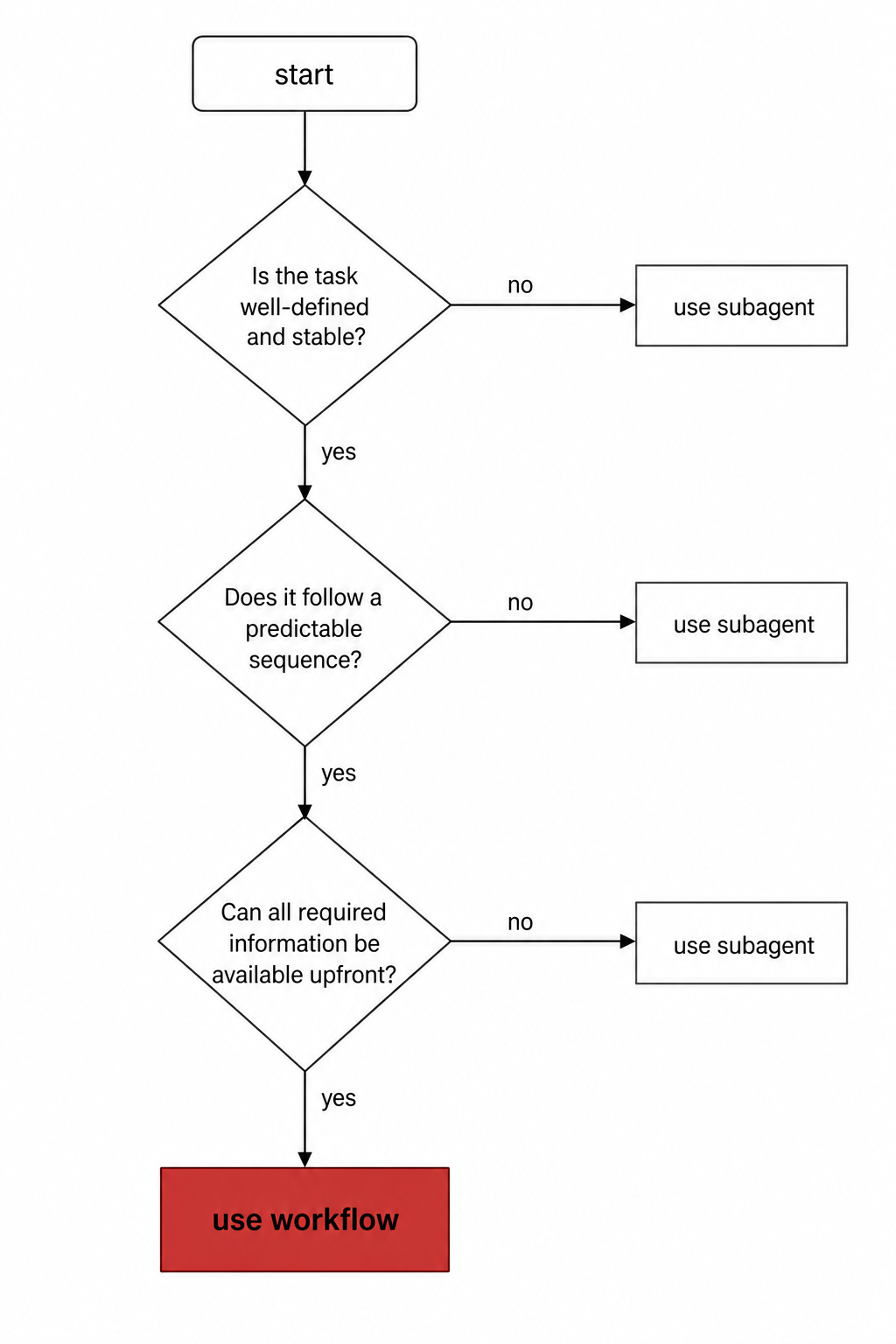
There is really only one criterion:Can one conversation window still coordinate the number of agents this work requires?If it can, subagents are enough; if it cannot, or if you want to sink the orchestration into a readable, rerunnable script, then use a workflow.
| Suitable | Not Suitable |
|---|---|
| Scanning the whole repository for bugs / security audit | Changing one function, fixing one clear bug |
| Migrating 500 files | A factual query answerable with one question |
| Research that requires cross-checking multiple sources | Processes that need you to make decisions midway and sign off by stage (a workflow cannot accept input while running) |
| Hard plans that are worth drafting independently from several angles | Convenience tasks like refactoring / docs / renaming / dependency upgrades |
There is a counterintuitive point: once a workflow starts running, it cannot ask you for input midway; only agent permission pop-ups can pause it. So for processes like "let me take a look halfway through before deciding," do not cram them into a single workflow—split each stage into its own workflow, and you sign off between stages.
Three Trigger Methods
1. Include the word workflow in the prompt.This does not change the session's effort; it only runs this one task as a workflow. Claude Code highlights this word and then writes a script for you. If you trigger it by mistake, press alt+w to cancel.
Run a workflow to audit every API endpoint under src/routes/ for missing auth checks2. ultracode mode./effort ultracode turns on xhigh reasoning + automatic orchestration. Once enabled, Claude decides for itself whether each task needs a workflow—a single request might launch three in a row: one to understand the code, one to make changes, and one to verify. The cost is that every task in the whole session uses more tokens and runs slower, so remember to switch back down with /effort high when you return to everyday work.
3. Built-in / saved commands./deep-research is built in. After you run a workflow you are happy with, select it in /workflows and press s to save it as a command—either into the project’s .claude/workflows/ (shared with the repo) or your home directory’s ~/.claude/workflows/ (for your own use only). Next time, call it directly with /<name>. Running the same orchestration for every review is very nice.
Cost and Those Hard Limits
A workflow spawns a bunch of agents, so the tokens consumed in one run are noticeably higher than finishing the same thing in the chat, and they still count toward your plan usage and rate limits as usual. Boundaries you should know:
| Up to 16 concurrent agents | Fewer on machines with fewer CPU cores; extras queue up, and a new one starts when one finishes |
| Up to 1000 agents per run | A safety net for runaway loops |
| No input midway | Only agent permission popups can pause it; if you need staged sign-off, split it into multiple workflows |
| The script itself does not touch the filesystem/shell | Reading, writing, and running commands are all done by agents; the script only coordinates |
| Can resume within the same session | Completed agents return cached results, while the remaining live ones rerun; if you exit Claude Code and come back, it starts from scratch |
Two money-saving moves: before a big run, use /model to confirm you are not still on a large model; when describing the task, say directly “use a smaller model for the lightweight phases”—each agent uses the same model as the session by default unless the script routes a specific phase separately.
The One-Sentence Takeaway
A workflow is not a “stronger subagent”; it pulls orchestration out of Claude’s on-the-fly judgment and solidifies it into code you can review, rerun, and cross-validate. So its sweet spot is very clear: work large enough that it cannot fit in one window, or conclusions important enough to justify having multiple agents challenge each other. For everyday code changes, honestly, letting Claude handle it single-threaded is faster and cheaper.
 WeChat Pay
 Alipay
Comments
Replies are public immediately and may be moderated for policy violations.