
The first time I connected chrome-use to the Slack desktop app and snapshot returned a bunch of named buttons, I was taken aback: this was no different from operating a web page. Later it clicked, because the Slack desktop app is a web page to begin with.
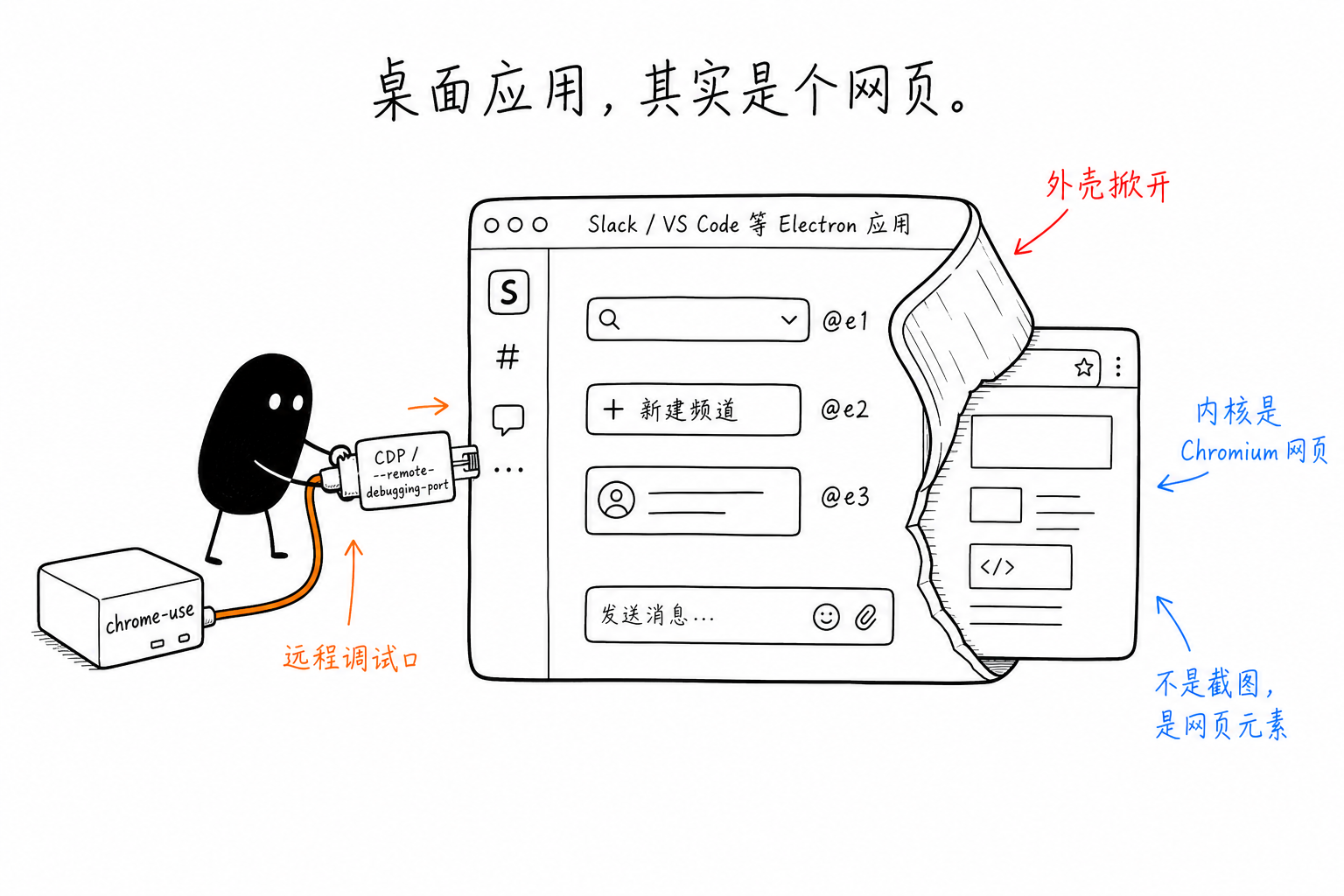
An Electron app is a Chromium rendering engine plus a layer of Node.js shell. The Slack, VS Code, Discord, Figma, and Notion you think of as “desktop software” all have interfaces rendered by Chromium as HTML, just wrapped in a native window shell. Once you accept this fact, something that was originally very hard suddenly collapses into something simple: operating a desktop app degenerates into operating a web page.
How Awkward Desktop Automation Used to Be
First, let’s talk about how hard it was to make a program operate a desktop app before this path existed.
One approach was to take screenshots, find the pixel coordinates of a button, and click there. Change the resolution, switch the theme, or move the window, and the coordinates are all wrong. More importantly, the program does not “understand” what is on the interface; it only sees an image. Another approach was to use system accessibility APIs, such as Accessibility on macOS or UIAutomation on Windows. These can retrieve the control tree, but each platform has its own API, and the information Electron apps expose to these APIs is often incomplete, because their “controls” are actually divs, not native controls.
Both approaches are tiring, and both work around one fact: inside the app there is clearly a well-structured, semantic DOM, yet you are trying to reach it from the outside through pixels or through a translation layer.
Chromium Comes With a Door
Because the rendering engine is Chromium, Electron apps naturally speak Chrome DevTools Protocol. Start one with --remote-debugging-port, and it opens a CDP port, directly exposing the internal DOM:
open -a "Slack" --args --remote-debugging-port=9222
chrome-use connect 9222
chrome-use snapshot -i
Just give each app a non-conflicting port. The documentation site has cross-platform launch commands, so I won’t expand on them here.
What snapshot returns is the accessibility view of that DOM: every button and input field is a named element, located by @ref. You are not guessing that “the Send button is probably around those pixels in the lower right.” You get the actual button "Send" itself. Moving the window or changing the theme does not matter, because you are bound to the element, not coordinates. For an agent, this difference is fundamental: it can now understand what this desktop app looks like, instead of blindly clicking at a screenshot.
One Trade-Off You Need to Know
There is one difference from browser scenarios worth calling out separately, because it is easy to take for granted.
When operating your everyday Chrome, chrome-use uses a browser extension plus native messaging. It does not touch the debugging port, so there is no “allow remote debugging” prompt and no protocol-level traces such as Runtime.enable. But Electron apps cannot install extensions from the Chrome Web Store, so this path can only use --remote-debugging-port. In other words, the “zero trace” advantages available in browser scenarios are not available here. The prerequisite is that you open a debugging port yourself and connect to it.
For automating “your own apps” such as Slack or VS Code, this is not a problem at all: you are not trying to fool anyone; you are automating tools you are already logged into. But if you come to Electron with the browser-world expectation of being “undetectable,” you need to adjust that expectation first: this is “connecting into your own app,” not “invisibly operating someone else’s website.”
An Interesting Detail: Apps Can Contain Apps
Electron apps often embed <webview> internally. For example, a third-party app panel opened inside Slack is essentially another independent web page. In CDP, these are separate targets. After connecting, run chrome-use tab first, and you will see the main window, settings window, and those webviews each appear as their own target. You can switch into each one separately to operate it.
So an Electron app is not “one web page”; it is “a stack of web pages inside a native shell.” Once you understand this, scenarios that used to be headache-inducing, such as multiple windows and nested panels, simply become a matter of switching to the correct target.
Boundaries
This approach only applies to apps based on the Chromium engine. Pure native apps written with Swift/AppKit do not have a CDP port and cannot be connected to this way. For those, you still need to go back to system accessibility, or use another tool. For native apps on iPhone, I use a different stack.
The judgment is simple: desktop apps such as Slack, VS Code, Discord, Figma, Notion, and Spotify, which run one codebase across multiple platforms, are basically all Electron.
After realizing that “desktop apps are actually web pages,” my first reaction now when I see a desktop tool is to confirm whether it is Electron. If it is, operating it is no longer the kind of “desktop automation” work I have always found messy, but the familiar web-opening approach I already know well.
 微信
微信 支付宝
支付宝
Comments
Replies are public immediately and may be moderated for policy violations.