
chrome-use’s selling point is that it lets agents use your one real browser. But that selling point comes with a problem: tools that open a new browser give each task its own separate browser, so they naturally stay out of each other’s way. chrome-use does the opposite: there may be several agents, plus you yourself, all acting inside the same Chrome at the same time. Who clicked whose tab, who navigated whose page away — it has to solve these problems, otherwise “using your browser” turns into a disaster.
The Problem Is More Concrete Than It Seems
Suppose you have Chrome open and are reading documentation, while two agents are running in the background: one helping you go through Slack messages, the other scraping data from some admin panel. All three parties are in this one browser.
If they operate on the “current tab” without distinction, things immediately become chaotic: the login page opened by agent A gets treated by agent B as its own target and clicked; the tab you are reading gets navigated somewhere else by some agent. The new-browser approach does not have this problem, because each task has its own process. If chrome-use wants the same non-interference while “sharing one real browser,” it needs another mechanism.
Its Solution: Isolate by “Who Opened It”
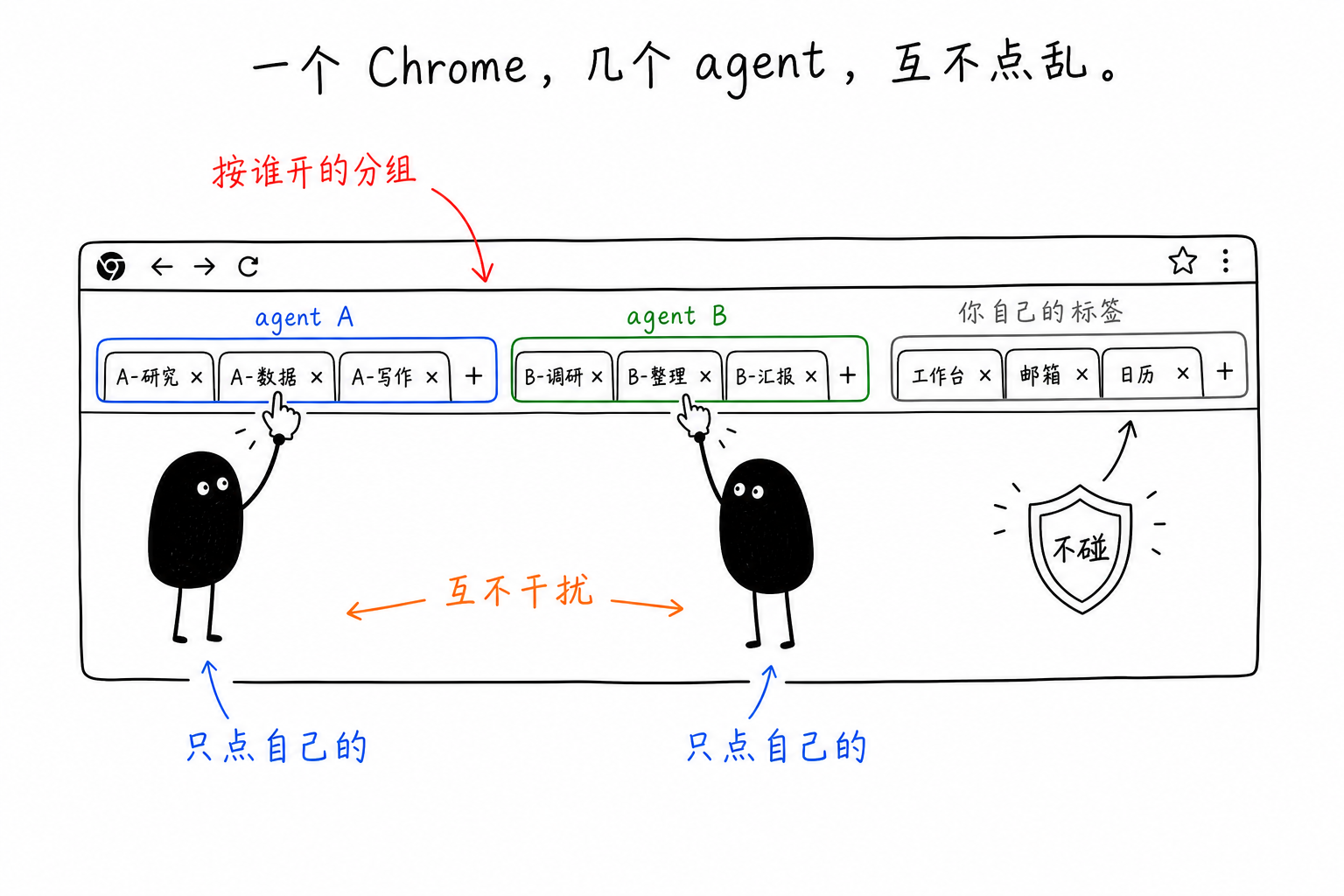
chrome-use does not hand each agent a browser. Instead, it divides ownership inside the same Chrome. Each --session <name> gets three things: a colored tab group (so you can tell at a glance in Chrome which group belongs to which agent), a dedicated background daemon, and one hard rule: it only operates on tabs it created itself.
So each party does its own thing: agent A’s pages are in A’s tab group, agent B’s are in B’s group, and nobody touches your own tabs. You do not even have to name every agent; if you do not, it automatically derives a stable session name from the agent. Tabs have stable IDs within a session (t1, t2, …, never reused once used), so actions like “switch back to the tab I was just on” are deterministic and do not get mixed up. When you are done, chrome-use close (or close --all) clears the tabs for that session without touching your others.
A Trade-Off That Can Trip You Up If Left Unsaid
There is a key detail here. The official docs mention it briefly, but it is easy to miss: this session-based isolation only holds on the “extension connection” path; if you connect directly with a raw --cdp <port>, it is not isolated.
The reason is that isolation depends on the browser extension to manage tab groups and ownership. A bare CDP port connection does not have that layer. Several connections see the same pile of tabs, and anyone can click anyone else’s. This connects neatly to the other side of the Electron article I wrote earlier: Electron apps can only use --remote-debugging-port (they cannot install the extension), so on Electron you do not get this multi-agent isolation. That path never had the extension as a safety net in the first place.
This also explains why chrome-use insists on using the extension plus native messaging in browser scenarios, instead of taking the easy route and connecting directly to the debugging port. Avoiding the “Allow remote debugging?” prompt is only the surface-level benefit. More materially, only the extension path can support “multiple agents each governing themselves inside one real browser.”
One More Layer: Isolation Inside the Page Too
Isolation is not only at the tab level. The operations chrome-use injects into pages run in an isolated world: they can read the page’s DOM, but cannot touch the page’s own JavaScript global variables. The benefit goes both ways: your automation logic does not accidentally step on the page script’s globals, and the page script cannot detect what you injected. This is on the same line as “not being recognized by anti-bot systems”: the fewer traces, the better.
When You Actually Need This
For a single agent and a single task, you do not really need to think about any of this. The default automatic session name is enough. It starts to matter when you begin running multiple agents in parallel, and they share this one already-logged-in browser of yours. For example, one resident assistant is sending and receiving messages, and you temporarily ask another agent to look something up. At that point, give each one its own --session, and all three parties (two agents plus you) can work in the same Chrome at the same time without fighting.
In the end, tools that open a new browser get isolation by “opening several browsers.” chrome-use insists on “just using your one real browser,” and builds isolation into it through ownership and tab groups. The former is simpler. The latter gives you this in return: your entire logged-in state is directly available to several agents, without each of them having to log in again separately.
 微信
微信 支付宝
支付宝
Comments
Replies are public immediately and may be moderated for policy violations.