
Even now, many people still do not understand how they were caught up in the recent wave of Claude account suspensions. Some people changed networks and continued using it without issue, while others logged in again the next day and found their accounts gone. Even among people using relays in the same way and located in mainland China in the same way, the outcomes have differed.
I reviewed the mechanisms that can be examined: Anthropic’s official policies, methodology documents from several providers that handle IP reputation, real account suspension cases from the community, and watermarking code discovered through reverse engineering inside the Claude Code client. Looking at these together, I found that account suspensions are not inexplicable; they happen when several independently detectable axes overlap. This article breaks down those axes one by one. It explains what causes suspensions, how to self-check, and how to avoid them.
At the end, I include two small tools I made myself. One checks your network, and the other monitors usage. Both are free, and I will explain them later.
## First, the Conclusion: Account Suspensions Are Based on Three Things, Not One

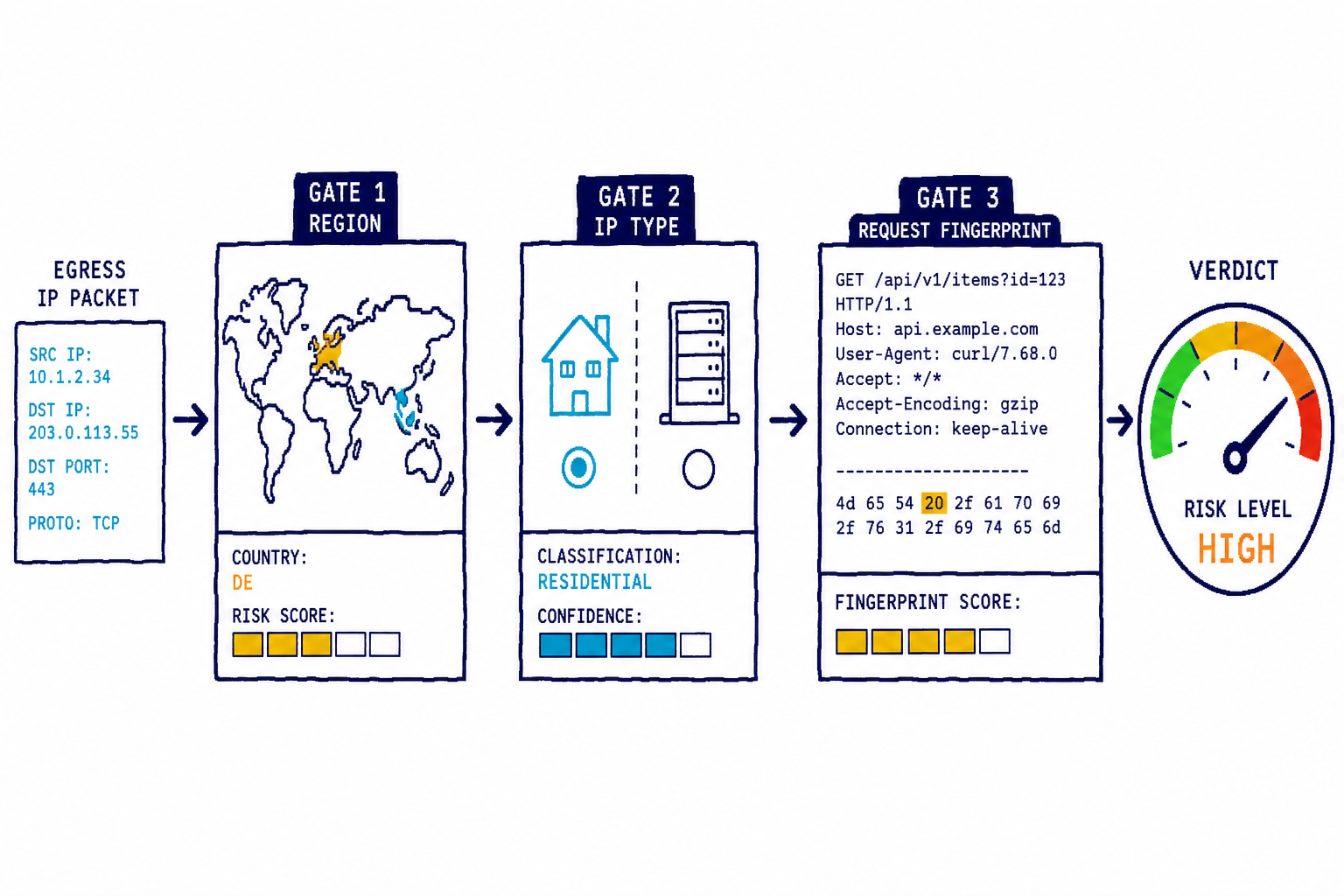
Many people think, “If you use a VPN or relay, you will be suspended.” That statement is only half correct. In reality, risk is determined across three independent dimensions, each of which can potentially get you suspended on its own.

The first is region: which country your network exit is in. This is the only suspension trigger that Anthropic has officially stated. The second is IP type: whether it is residential, data center, VPN, proxy, or Tor. This dimension can be measured most accurately by vendor reputation databases, but it has not been officially stated. The third is the request fingerprint. If you are using a third-party relay, Claude Code embeds a steganographic watermark in the request that can be traced back to you. This dimension is completely independent from the first two.

Let’s look at them in order.
Dimension 1: Region, the Only Red Line Officially Stated
First, let’s look at what Anthropic itself says. In the support document “What should I do if I received a warning for policy violations?”, only three types of triggers are listed for account suspension: violations in usage content, violations of the Terms of Service, and account creation from unsupported regions.
Pay attention to the last one. Across the official document, there is not a single mention of VPNs, proxies, IP addresses, or shared connections. The only network-related concept that appears is “region.” Meanwhile, in a separate notice, Anthropic states that it prohibits service use in certain regions under its Terms of Service due to legal, regulatory, and safety risks.
Put simply, mainland China is not on Anthropic’s list of supported regions. Accessing Claude directly from a mainland Chinese IP is itself a violation of the Terms of Service, and this has nothing to do with whether that IP is clean.
This also explains a phenomenon many people find hard to accept. Their home broadband is clearly a clean residential IP, with no proxy used at all, so why is there still risk? The issue is not that it is “dirty,” but that it is in the “wrong place.” Even if a Beijing Unicom residential IP has a perfect reputation score of 0, as long as it is an exit point in mainland China, it is a red line for Claude. Many people use VPNs or relays precisely to get around this red line. But after bypassing the regional dimension, they then stumble over IP type and request fingerprint.
Dimension Two: IP Type, the Dimension Vendors Can Measure Most Accurately
Although the official side does not state this explicitly, the vast majority of cases seen in the community where “it worked after changing networks” point to the same issue: whether your exit IP is a data center, proxy, or VPN IP. As for how this dimension is judged, vendors specializing in risk management have published fairly detailed methodologies, so I will explain it according to those public documents.
First, look at the type. proxycheck.io classifies IPs by type using base scores. Data centers are 33 points, VPNs are 50 points, crawlers/Tor are 75 points, and public proxies and compromised hosts jump straight to 100 points. The higher the score, the greater the danger. This ordering matters. VPNs are riskier than ordinary data centers, and proxies are riskier still than VPNs. That is because a data center IP at least represents the state of “this server is connected to the internet normally,” whereas with a proxy or VPN, it is obvious that someone is trying to hide their identity.
Residential proxies are among the most troublesome categories. IP2Location’s classification includes a dedicated category called RES, residential proxy. This means someone is selling a residential broadband line as a proxy. This kind of IP looks exactly like an ordinary residential line in terms of geolocation and ASN, but it is used by countless strangers for all kinds of automation purposes, and its reputation is already in tatters. If you buy a cheap “residential IP” service, there is a high probability that it is this type, and its risk is higher than that of a data center.
Reputation has guilt by association. ipapi.is has a metric called abuser_score. It does not look at a single IP, but calculates the proportion of abusive IPs within the entire ASN/organization network. It is divided into five levels: above 20% is extremely high, 3% to 20% is high, 0.85% to 3% is somewhat high, 0.05% to 0.85% is low, and below 0.05% is extremely low. In other words, even if your specific IP is clean and has no direct history of wrongdoing whatsoever, if the broader network that IP belongs to is dirty, you will be held responsible by association. In the original explanation, the point is that although the IP itself is not flagged, given how many abusive IPs exist within its network, it is highly likely to be abused in the near future. That is how risk management calculates things. It does not look at who you are, but at who you are standing with.
Abuse history accumulates. AbuseIPDB assigns each IP an abuseConfidenceScore from 0 to 100. This is based entirely on community reports, and 100 means the IP is almost certainly malicious. The score is determined by the natural logarithm of the number of reports: the more reports there are, the higher the score becomes, though the growth gradually slows. It does not jump sharply from just one or two reports.
Combining these factors, the risk profile of an IP roughly looks like this: type is the foundation, and data centers, VPNs, and proxies each have their own baseline. On top of that are layered abuse history and network-level reputation, and the more they overlap, the redder the signal becomes. This is also the scoring logic of my detection tool. I will explain it later.
Important Correction: A Data Center IP Does Not Automatically Mean You Will Be Blocked
Here, I need to correct a misunderstanding I initially had myself. Many people hear “data center IPs are risky” and assume that running Claude on a cloud server will get them blocked, but that is not the case.
Running Claude Code on an AWS/GCP server, or calling the API from one, is a completely normal and supported use case. There is only one situation where a data center IP truly becomes dangerous: when you use it to log in to the web version of claude.ai or register a new account. Web login and registration are flows designed on the assumption that a real human is using a browser. When a data center IP appears there, it looks as if an automation script is cultivating accounts at scale.
Therefore, when judging data center IPs, you should not reject them across the board. If you are running an API or command-line tool, a data center is fine. For logging in to or registering on the web version, a data center is dangerous. Many detection tools fail to handle this distinction correctly, and the first version of my own tool did too.
Third Axis: The Watermark Hidden Inside the Date
The first two axes were about “how your network looks.” This axis is about “how Anthropic marks the request itself.” The material comes from @chenchengpro’s reverse engineering of the Claude Code version 191 source code, and I also checked it against the client on my own machine. The mechanism is real.
The trigger condition is that you have set a third-party relay via ANTHROPIC_BASE_URL, and that URL is not the official api.anthropic.com. Users connecting directly to the official endpoint are not affected at all. That is exactly why Chen Cheng says this watermark is not directly related to the recent wave of bans. The watermark is a tracking mechanism prepared for relay and distillation scenarios, not the ban itself.
Claude Code contains this line, assembled as the date inside the system prompt:
return `Today${n}s date is ${r}.`;
At first glance it looks harmless. But steganography is hidden in that n, meaning the separator between the apostrophe and the date, secretly encoding identity information across two axes.
One is the timezone. If the system timezone is Asia/Shanghai or Asia/Urumqi, the date separator quietly changes from 2026-06-30 to 2026/06/30. The important point is that it reads the system timezone, meaning Intl…resolvedOptions().timeZone, not the IP geolocation.
The other is the apostrophe. There are four variants, almost indistinguishable to the naked eye.
'(U+0027 standard apostrophe), normal third-party endpoint’(U+2019), domain whitelist hitʼ(U+02BC), hit on large-model-related keywords in mainland Chinaʹ(U+02B9), both domain and keyword hit
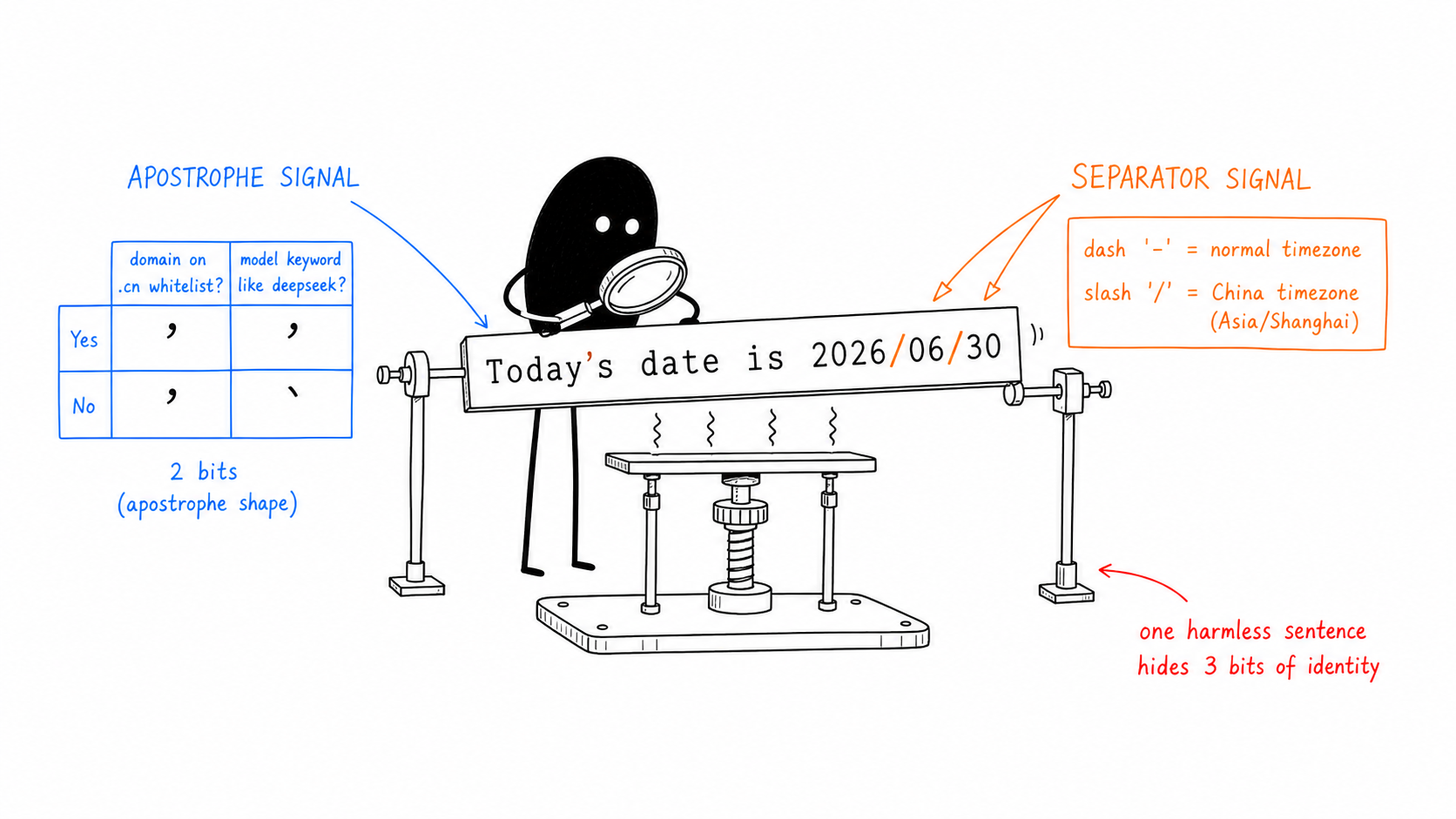
The three axes are encoded independently. Even if the relay domain is not on the whitelist and contains no keyword, if the system timezone is Shanghai or Urumqi, the separator still becomes a slash. In other words, all users with “China timezone + any third-party endpoint” are tagged on the timezone axis.
The matching logic has also been dug out. Domains are matched by suffix. The whitelist starts with cn, and domains ending in .cn are swept up wholesale without needing to be enumerated one by one. Keywords are matched by substring. As long as "deepseek" appears somewhere in the domain, it hits; exact matching is not required. The two lists are further obfuscated with XOR (key=91) and base64 to avoid string scanning.
Why choose the sentence “today’s date” as the carrier? This is the most insidious part. The mark is not hidden in an HTTP header or metadata, but inside the body of the system prompt. Relay servers usually rewrite or filter request headers, but almost nobody touches natural language like a “date.” In other words, this is a watermark that cannot be washed away by scrubbing headers. And because currentDate is a user-context field included in every request, the watermark appears with 100% stability. Changing the apostrophe and separator does not alter the meaning. To the model, it reads exactly the same, and even in a diff it is easy to miss.
How does the evidence loop close? The mark travels with the request. If a relay service or distillation pipeline eventually routes back to the official Anthropic API to resell Claude, the marked request returns to Anthropic’s own servers. Anthropic can then read this in its own logs: the date in this “directly connected to me” request is 2026/06/30, meaning slash, so China timezone. The apostrophe is ʹ, meaning both the domain and the deepseek keyword hit. That is hard evidence. The origin is a client in a China timezone using a mainland-China large-model relay. There is no need for active probing. The traffic confesses on its own.
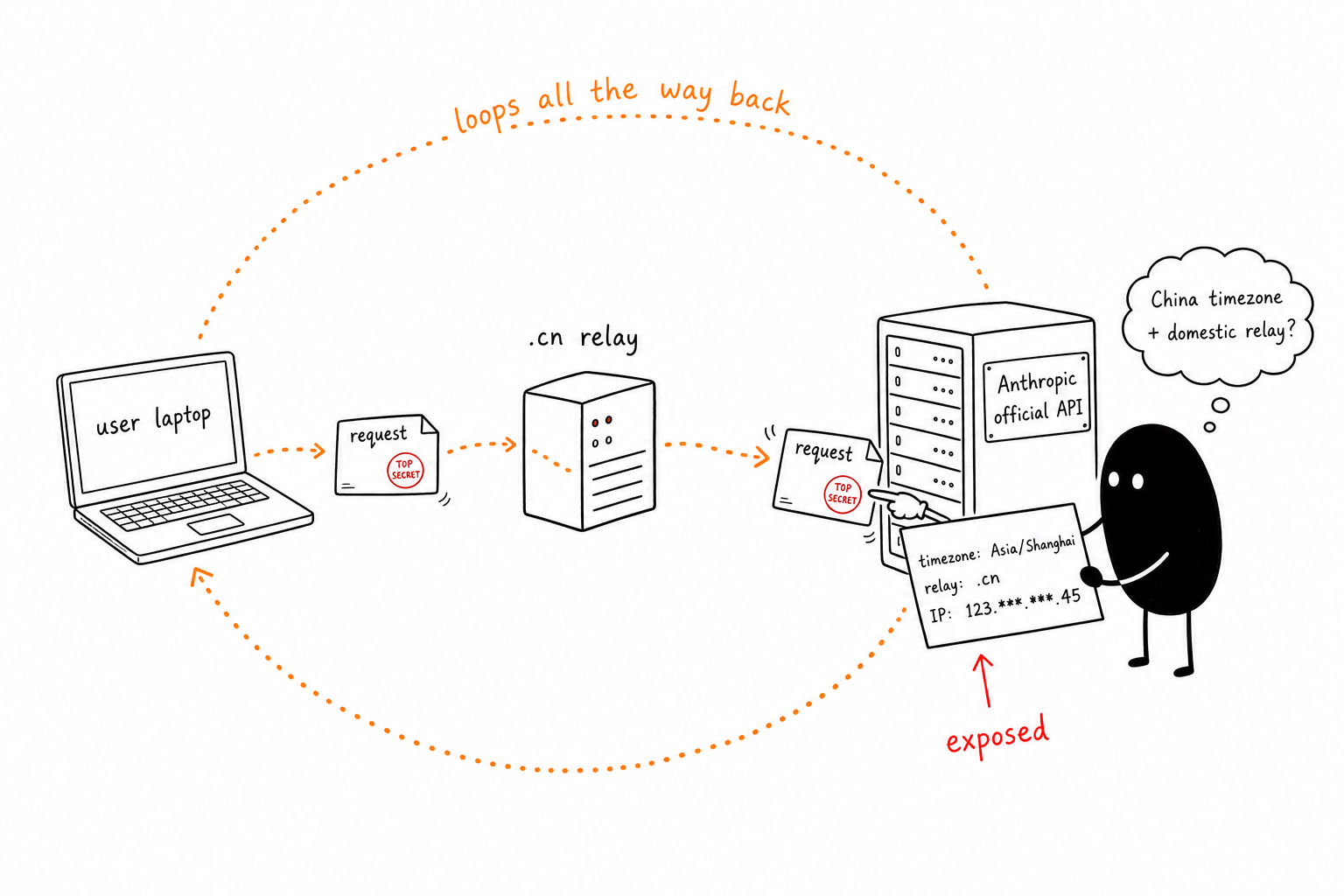
For ordinary users, the implication is very clear. As long as you use a third-party relay, your requests can be tracked by fingerprint. If you are in a mainland China timezone, you will definitely be marked. Even if your timezone is different, you will still be marked if the relay domain is .cn or contains the name of a mainland Chinese model. If you want to avoid being marked completely, there is no path other than connecting directly to the official endpoint.
So how do you actually self-check?
We’ve finished talking through the three dimensions. The question is: how do you know where the network you are using right now sits? Things like IP type, region, and reputation cannot be judged by eye.
I made a free check page for this. It is meant to answer one question: “Can I safely use Claude on this current network?”
Open it and you can immediately see the assessment of your current exit IP. No registration, no need to enter anything. It does a few things.
The assessment has four categories, not some vague score: Safe (residential line and supported region), Caution (data center; depends on what you use it for), High Risk (VPN, proxy, Tor, or overlapping abuse signals), and Unsupported Region (mainland China, etc.). For each category, it tells you directly what to do instead of just throwing a number at you and making you guess.
Region takes priority over IP. Even if you have a clean residential IP in Beijing, it will not falsely show “Safe”; it will tell you “Unsupported region, direct access is risky.” This is the key point that makes an IP check truly Claude-oriented. For Claude, what country you are in matters more than how clean your IP is.
All signals are disclosed and shown. It lists whether the IP is in a data center, VPN, proxy, residential proxy, Tor, mobile network, and what stage the network-range abuse reputation is in. It also shows things that are not included in the score. Recently, I added a dedicated row called “China cloud.” Alibaba Cloud, Tencent Cloud, Volcengine, ByteDance, and similar providers are marked red on their own, even if the IP is geolocated to the United States and the location is shown as the U.S. What matters to Claude is not whether the IP is in the U.S., but whether the cloud behind it is a Chinese company. The warning in the mitigation list above — “U.S. exit + major domestic-provider domain is actually more dangerous” — is exactly what this row handles.
There are also two detections that run directly in your browser. Nothing is uploaded anywhere, and they correspond exactly to the watermarks described in the third dimension. The first is the browser timezone. The page directly reads Intl.DateTimeFormat().resolvedOptions().timeZone; if it hits a mainland China zone such as Asia/Shanghai, it warns you in red. This is the same value the watermark reads, and it is also the first gate in the entire signal chain. Once the timezone matches, it does not matter how clean the IP later in the chain is. The other is the real IP exposed by WebRTC. Many people do not know that even with a proxy set up, the browser’s WebRTC can leak the real public IP behind it. The page probes for this and directly displays the IP if it leaks.
Below that is a “local self-check” section. System proxy, proxy values left in environment variables, ANTHROPIC_BASE_URL — these are signals a website physically cannot read, but Claude Code reads them all from your machine the moment it starts. I cannot test these on your behalf, so I listed the commands you should run. Run through them in your terminal, and clear anything that is not empty.
There is also a Claude safety score and global ranking. The score is from 0 to 100; the higher it is, the safer. You can also see how much of the global detection results you outperform. It is mostly just for fun, but in practice some people do like this kind of comparison. Once the assessment is generated, you can also create a share image with one tap. It is your own card with the IP blurred, making it convenient to screenshot and send.
The scoring logic is exactly what this article has been explaining: proxycheck’s type criteria, ipapi.is’s network-range reputation classification, plus region assessment. The route for checking your own IP uses only pure Cloudflare edge data and local computation, and never touches any third party. That is why it does not go down and has no usage limit. Only when checking “someone else’s” IP does it add one layer of free threat intelligence.
You can also check another IP if you want. Use ip-check.leeguoo.com/?ip=1.2.3.4, or add the Accept: application/json header to get structured results.
Mitigation: Action List by Impact
Once self-checking has identified the risk points, the next question is how to avoid them. Here they are in order of importance.
Region comes first. If your exit is in mainland China, or in another unsupported region, this is the only red line the official side has explicitly stated. Fix this first, and access from a clean residential connection in a supported region.
Change your system timezone to avoid the detection list — this is the lowest-cost move. For the third watermark, the timezone dimension reads your system timezone, not your IP geolocation. If you are on Asia/Shanghai or Asia/Urumqi, change it to Asia/Taipei. It is in the same UTC+8 zone, so the displayed time is exactly the same as Beijing time, and calendars and schedules will still work normally, but it is not on the detection list. Taipei is also within Claude’s officially supported regions. Do not choose Singapore — a large number of secondhand accounts use the Singapore timezone, making it a conspicuous candidate for the next expansion of detection. On Mac, after changing it, remember to go to “Privacy & Security → Location Services → System Services” and turn off “Setting Time Zone.” Otherwise Apple may switch you back to Shanghai based on Wi-Fi location. Run node -e "console.log(Intl.DateTimeFormat().resolvedOptions().timeZone)" in the terminal; if it returns Asia/Taipei, you are done. This is the exact command Claude Code uses internally when reading the timezone. This practical procedure is organized based on @app_sail’s anti-account-ban guide.
Do not log in to Claude or re-authenticate from data center, VPN, or proxy IPs. Operations like first login, registration, and redoing OAuth authentication are especially sensitive moments for risk controls. Running APIs or command-line tools on cloud servers day to day is fine, but authentication operations should be performed from a clean residential connection whenever possible.
If you can connect directly, connect directly to the official endpoints. Use api.anthropic.com and claude.ai, and avoid third-party relays as much as possible. In addition to IP risk, relays also have the issue of the indelible fingerprint watermark mentioned earlier. If you are genuinely worried about account-ban risk, direct connection is the only way to address both IP and fingerprint at the same time. If you absolutely must use a relay or VPS, avoid overseas nodes from major Chinese providers such as Alibaba Cloud, Tencent Cloud, and Volcengine — the combination of “US exit + major Chinese company domain” may even produce a higher risk score than connecting directly from mainland China. It is essentially telling the service side that “Chinese users are using overseas nodes to bypass restrictions.” Choose hosting providers with independent domains and clean reverse DNS hostnames, such as Hostinger, Vultr, or Linode.
Keep one account fixed to one clean network. Do not frequently switch across networks, and do not rapidly rotate multiple accounts on a single machine. These behavior patterns themselves become signals for risk control.
Recheck regularly. VPN exits change. Residential IPs can be reclaimed and reassigned by carriers. A relay service you trusted may suddenly end up on a blacklist. Clean today does not necessarily mean clean tomorrow.
By the way: a status bar for monitoring usage
The above is for checking your network. If you use Claude Code, I also have a small tool I’ve been maintaining for a while. It lets you monitor limits, context, and billing pace from the status bar.
It does several things. It shows your 5-hour and 7-day limit windows with real-time progress bars, and also predicts roughly what percentage you are likely to consume within each window. When you switch models (from Sonnet to Fable), or run multiple agents in parallel, the prediction quickly follows the new consumption rate without lagging behind. You can see the context window, prompt-cache countdown, and how much this session has cost, all in one line.
The account suspension detection discussed above is also built in. If your exit IP is risky, the status bar directly shows a red warning saying, “Do not log in to Claude from this IP.” If you are using a relay and your timezone is set to China, it tells you that your requests carry a fingerprint. You do not need to open a page just to check your network. It watches for you.
Installation is one line.
uv tool install claude-statusbar
Or you can use pipx install claude-statusbar, or pip install -U claude-statusbar. After installation, specify it in Claude Code’s status bar settings, and you are done.
Finally
Account suspension may sound mysterious, but when you break it down, it is not that opaque. Region is an official red line, IP type is a trust signal that providers can measure quite accurately, and request fingerprints are unavoidable markers when traffic goes through a relay. These three factors are independent of one another. Any one of them can trigger a problem, but each also has a way to mitigate it.
The least troublesome approach is to always connect directly to the official service and use a clean residential connection. That solves all three concerns at once. If that is not possible, spend just 10 seconds opening ip-check.leeguoo.com first, and check where you currently stand.
All tools are free, and the source code is public. If you run into any problems, please feel free to open an Issue.
 微信
微信 支付宝
支付宝
Comments
Replies are public immediately and may be moderated for policy violations.