
During development, there are always moments when you want to temporarily change the network: the backend API is not ready yet, so you want to use fake data to get the frontend running; you want to see what happens when a request carries different parameters; or you want to cut off a certain analytics/tracking request directly. Previously, doing these things meant either changing code to add a switch, starting a mock server, or attaching a packet-capture proxy—and installing a CA certificate. None of these are especially heavy, but they all require setting up something extra.
chrome-use's network route brings this into the browser itself: it intercepts matching requests directly in the Chrome instance you are driving, then mocks the response, changes the outgoing request, or simply blocks it. No proxy, no certificate, and no changes to the code under test.
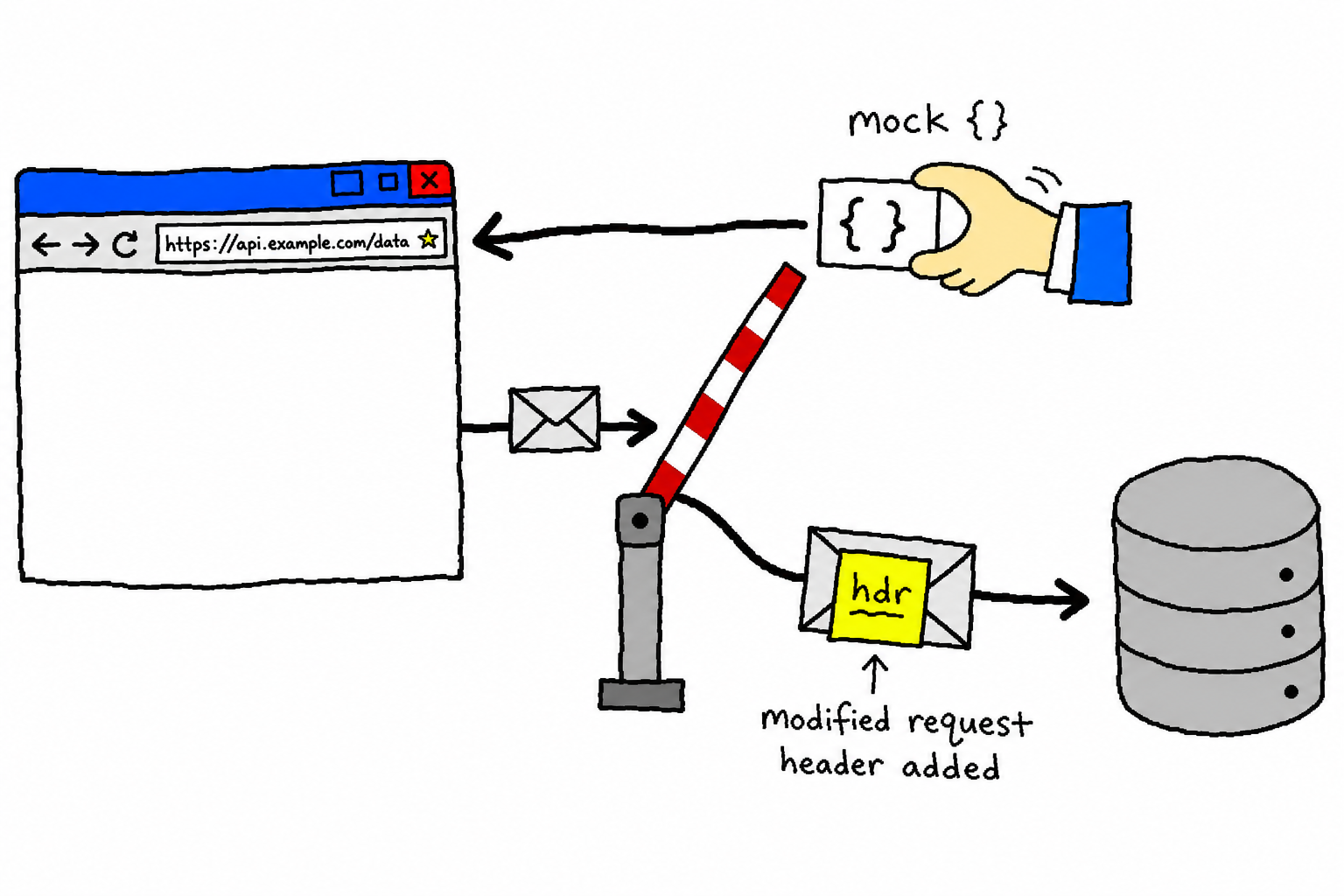
Four uses
A single network route command decides what to do based on the parameters you provide:
# 1) Mock response: the request is not sent out at all; it directly returns the fake data you provide
chrome-use network route "*/api/me" --body '{"vip":true}' --status 200 --content-type application/json

# 2) Change request: the request is still sent, but its method/headers/body/URL are changed, and the real response returns as usual
chrome-use network route "*/api/save" --method POST --set-header Authorization="Bearer test"
chrome-use network route "*/v1/*" --rewrite-url https://staging.example.com/v1/thing

# 3) Change real response: the request is still sent, then after the real response is received, change its status/headers/body
chrome-use network route "*/api/me" --edit-status 503 --edit-header X-Env=test --replace 'prod=>staging'

# 4) Block: cut it off directly (block analytics, test offline scenarios)
chrome-use network route "*/analytics" --abort
The distinction is simple: if you include mock fields (--body / --status / --header / --content-type), it fabricates a response, short-circuiting the request so it never goes out to the network. If you include request fields (--method / --set-body / --set-header / --rewrite-url), it modifies the request and then lets it continue, returning the real response. If you include editing fields (--edit-status / --edit-header / --replace 'from=>to'), it lets the request continue, waits for the real response to come back, and then modifies it. The difference between mocking and "changing the real response" is this: the former never goes out to the network and uses data you create yourself; the latter waits for the real response and only changes a few parts of it. The header-related parameters in these categories can all be written multiple times, merging into and overriding the existing headers.
The naming intentionally aligns with Playwright's route / fulfill / continue / abort, so people who have used it do not have to learn a new model.
Principle: a protocol it already speaks
Under the hood, this is Chrome DevTools Protocol's Fetch domain: Fetch.enable attaches matching rules, matching requests stop at Fetch.requestPaused, and then, depending on the situation, it calls fulfillRequest to return a fake response, continueRequest to continue with overridden parameters, or failRequest to block. This is not a newly invented mechanism: DevTools' "Local Overrides" and Playwright's route both rely on the same Fetch domain underneath when intercepting in Chrome.
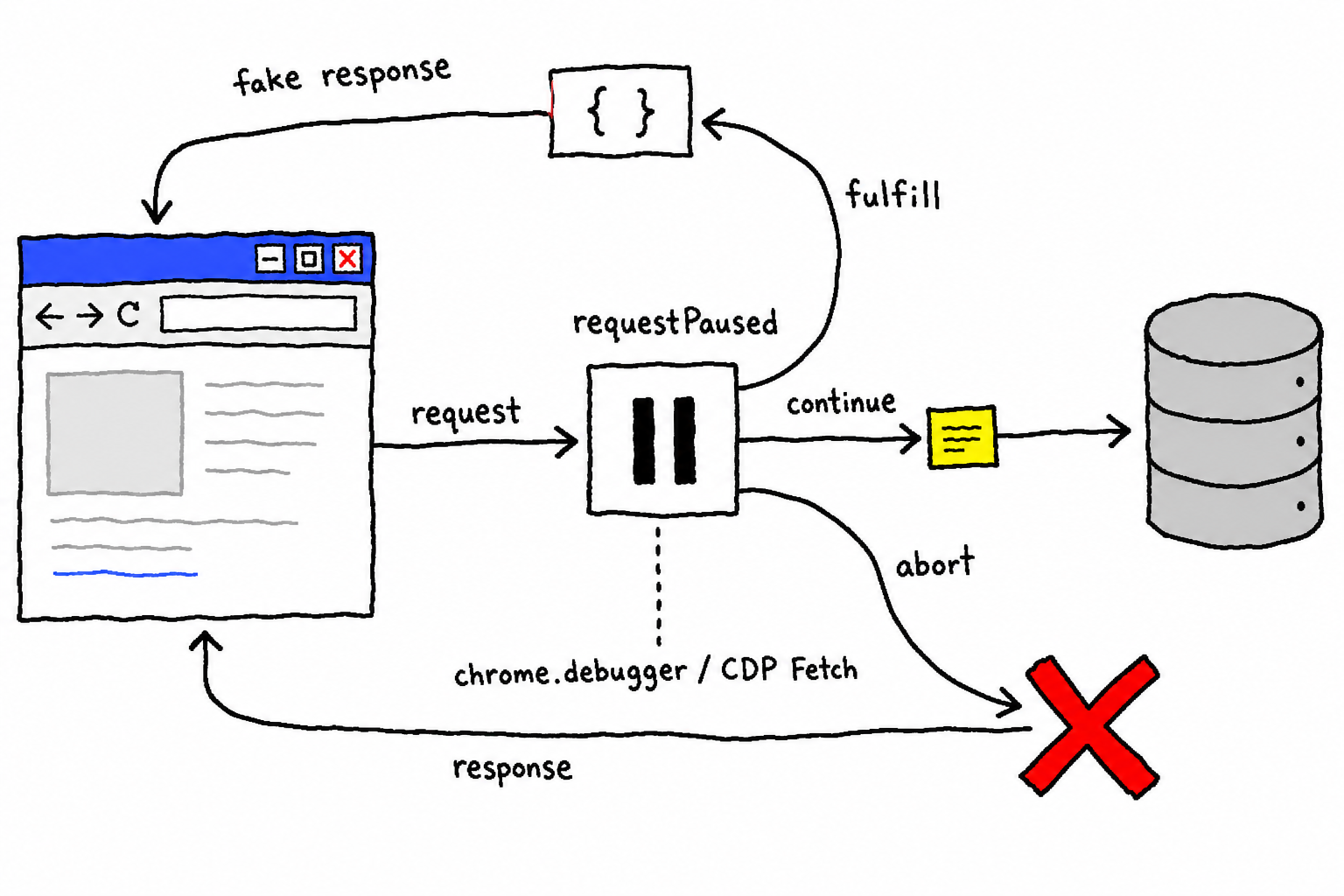
For chrome-use, there are two key points.
First, it already speaks CDP. chrome-use uses its own native CDP client to drive the browser, and commands like fulfillRequest / continueRequest were already in the codebase for domain filtering and proxy authentication. Adding mocks and request modification is basically exposing existing execution capabilities through the command line, not writing a whole new system from scratch.
Second, it does not touch browser extension permissions. chrome-use connects to real Chrome through the extension's chrome.debugger channel, and request interception simply sends a few more CDP commands through that channel. Not a single word in the extension manifest has to change. It does not need webRequest, let alone declarativeNetRequest, and those two are exactly the permissions the Chrome Web Store scrutinizes closely. So this feature introduces no new permissions and therefore does not create extra risk for extension review.
As an aside, here is why an existing mock tool was not integrated directly. After looking around: mockttp is an in-process Node proxy and requires a self-signed CA; mitmproxy is a standalone Python MITM proxy and also requires installing a certificate; MSW works by injecting a Service Worker into the page, which directly violates chrome-use's "zero JS injection" stealth principle. They are either heavy, require a proxy plus certificate, or break stealth, and when intercepting in Chrome, what they wrap is still the same CDP Fetch. Since chrome-use already speaks this protocol itself, filling in the surface layer is the lightest path.
Running it on a real device
Use httpbin.org, which echoes requests as-is, to verify the two main paths, and start an isolated browser to run them.
Mock response: set fake data for /get, then fetch it from the page:
chrome-use --launch --session demo network route "*/get" \
  --body '{"mocked":true,"by":"chrome-use"}' --status 200 --content-type application/json
chrome-use --session demo open https://httpbin.org/
# In the page: fetch('/get') → {"mocked":true,"by":"chrome-use"}
What returns is the fake data that was configured, not httpbin's real /get response. The request never went out to the network.
Change request: add a custom header to /headers, then fetch it again. httpbin will echo back the request headers it received:
chrome-use --session demo network route "*/headers" --set-header X-Chrome-Use=hello123
# In the page: fetch('/headers') → the echoed headers include "X-Chrome-Use": "hello123"
The headers echoed by httpbin include X-Chrome-Use: hello123, showing that this header was added before the request was actually sent.
Use example.com to verify changing a real response: let the request go out as usual, receive the real page, then replace text in the response body, change the status code to 599, and add a response header.
chrome-use --launch --session demo network route "*example.com/" \
  --edit-status 599 --edit-header X-Edited=yes --replace 'Example=>EDITED' --resource-type xhr,fetch
chrome-use --session demo open https://example.com/
# In the page fetch('/') → {status:599, xedited:"yes", bodyEdited:true}
What is received is the modified version of the real response: the status code becomes 599, the X-Edited header is added, and Example in the body is replaced with EDITED. Here, --resource-type xhr,fetch limits editing to API requests and avoids touching top-level document navigation. Changing the status code of a navigation document to an error code would make the page-loading semantics messy.
Current boundaries
Changing a real response currently means "fetch the entire response body, do string replacement, and override the status/headers." That is enough for everyday field changes and creating error states. More granular structured rewriting, such as changing only a specific JSON field, is currently handled with string replacement for now, and future work depends on demand. Also, chrome-use can already record HAR, and the next plan is to allow recorded HAR entries to be used directly as mock fixtures: record once, then tweak and replay.
Two repositories: chrome-use is at github.com/leeguooooo/chrome-use; run the full command chrome-use skills get core to pull it locally and inspect it.
 微信
微信 支付宝
支付宝
Comments
Replies are public immediately and may be moderated for policy violations.