

I had Codex’s Computer Use plugin installed on my machine and used it for a while. It was steadier at operating apps than anything else I had seen: accurate clicks, correct scrolling, and very few empty clicks. Two thoughts came up at the same time: why is it so steady, and could I use it in another agent too, such as the Claude Code I keep open every day? So I took it apart, and in the end I got it connected.
The teardown process was mostly static reading of symbols and strings, with disassembly for the parts I could not understand directly. There were three hands-on steps: making the official Codex actually run once, writing a reimplementation based on what I understood, and finally connecting it into Claude Code. I’ll go through them in that order: how it works, how the gate that only recognizes OpenAI’s signature blocks others, and how I got past that gate and connected it to Claude Code.
Conclusion First: It Doesn’t Rely on “Looking at Images and Clicking Coordinates”
A lot of computer-use products on the market follow this pattern: screenshot → model looks at the image → outputs pixel coordinates → click. The problems with a purely visual approach are obvious: coordinates drift, small controls are hard to click accurately, things break after scrolling, and images burn tokens.
Codex takes a different path: Accessibility Tree first, screenshots only as a fallback. The self-description string for its main tool says this very plainly:
Start an app use session if needed, then get the state of the app's key window and return a screenshot and accessibility tree. This must be called once per assistant turn before interacting with the app.
Before taking action each turn, it first fetches the state, getting both a screenshot and the accessibility tree. If structured controls exist, it clicks by the IDs in the tree: accurate, stable, and cheap. Only when that fails does it fall back to pixel clicks, which are more general. This “two-legged” design is the root of why it feels good to use.
Two Processes, One Codename: Sky
It’s not a script, but a native macOS app suite: arm64 Swift, minimum macOS 14.4. Crack open the .app and you’ll see two executables:
SkyComputerUseClient(11MB): the MCP frontend. Codex exposes tools through it; it rises and falls with conversation turns, short-lived.SkyComputerUseService(17MB): the resident engine. It does the real work of screenshots, tree traversal, and input injection.
The two communicate through XPC + Mach ports (the transport class is called ComputerUseIPCXPCTransport, and the channel name is CodexComputerUseIPC-1), sharing the same App Group keepalive state. It also ships with two small apps: one prevents the lock screen during automation (CUALockScreenGuardian), and the other guides permission granting.
The internal codename is Sky. The snapshot containing screenshot plus tree is called a Skyshot; the observation recording feature is called Skysight; and the input abstraction prefix is SAI.
Why split it into two processes? Because state needs to stay alive between turns: the tree, event stream, and permission grants all have to remain on the service side, while the frontend only translates the protocol. This is also the premise that makes the later “incremental diff” possible.
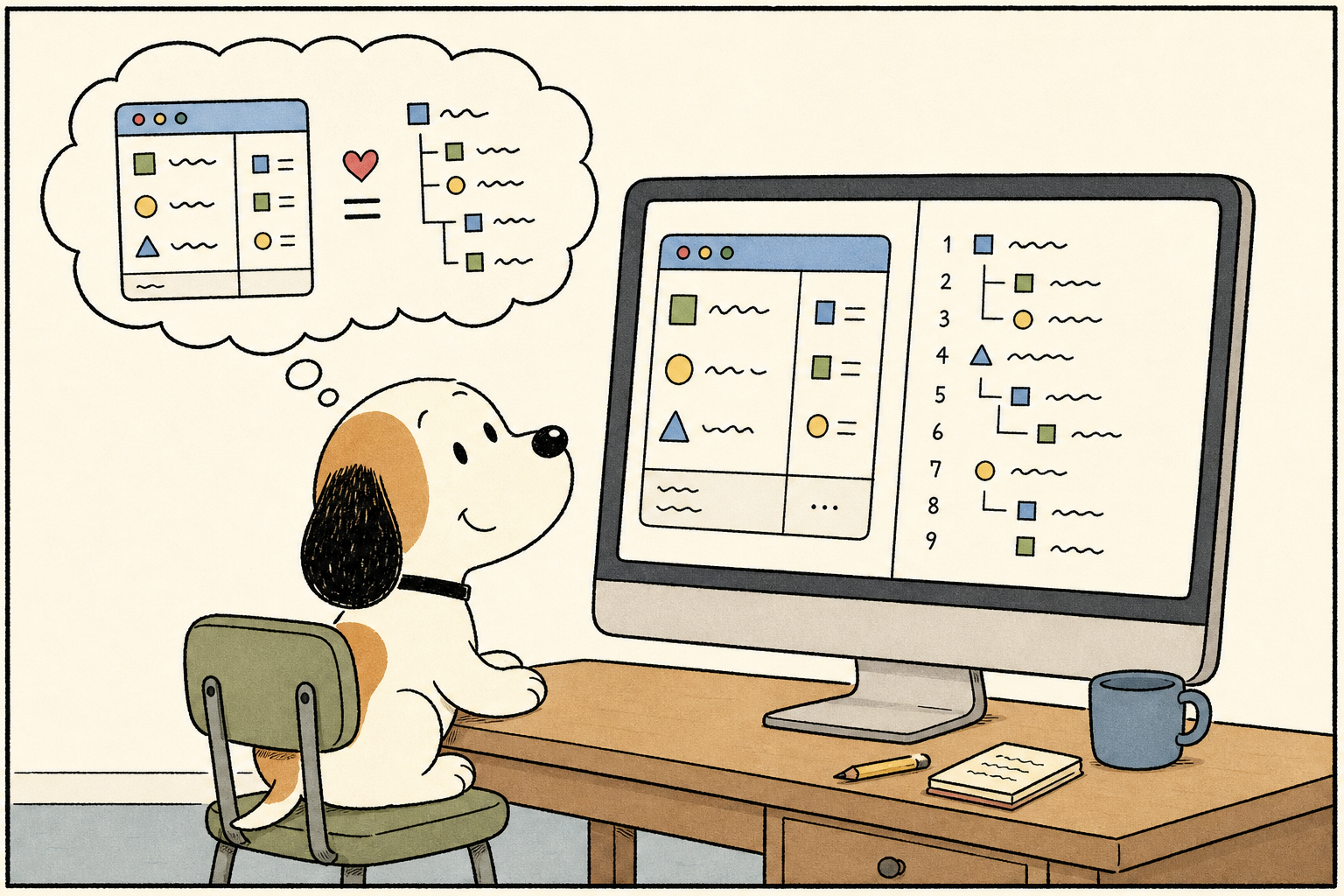
Skyshot: in the same frame, one screenshot paired with one tree
Skyshot is the single most copy-worthy part of the whole design.
The screenshot side uses ScreenCaptureKit: capture, then compress to JPEG, aggressively. In my own test, capturing a TextEdit window returned an image of 586×488, 23.5KB. Small images save tokens, but the real information carrier is not the image. It is that tree.
The tree side takes the real controls traversed from the system Accessibility API and projects them into a piece of text for the model to read. Its class name is literally LMReadableElement (LM = Language Model). The screenshot only lets the model “take a glance to confirm”; which element to click and what value to read all depend on the tree.
What does that tree shown to the model look like?
Words alone are not enough, so I had it capture the state of a TextEdit window once and pulled out the real returned data (excerpt):
Computer Use state (CUA App Version: 857)
<app_state>
App=/System/Applications/TextEdit.app/ (bundleID com.apple.TextEdit, pid 71221)
Window: "Untitled", App: TextEdit.
0 standard window Untitled, Secondary Actions: Raise
	1 scroll area Secondary Actions: Scroll Left, Scroll Right, Scroll Up, Scroll Down
		2 text entry area (settable, string) Value: <body text>, ID: First Text View
	21 container
		22 checkbox bold, Help: Bold text, Value: 0
	28 pop up button typeface, Help: Choose the typeface, Value: Helvetica
The focused UI element is 2 text entry area (settable, string) …
</app_state>
This format is its “interface language.” Breaking down each field:
| Element | Example | Meaning |
|---|---|---|
| Leading integer | 2 text entry area … | Element number, used by click / set_value / scroll for targeting |
| Indentation (Tab) | Child nodes are one level deeper than parent nodes | Encodes tree depth |
| Role | standard window, pop up button | Plain-language role the model can understand directly |
| Parenthesized traits | (settable, string), (disabled, settable, float) | Whether it can be set, what type it is, whether it is disabled |
| Fields | Value:, Help:, ID: | Current value, hover tooltip, control identifier |
| Secondary Actions | Raise, Show color panel | Extra accessibility actions, triggered by another tool |
| Final focus line | The focused UI element is 2 … | Points out the current focus directly, saving the model one inference step |
The entire rich-control TextEdit window is only 3.6KB after serialization. Plain text, leading line numbers, Tab indentation, plain-language roles: token-efficient, diff-friendly, and zero learning cost for the model. The (settable) bit in parentheses is especially clever: it directly tells the model “whether this can be changed,” tying together the later set_value and incremental diff.
Ten Tools, Two Addressing Modes
You can extract the complete tool table from the frontend binary: ten tools in total. The core ones are:
get_app_state: fetch state (screenshot + tree), must be called once at the start of every turn.click: click by number, or by screenshot pixel coordinates.type_text/press_key: type text, press key combinations.scroll: scroll an element by “pages,” with fractional pages supported.set_value: directly set the value of a settable control, instead of typing character by character.perform_secondary_action: trigger those Secondary Actions listed above.
There’s a detail in click: it accepts both element_index and x/y. This isn’t a slapdash either-or; it’s a deliberate fallback chain: if structure is available, never use pixels. set_value works the same way: rather than simulating input one keystroke at a time, directly set the control’s value to the target—faster, more reliable, and unaffected by input methods. It even lets the model use “the text segment from the tree itself” to position the cursor, then provide prefix/suffix context to disambiguate when the text isn’t unique.
Only send the changed part: incremental diff
This is the biggest cost saver, and also the easiest one to overlook. These lines addressed to the model sit right inside the binary:
The following is a diff from the previous accessibility tree
The following is a cumulative diff from the initial accessibility tree
There has been no change in the accessibility tree for …
Send the full tree the first time, then in each subsequent turn send only the diff: either relative to the previous turn, or the cumulative diff relative to the initial state; if nothing changed, simply say “no change.” A full tree for a large app can be tens of thousands of tokens, so resending it every turn is just burning money.
The prerequisite for diffing is that element IDs remain stable across turns. That depends on a resident service maintaining a transactional, invalidatable tree structure (classes named UIElementTreeTransaction and UIElementTreeInvalidationMonitor). A purely visual, stateless approach can’t do this; it’s exactly the payoff you get from a stateful two-process architecture.
How Input Gets Typed, and the Unassuming Guardrails
Input goes through Core Graphics event synthesis, not brittle AppleScript: CGEvent / CGEventSource synthesize mouse and keyboard events, and strings are translated into virtual-key sequences (including modifiers, layout-independent). For supported controls, it can also send AXPress directly.
What really sets it apart is the guardrails. These things are useless in demos, but you only feel the pain after running for a long time:
- Focus-steal prevention (
SystemFocusStealPreventer,SyntheticAppFocusEnforcer): the biggest trap with synthetic input is that halfway through typing, focus gets stolen by another window or notification, and keystrokes land in the wrong app. It has dedicated subsystems to pin the target in the foreground. - Lock-screen prevention (
CUALockScreenGuardian): when the screen is locked, macOS hides all app windows from accessibility. I ran into this myself later when trying to replicate it. - Lighting up Electron (
AXManualAccessibility): Chromium / Electron do not expose the DOM tree to accessibility by default. It setsAXManualAccessibility=truefor these apps, forcing Chromium to build the tree on the spot. So Codex can get structured elements in browsers, VS Code, and Slack too, not just screenshots. - Pre-capture highlighting: before taking a screenshot, it first draws a highlight box on the screen (the IPC message carries the
CaptureAnimationfamily), so you can see “the AI is looking here.”
It Stops on Its Own: Confirmation Policy
The plugin’s bundled SKILL.md embeds a fairly restrained confirmation policy. Because UI actions have real side effects—deleting data, transferring money, sending messages—it divides risky actions into four tiers: leave it to the user, always confirm before acting, initial prompt authorization is enough, and always allow. Deleting cloud data, installing new software, financial transactions, and solving verification codes fall under “always confirm.”
It also distinguishes between “instructions personally entered by the user” and “instructions embedded in third-party content”: the latter—webpages, PDFs, pasted text—is always treated as potentially malicious and never considered authorization.
I saw this system run in real time. I asked the official Codex to use Computer Use to send a message to a WeChat contact. It navigated to the conversation, focused the input box, then stopped on its own and replied: “Sending a message to a third party requires confirmation; please confirm.” The policy isn’t just there to look good in the docs—it actually blocks actions.
The -10000 Gate: How It Recognizes “Whether It’s OpenAI”

At one point, I wanted to bypass Codex and call its MCP directly myself. The handshake and tools/list both worked, but as soon as I invoked a real action, the service replied:
Computer Use server error -10000: Sender process is not authenticated
This gate is its core line of defense: only apps signed by OpenAI itself are allowed to drive it. I dug the verification logic all the way down to the assembly layer, and the full chain looks like this:
① Get the peer identity, kernel-level and unforgeable. getsockopt(fd, …, LOCAL_PEERTOKEN) retrieves the peer’s audit token from the socket, then audit_token_to_pid converts it into a pid. The audit token is provided by the kernel through the socket, so the caller can’t impersonate someone else just by “lying about its pid.”
② Trace through to the responsible process. The direct connection comes from a CLI helper (com.openai.sky.CUAService.cli, which itself is not on the allowlist). So the service uses dlopen + dlsym to call a private API and resolve the app that is “actually responsible for this helper,” namely Codex / ChatGPT / Atlas. The corresponding key is senderParentResponsibleIdentity. This step defeats the trick of “writing my own wrapper around the helper.”
③ Obtain the kernel-backed code object. It calls SecCodeCopyGuestWithAttributes with the audit token (the call site is around 0x10012b5bc) to obtain a SecCode verified by the system code-signing subsystem.
④ Read the signing information. After SecCodeCopySigningInformation (0x10012a2cc), it reads two fields: kSecCodeInfoTeamIdentifier (Apple Team ID) and kSecCodeInfoIdentifier (bundle / signing identifier).
⑤ Compare. The Team ID must equal 2DC432GLL2 (OpenAI’s developer team), and the bundle ID must fall within the allowlist: com.openai.codex (including alpha/beta/dev/nightly), com.openai.chat, com.openai.atlas, and com.openai.sky.*. If it matches, the request is allowed through; otherwise, you get that -10000 error.
This gate is worth discussing on its own because it is a solid template for “how to authenticate callers for an IPC service”:
- The audit token comes from the kernel, not from caller-supplied data, so it cannot be forged.
- Resolving the responsible process makes “wrapping it in a shell” useless.
- The
SecCodeis derived from the audit token and backed by the kernel; unsigned, ad-hoc-signed, or re-signed binaries cannot produce the Team ID2DC432GLL2.
But step ④ hides the only weak spot in this gate. The next section walks through that opening.
Threshold: Replacing the String It Reads Itself
Steps ① and ② from the previous section come from the kernel and cannot be forged: who is connecting, and who is responsible for it, are fixed by the kernel through the audit token. But the team ID used for the final comparison is read inside its own process, through an ordinary dynamically linked function, SecCodeCopySigningInformation. The kernel is responsible for identifying “which process should be checked,” but “what team id is in that process’s signature” is returned in the client’s own address space, by a symbol that can be replaced.
So I don’t forge the signature, and I don’t touch the two kernel-backed steps. I only change the team id in that dictionary after it reads the signing information and before it compares it. The method is DYLD interpose, in a thirty-line dylib:
static OSStatus my_SecCodeCopySigningInformation(
    SecStaticCodeRef code, SecCSFlags flags, CFDictionaryRef *info) {
  OSStatus st = SecCodeCopySigningInformation(code, flags, info);   // call the real one first
  if (st == errSecSuccess && info && *info) {
    // rewrite the team id in the returned dictionary to OpenAI’s 2DC432GLL2
    CFMutableDictionaryRef m = CFDictionaryCreateMutableCopy(NULL, 0, *info);
    CFDictionarySetValue(m, kSecCodeInfoTeamIdentifier, CFSTR("2DC432GLL2"));
    CFRelease(*info);
    *info = m;
  }
  return st;
}
// in the __DATA,__interpose section, point the real function to this stand-in
Start the process with DYLD_INSERT_LIBRARIES=team_hook.dylib, and after that, every time it reads the signature, the team id is 2DC432GLL2. In practice, changing only this one field was enough to pass the gate. Before injection, list_apps returned -10000; after injection, it directly returned the real app list.
This also confirms the foreshadowing from the previous section. It did not use SecCodeCheckValidityWithErrors with a designated requirement and let the kernel decide “is this signed by 2DC432GLL2?” Instead, it reads the team id into a string itself and then compares it. The former keeps the decision inside the system, out of my reach; the latter hands the final sentence to a user-mode function I can replace. The trust anchor appears to be that team ID, but the real anchor is “who reads it,” and it chose to read it itself.
(And, by the way, correcting an early mistaken judgment of mine: I once thought NOPing out three branches in the binary would be enough to bypass it. Those three are at 0x100019a00; reversing them shows they are the description getter for an NSError. Changing them only garbles the error text and does not gate a single permission. The real switch is the hook above.)
Wiring It into Claude Code
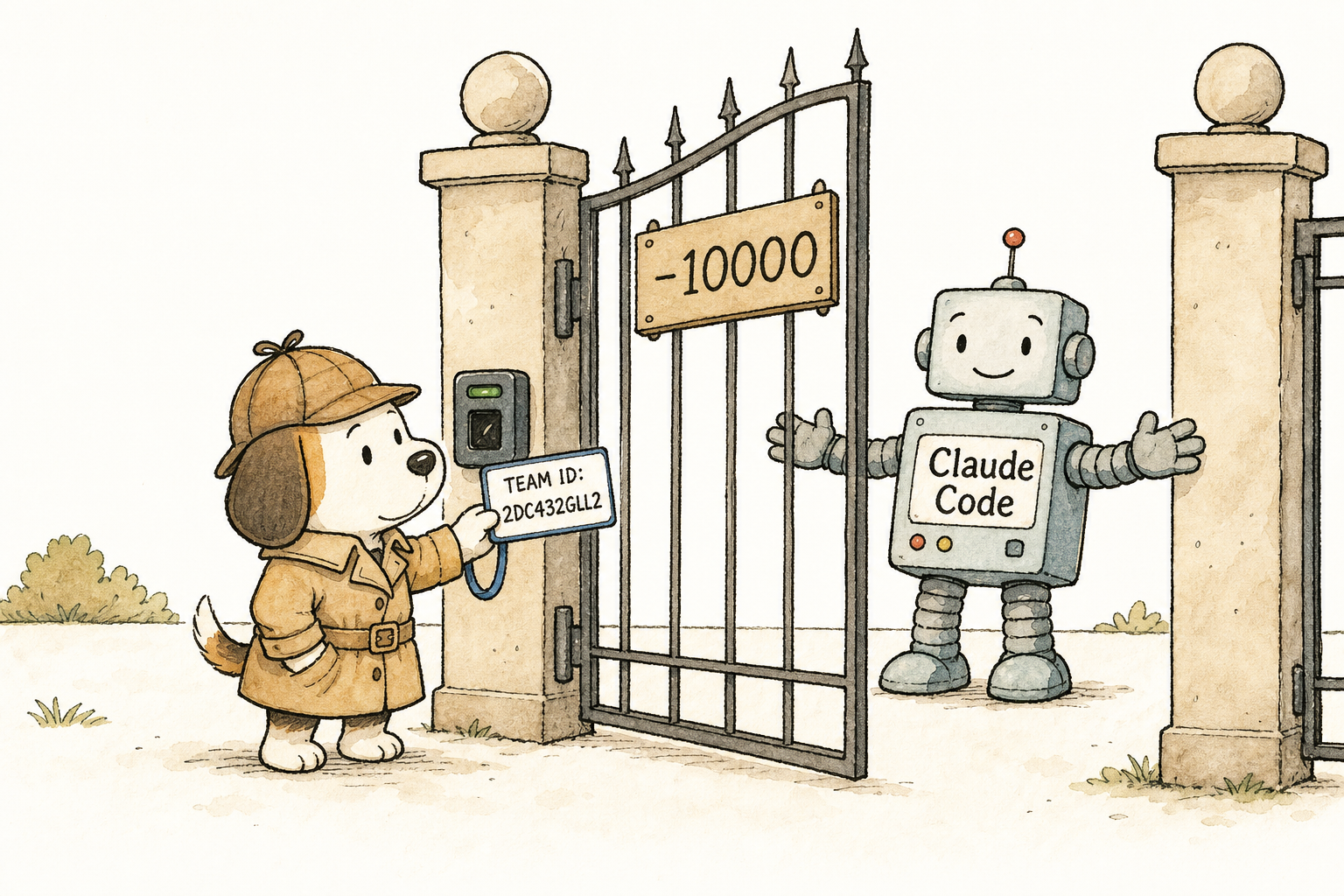
Once through the gate, what remained was wiring it into Claude Code. Claude Code loads tools as MCP servers, and SkyComputerUseClient mcp itself is an MCP server over stdio, exposing exactly those ten tools: get_app_state / click / type_text and the rest. Registering one entry is enough, with just one catch:
The name computer-use is reserved in Claude Code, and will be silently rejected during loading. Use another name, such as mac-computer-use:
claude mcp add mac-computer-use --scope user \
  -e DYLD_INSERT_LIBRARIES="$HOME/.codex/computer-use/team_hook.dylib" -- \
  "…/SkyComputerUseClient.app/Contents/MacOS/SkyComputerUseClient" mcp
-e carries the hook in. Restart Claude Code, and those ten tools appear. I tried calling get_app_state on WhatsApp with it—the call that would have returned -10000 before injection—and it directly returned the full accessibility tree. Then I clicked the send button by element number, and the message went out. It used the accessibility tree the whole way, with no screenshots involved.
I packaged the patching, hook compilation, and MCP registration steps into an install.sh; the repo is at leeguooooo/computer-use, and a single curl … | sh installs it. To be clear about the boundaries: this is on my own machine, with my own installed Codex, to make it interoperate with another agent I commonly use. System-level permissions—Accessibility / Screen Recording—are still governed by macOS TCC. They cannot be bypassed, and should not be bypassed; after patching, the first launch will still show the system permission dialog as usual. Just click Allow.
I Wrote One Following the Same Approach, Called opencua
Before wiring it up, I also wanted to verify something else: whether the core of this whole setup could be reproduced using public macOS APIs. So, based on my understanding, I wrote a clean-room version in about 600 lines of Swift, called opencua: the same accessibility tree + screenshots + CGEvent, zero OpenAI code, signed with my own certificate.
On simple native apps, it’s almost 1:1. I had it capture TextEdit’s state, and the tree it produced lined up with the official one line by line:
| Official Codex | My opencua | |
|---|---|---|
| Root node | 0 standard window Untitled | 0 standard window "Untitled 3" |
| Text area | 2 text entry area (settable, string) Value: … | 2 text entry area (settable) value=… |
| Focus | The focused UI element is 2 | focused element index = 2 |
Screenshots, clicks, and typing all worked too: I used it to type a sentence containing «» into TextEdit (non-ASCII could be injected as well), then clicked the bold checkbox and read the state back to confirm the value changed from 0 to 1. The observe → act → observe loop worked end to end.
During the teardown, two reverse-engineering conclusions were disproven by reality on the spot. First, when I captured Chrome’s state, the window count came back as 0 and the main window came back as the app itself — exactly because Chromium does not expose its tree unless AXManualAccessibility is enabled. Second, for a while every app I inspected returned 0 windows; after digging for ages, I found the machine was locked. When the screen is locked, macOS hides all windows from accessibility. That neatly explains why it includes CUALockScreenGuardian.
Then came the real-world wall. I had opencua operate WeChat: search for a contact and send a message. The search box could be focused and text could be typed into it, but the search results were a row of virtualized cells; the names didn’t enter accessibility at all before rendering. My serializer only captured a bunch of empty virtual_cells, while the official version could reliably read the contact names. That’s where the gap was.
This hands-on test instead confirmed my judgment from the teardown: the moat of this system is not the algorithm. The core can be reproduced in a few hundred lines. What’s truly hard is the unglamorous production-grade polish in that last 20%: virtualized lists, focus management, timing retries, and special handling for everyone’s custom-drawn controls. A prototype can’t grind through all of that; the original has clearly spent a long time polishing this part.
A Few Things I Remember After Taking It Apart
If I were building my own macOS computer use implementation, these are the things I’d copy:
- Accessibility tree first, screenshot as fallback, with every action double-addressed (ID / pixel). This is the root of “clicking accurately.”
- Stateful dual-process design: a short-lived frontend + a resident engine. Keeping tree state alive across turns is the prerequisite for incremental diffs and stable IDs.
- Send the tree as incremental diffs: full dump the first time, only differences after that. This is the dividing line for token cost in long tasks.
- Use plain text + line-leading IDs + tab indentation for the model-facing tree, and encode “whether it can be modified” in parentheses.
- Enable
AXManualAccessibilityfor Chromium / Electron, otherwise browsers and a pile of Electron apps are screenshot-only. - Guardrails separate production from demo: prevent focus stealing, prevent lock screen, highlight before capture, per-app authorization.
- Don’t leave the final word in auth to user space: using the audit token to get identity and resolving the responsible process are both right, but if the final step is reading out the team ID yourself and doing a string comparison, anyone who can inject locally can pass it with one interpose. Either use
SecCodeCheckValidityWithErrorswith a designated requirement and let the kernel decide, or acknowledge this weak spot. When I plugged it into Claude Code, this is exactly the path it took.
It’s “best” not because the model is stronger, but because the engineering has fully digested the accessibility API stack. Screenshots are only the fallback; the real vehicle is a diffable accessibility tree that the model can read. Then reliability is propped up by unglamorous details like focus, lock screen handling, highlighting, and tiered confirmation. The moat is in those places, not in the prompt. That signature gate has the same engineering feel too; it just leaves the final step in user space, which is why the second half of this piece exists.
 微信
微信 支付宝
支付宝
Comments
Replies are public immediately and may be moderated for policy violations.