
After reading through the Wan2.2 repository from generate.py all the way to the schedulers, what is really worth writing down is not “how to use this model,” but how this code can bite you when you are not paying attention.
Wan2.2 is an open-source video generation model library from Alibaba’s Wan team. It has a single generate.py entry point and uses --task to branch into five inference pipelines: text-to-video, image-to-video, unified text-image-to-video, speech-to-video, and character animation. On the surface, it looks like “one model, five ways to play.” Once you open the code, it feels more like five parallel worlds glued together by a thin CLI layer. Below, I’ll go through it in the order I read the code, marking the pitfalls where they appear and pasting the source code directly in the key places.
This article is about engineering pitfalls. If you want to first understand the principles behind video generation itself—VAE compression, flow matching, CFG, and the math and numbers behind the MoE dual experts—read the companion piece: Learning Video Generation Through the Wan2.2 Source Code. The two are best read together.
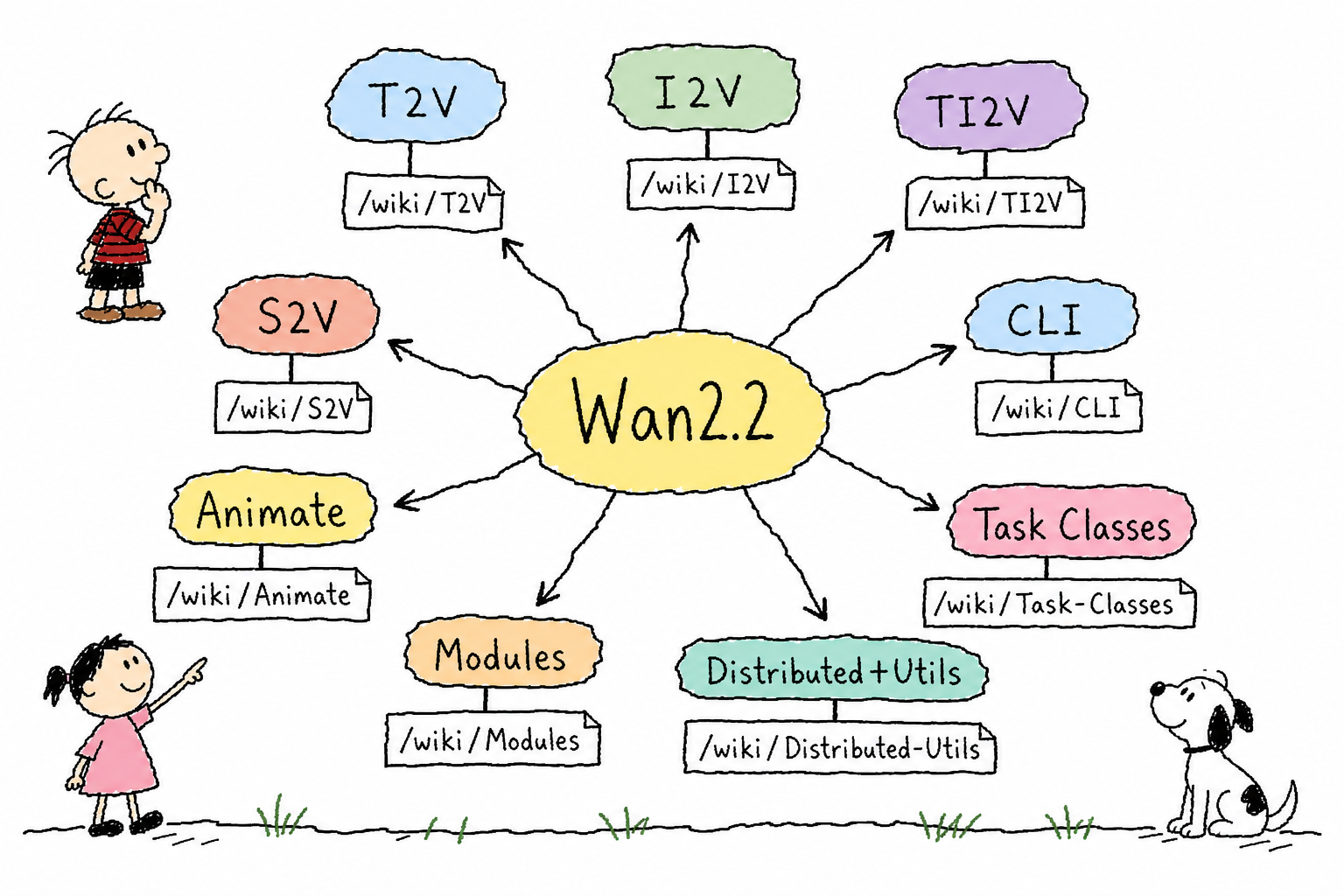
Five Tasks, Five Input Sets, Five Pitfall Sets
Wan2.2 is a task matrix. t2v-A14B, i2v-A14B, ti2v-5B, s2v-14B, and animate-14B each require completely different assets: plain text, a reference image, a reference image plus audio, or even a video plus a pose asset package produced by preprocessing. Which task to use and what inputs to prepare—the answer lives in the argument validation code in generate.py; the docs only tell half the story.
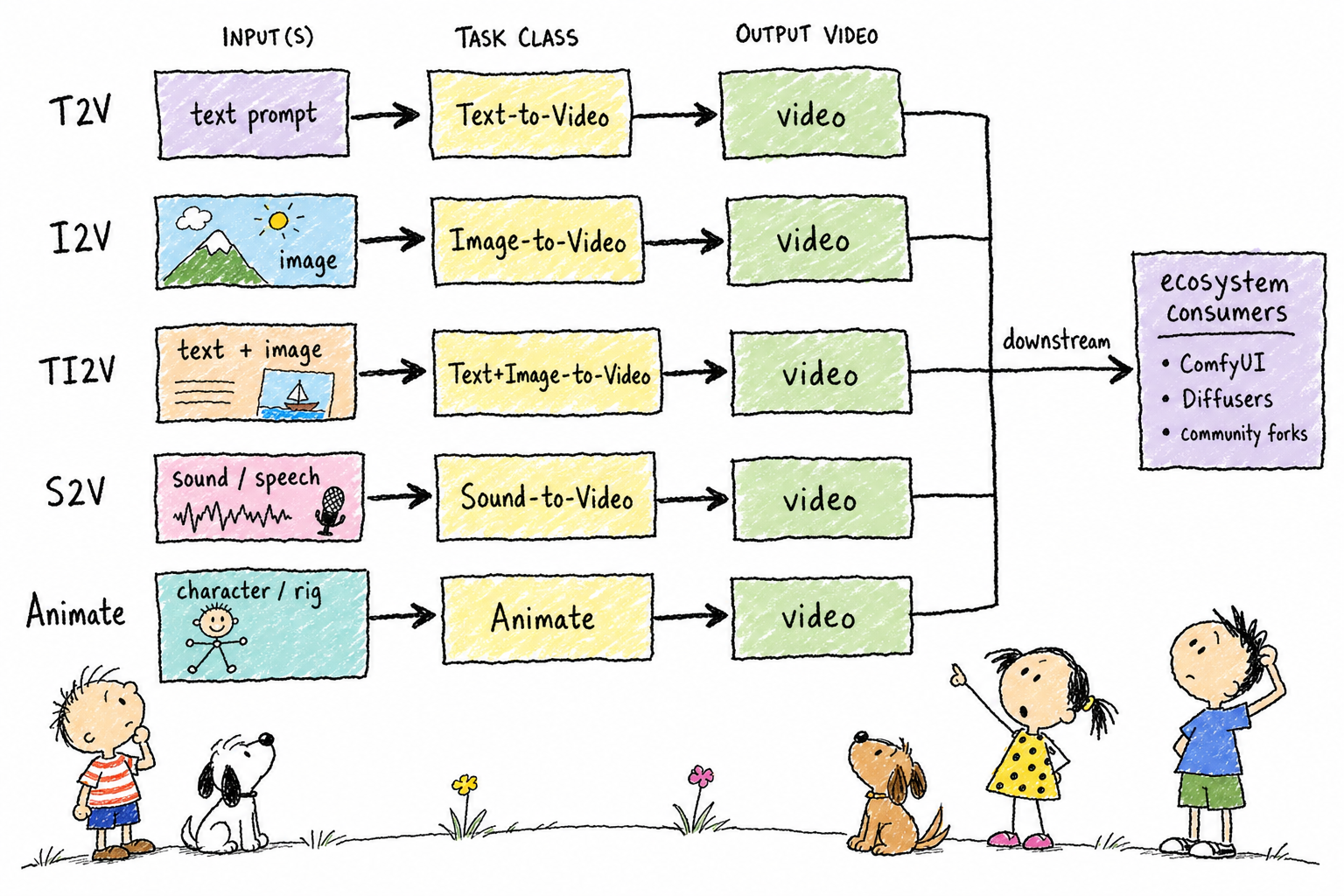
First, look at this default fallback logic in generate.py:
if args.prompt is None:
    args.prompt = EXAMPLE_PROMPT[args.task]["prompt"]
if args.image is None and "image" in EXAMPLE_PROMPT[args.task]:
    args.image = EXAMPLE_PROMPT[args.task]["image"]
If you don’t pass --prompt, the code doesn’t error out; it silently applies the hardcoded sample prompt: a white cat wearing sunglasses surfing. s2v-14B and i2v-A14B even share the same sample. Run these two tasks without passing a prompt, and the results will have the same style, because both tasks are just idling on the official demo assets. --image, --audio, and --tts_* all have similar fallbacks. After beginners get the demo running for the first time, they often mistakenly think their own configuration has taken effect. This is the number one source of confusion.
The meaning of --size does not line up across tasks. In t2v/ti2v, it means resolution; in i2v/s2v, it is effectively the target pixel area, and the final aspect ratio follows the input image. Filling in 1280*720 does not guarantee the output will be that size. frame_num must satisfy 4n+1, and the default values differ across tasks (t2v/i2v use 81, ti2v-5B uses 121, and animate-14B uses 77). Behind this is the VAE temporal compression ratio, so this number cannot be changed casually. Wan-Animate is a two-stage workflow: first run the standalone preprocess_data.py to produce a pose/mask/reference asset package, then feed that directory to generate.py. Skipping preprocessing and passing the raw video path directly is the most common way this codebase blows up.
The Five-Layer Architecture: Who Glues to Whom
Break apart the wan/ package: configs determines which weights and shapes the model runs with; modules is pure network definitions and has no concept of a “task”; distributed is a parallelism toolbox for pipelines; utils is sampling math and miscellaneous helpers. The pieces that glue them together are pipeline classes like text2video.py and image2video.py.
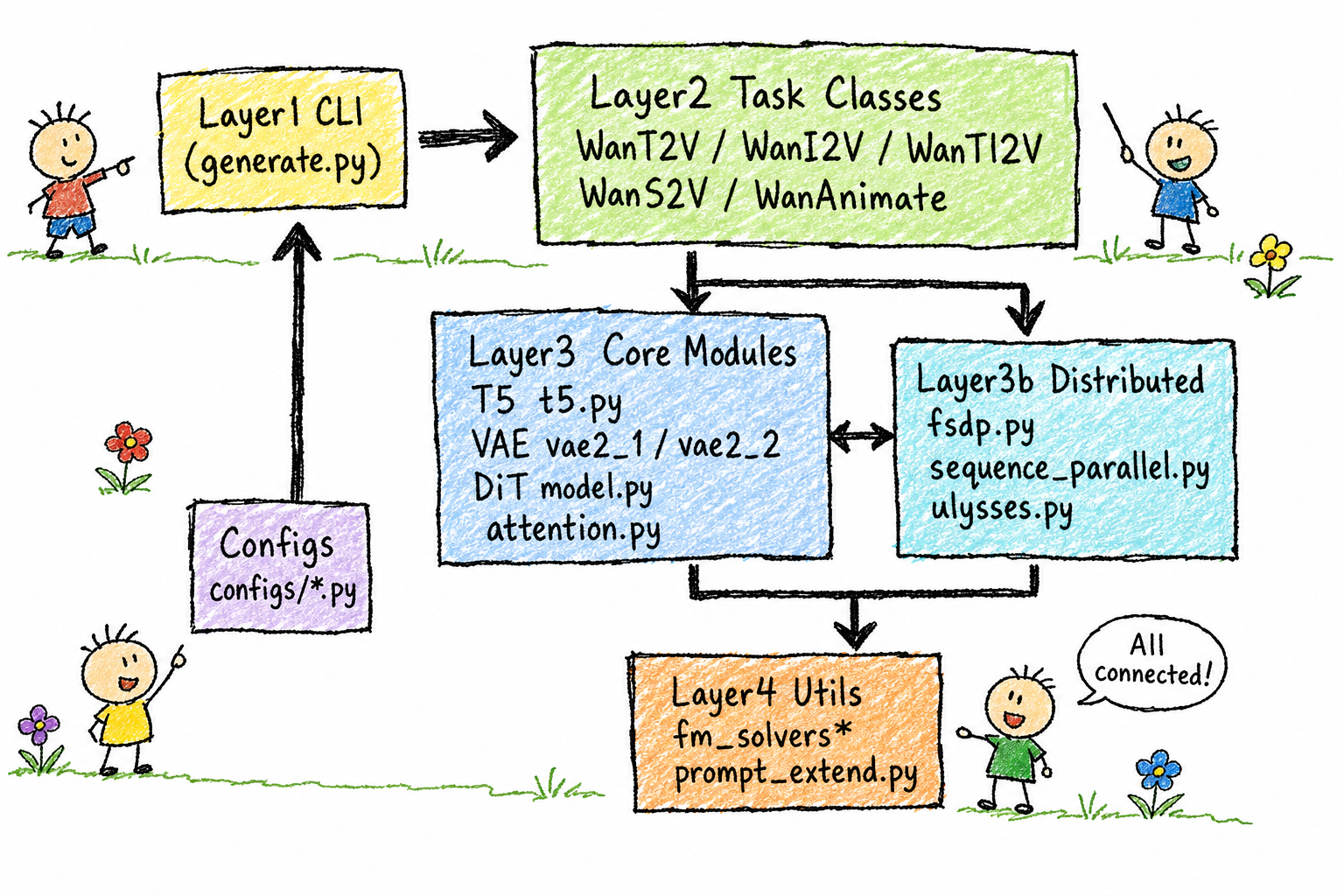
This layer carries a few bits of historical baggage. wan/distributed/__init__.py is an empty file; every pipeline bypasses it and imports directly from submodules, leaving the package name as nothing more than a namespace placeholder. wan/utils/__init__.py lists HuggingfaceTokenizer in its __all__, but that class is actually exported from wan/modules/tokenizers.py. If you follow __all__ and write from wan.utils import HuggingfaceTokenizer, you get an ImportError straight away—an outdated declaration that was never cleaned up.
There is also a cost to the line import wan: it eagerly pulls in all five pipelines and their respective dependencies. Even if you only want to run t2v-A14B, it also drags in heavy TTS/CosyVoice dependencies from speech2video.py. If any task module fails to import, the four unrelated tasks go down with it.
What a Single Generation Passes Through, and Where It Quietly Fails
Using t2v-A14B (MoE dual-expert) as the main thread: generate.py parses arguments → selects a pipeline class → encodes text → runs diffusion sampling → decodes with the VAE → saves as an mp4.
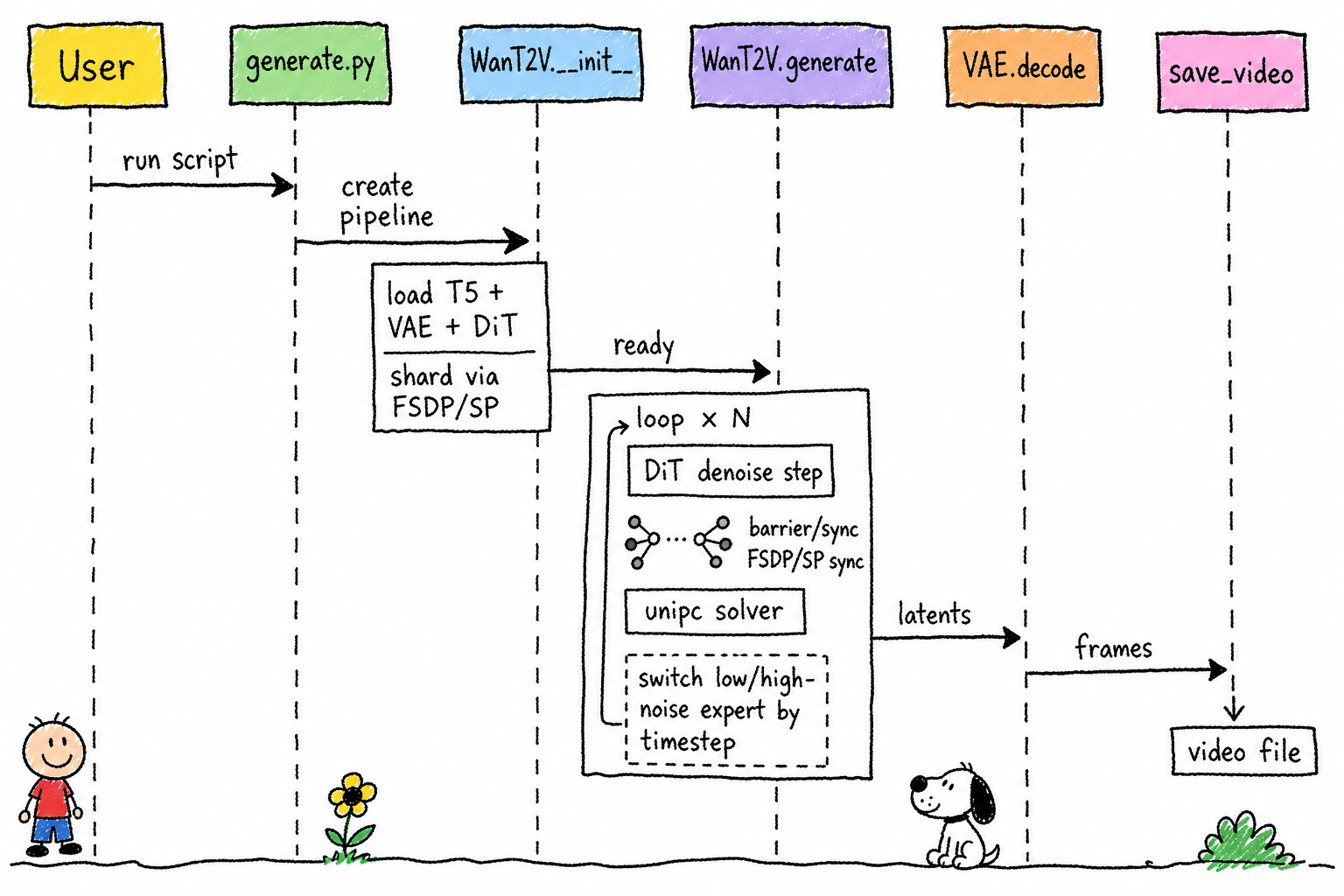
Argument validation is unevenly granular. If i2v-A14B is missing --image, it crashes directly on an assert; if s2v-14B is missing --audio, or animate-14B is missing video/pose/mask, there are no corresponding assertions, so the error is pushed out to runtime. The docs say frame_num must satisfy 4n+1, but the code has no such assert; pass the wrong frame count and it will only explode later when internal DiT/VAE shapes no longer line up, with the error location far removed from the cause.
One easily misunderstood point in the main sampling loop: after CFG (running DiT once for the conditional path and once for the unconditional path) is combined with MoE dual-expert switching, each timestep means “choose one expert, run two forward passes.” The two experts never appear in the same step. The switching condition is t.item() >= boundary * num_train_timesteps, directly comparing against the timestep value emitted by the scheduler. These are two independently maintained pieces of state: change the scheduler, or change shift so the timestep value range drifts, and the expert switch point shifts with it. No error is raised; you can only notice it by visually observing quality degradation.
Now look at writing to disk. The tail of save_video in wan/utils/utils.py:
        # write video
        writer = imageio.get_writer(
            cache_file, fps=fps, codec='libx264', quality=8)
        for frame in tensor.numpy():
            writer.append_data(frame)
        writer.close()
    except Exception as e:
        logging.info(f'save_video failed, error: {e}')
Encoding failures only print a single logging.info line and do not raise. The main flow never learns that saving failed, continues on to merge_video_audio, and eventually logs Finished, while no mp4 exists on disk. If ffmpeg fails inside merge_video_audio, that is swallowed in the same way. The entire chain can be correct up to the end, die on the final step, and still stay silent.
Five Parallel Worlds
The five task classes do not share a base class. The common skeleton _configure_model is copied once into each of the five files: eval + freeze gradients → monkey-patch attention when using sequence parallelism → dist.barrier() → FSDP sharding or move to GPU.
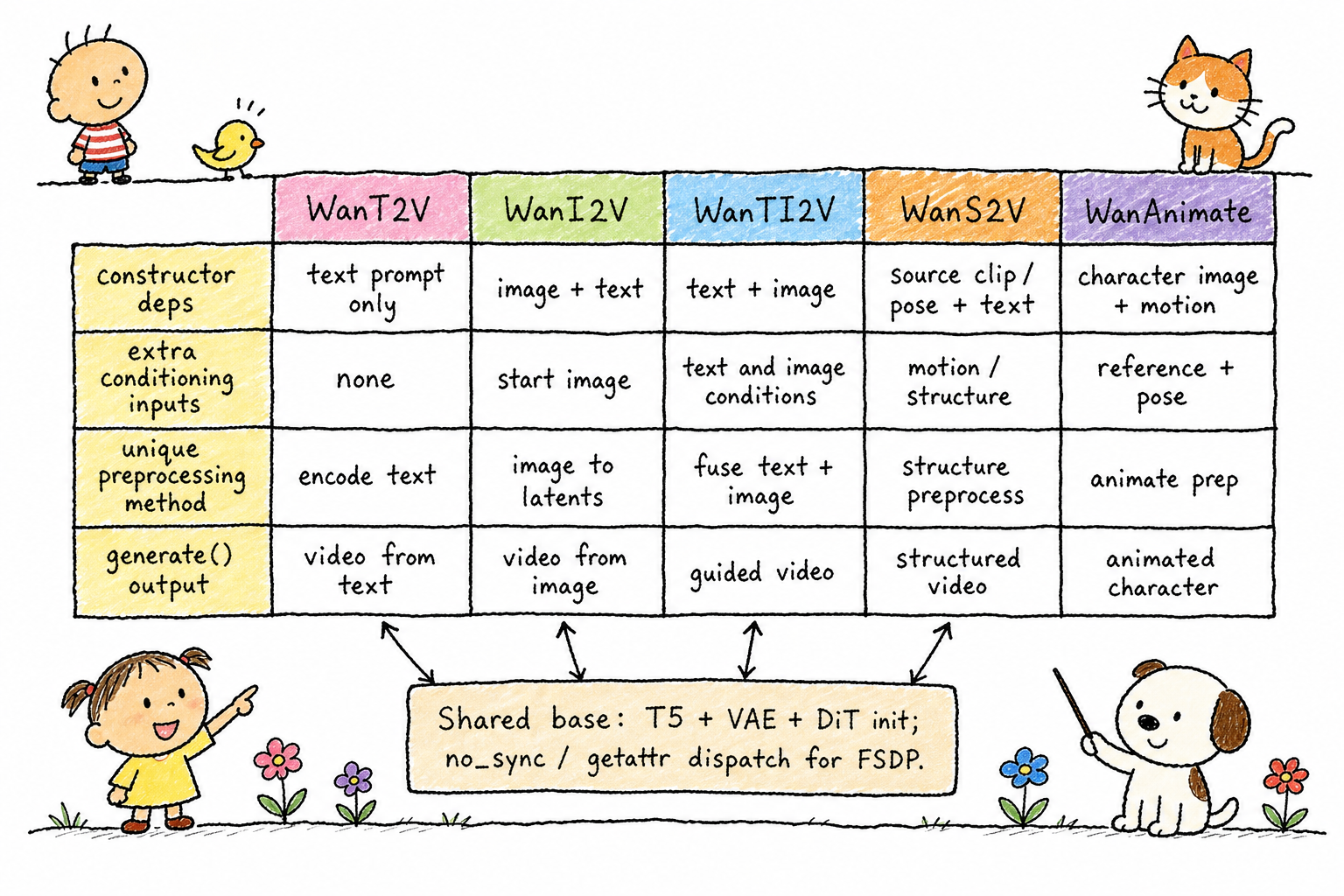
With five copies, the details have already drifted. The S2V and Animate versions have one extra line, model.use_context_parallel = True; the other three do not, making it hard to tell whether that is intentional or an omission. The default CFG switch is also inconsistent: four tasks enable it by default, while Animate disables it by default (guide_scale=1 means CFG does not run). If you treat “Animate is faster” as a bug while comparing tuning results, you can waste a lot of time: it is an intentional compute-saving design. The docstring sentence “only used for expression control, unnecessary in most cases” explains why, but the code will not remind you to look.
TI2V is essentially a dispatcher: pass an image and it goes through the internal i2v branch; pass no image and it goes through t2v, using the same model. It has one default-value trap: the WanTI2V.generate() signature has frame_num=81, while the forwarding targets t2v() / i2v() have frame_num=121 in their signatures. If you use this class directly as a Python library and do not explicitly pass a frame count, you get 81 frames. CLI users avoid this because generate.py always explicitly passes the configured value, 121, bypassing that default.
S2V is the only autoregressive segmented task. It computes num_repeat from the audio length, generates segments in a loop, and stitches them together using the latent at the end of the previous segment. Its get_gen_size leaves an interface for “continuing from the previous generated result” (the pre_video_path parameter), but the main flow always passes None. The interface exists, but the path is not connected, so it is easy to overestimate what it can do when reading the code.
Graceful Degradation Was Written, but Nobody Uses It
The DiT backbone (WanModel) is a stack of repeated Attention Blocks: Self-Attention with RoPE, Cross-Attention connected to text context, and FFN, driven by six-way AdaLN modulation.
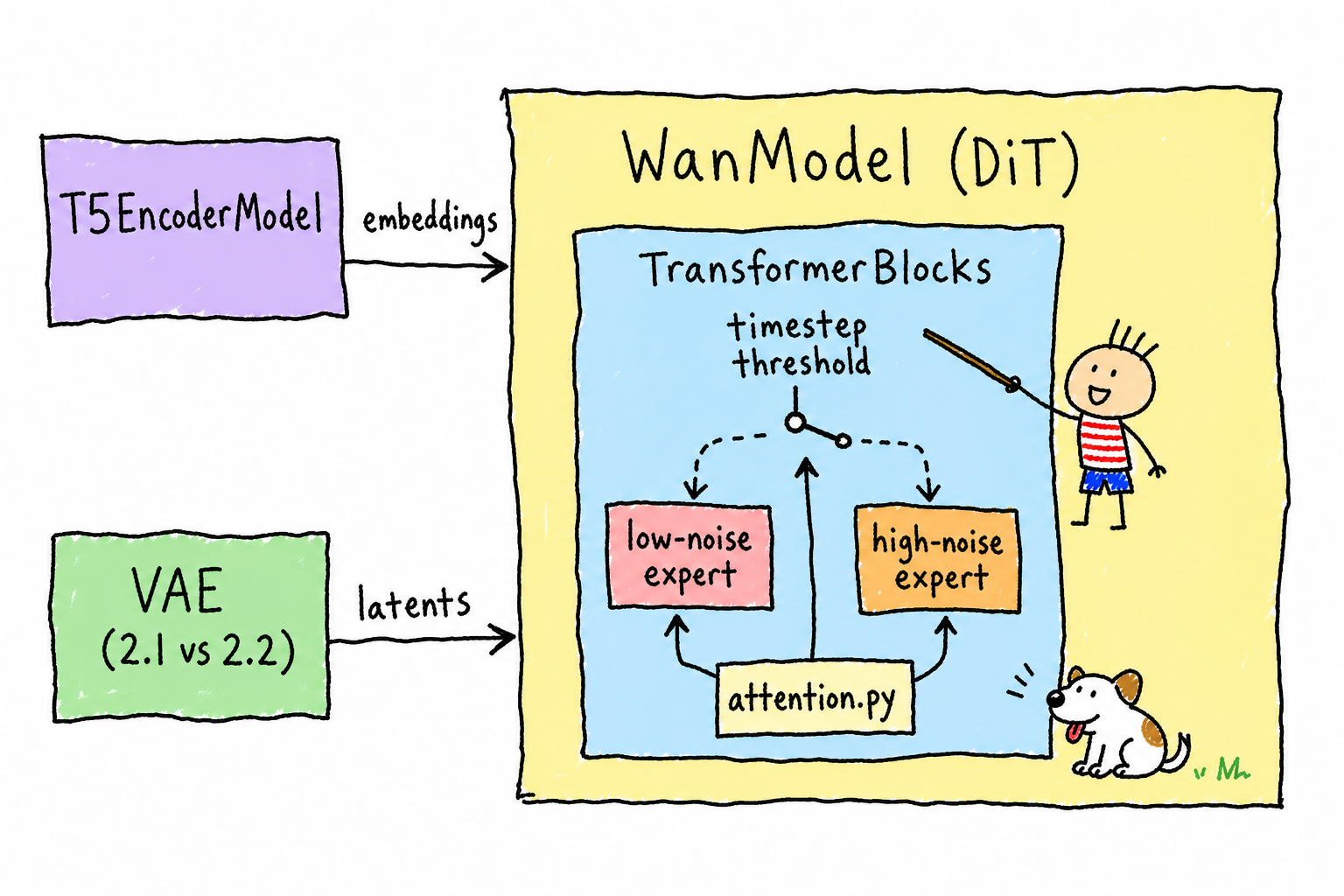
There is a dispatch function with fallback in wan/modules/attention.py, attention(): if FlashAttention is installed, it forwards to it; if not, it falls back to PyTorch’s scaled_dot_product_attention. But line 9 of model.py imports it like this:
from .attention import flash_attention
The backbone directly calls the lowest-level flash_attention(), and when flash-attn is not installed, that function contains a hard assert FLASH_ATTN_2_AVAILABLE (attention.py:112) and crashes immediately. The fallback was written, but the backbone does not use it. The attention kernel also requires q.device.type == 'cuda'; on CPU and Mac MPS, the first call hits an assertion failure with no helpful message.
The VAE pitfall is hidden one layer deeper. The Wan2.1 version (16 channels) and the Wan2.2 version (48 channels, with added patchify and dual-path downsampling) are structurally incompatible, and their two sets of normalization scale dimensions differ. If the checkpoint and VAE version are mismatched, the error is just a tensor shape mismatch, making the root cause hard to see. Wan2.2 VAE’s encode/decode also use try/except TypeError to fall back on invalid input: pass the wrong type, and it swallows the exception, logs it, and returns None; the caller only blows up much later because of that None. The Wan2.1 version does not have this try/except layer. Same repository, two VAE versions, two different personalities for error tolerance.
On the T5 side, umT5 uses per-layer independent relative positional encoding: all 24 layers compute their own bias, and the config has shared_pos=False. This is not a bug; it is umT5’s design, but if you do not look at that config line, it is easy to assume the bias is shared. The more practical risk is elsewhere: t5.py and both VAE versions load checkpoints using bare torch.load, without weights_only=True, which creates a risk of arbitrary code execution during deserialization when loading weight files from unknown sources.
How VRAM and compute are split
There are two axes for multi-GPU strategy: FSDP handles VRAM through parameter sharding, while Ulysses sequence parallelism handles compute by slicing the activation sequence dimension across GPUs. Both use the global world from torch.distributed; there is no separate data-parallel dimension. All GPUs in a single launch either belong to the same parallel group, or the run is single-GPU.
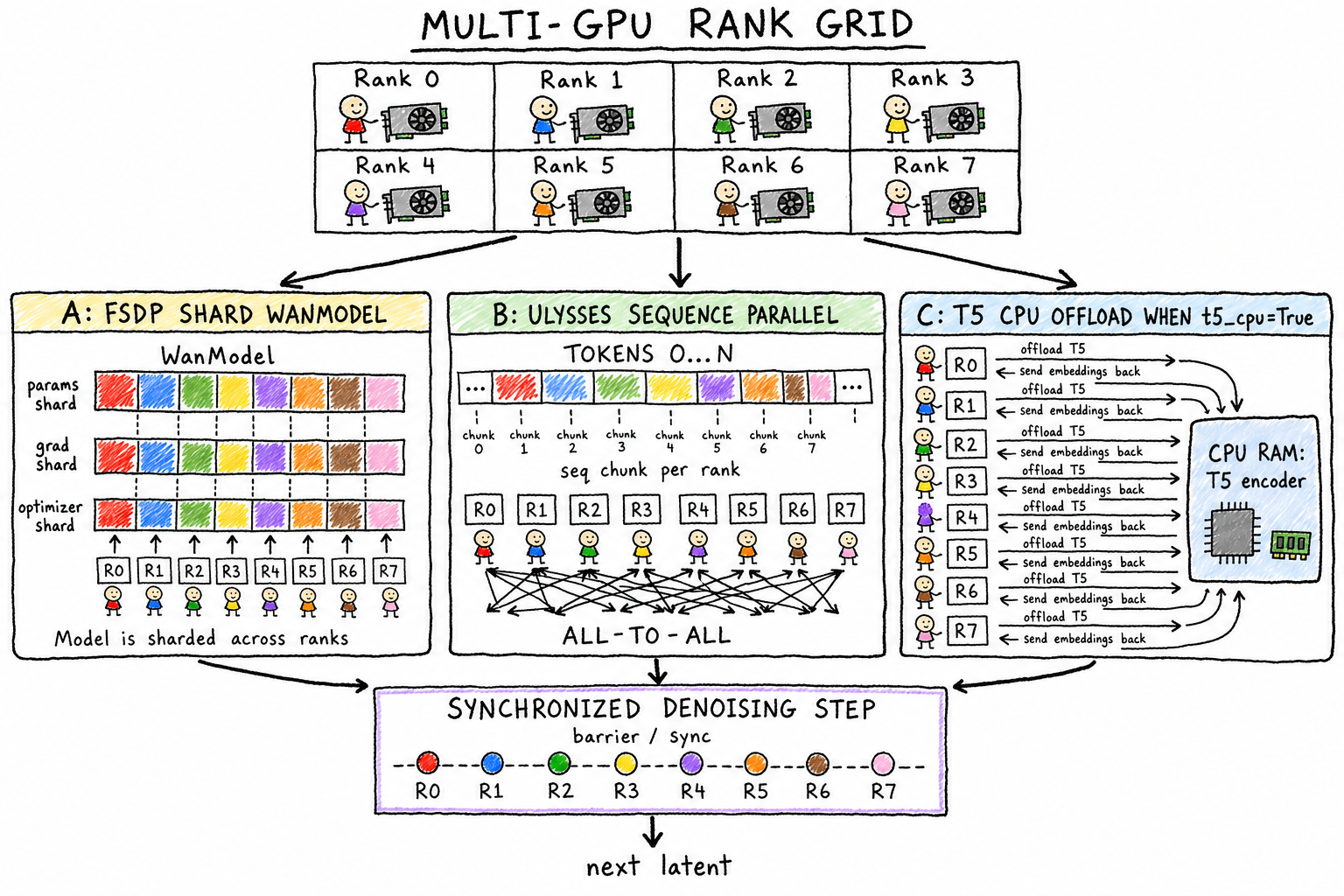
Ulysses works through two transformations: scatter q/k/v along the heads dimension and gather along the sequence dimension, so each GPU gets the full sequence and computes a subset of heads locally, runs FlashAttention locally, then swaps everything back with all-to-all. Hidden inside is an equal-length assumption: sp_dit_forward uses torch.chunk to split the sequence, and pad_freqs computes positional encodings based on “equal-length slices per GPU.” When torch.chunk does not divide evenly, the last chunk is shorter. If the sequence length is not an integer multiple of ulysses_size, the RoPE frequencies no longer line up with the tokens. The error is silent and only shows up as degraded quality.
FSDP’s VRAM savings also do not kick in from the start: the model is first moved onto the GPU in full, then passed to shard_model for sharding, with no meta-device initialization path. Before sharding, every GPU still has to fit the full model, so VRAM-constrained cards can OOM immediately at startup. In addition, free_model touches FSDP’s private _handle.flat_param.data attribute, which could break at any time after a PyTorch upgrade.
The shift parameter takes effect twice, in two places
The schedulers (FlowUniPCMultistepScheduler / FlowDPMSolverMultistepScheduler) are flow-matching versions adapted from the diffusers schedulers; the file header says "Copied from diffusers".
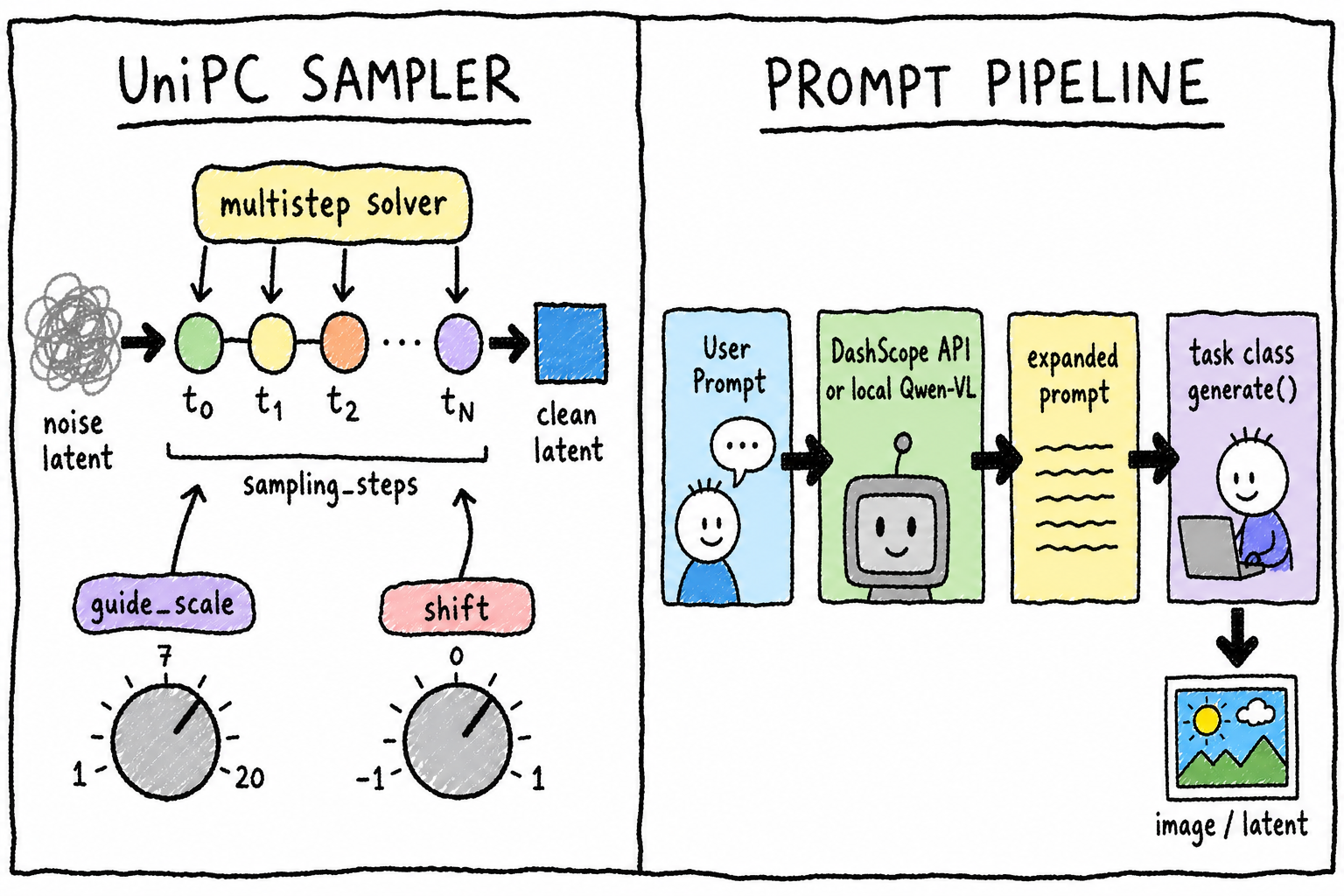
The UniPC construction code in text2video.py:
sample_scheduler = FlowUniPCMultistepScheduler(
    num_train_timesteps=self.num_train_timesteps,
    shift=1,
    use_dynamic_shifting=False)
sample_scheduler.set_timesteps(
    sampling_steps, device=self.device, shift=shift)
The shift=1 in the constructor is a hardcoded value; the real --sample_shift takes effect in set_timesteps. The DPM++ path is different again: before the call, it manually computes the sigma sequence with get_sampling_sigmas(steps, shift) and feeds that in. If you want to adjust the default shift value or add a third solver, copying one side makes it easy to miss the other; if you take the name at face value and change the constructor parameter, the change has no effect.
Prompt rewriting has two backends: the online DashScope API and local Qwen. It runs only once on rank 0 and then broadcasts the result, avoiding repeated multi-GPU calls. Local Qwen moves the entire model CPU↔GPU once per call, a tradeoff to free VRAM for the main model; the cost is obvious latency on every rewrite. The nested structure of the three tasks in the DEFAULT_SYS_PROMPTS dictionary is inconsistent, and decide_system_prompt relies on hardcoded string-matching branches. Adding a new task requires manually writing a new branch, and a wrongly written nesting only surfaces at runtime as a KeyError.
Three Resolution Tables
The biggest naming trap in the config layer: t5_checkpoint/vae_checkpoint are file paths, while low_noise_checkpoint/high_noise_checkpoint are subfolder names passed to from_pretrained. The same xxx_checkpoint naming convention has two different meanings. When you manually organize model directories or rename subfolders, the error comes from the transformers layer as “cannot find config.json”; it won’t tell you that the field was configured incorrectly.
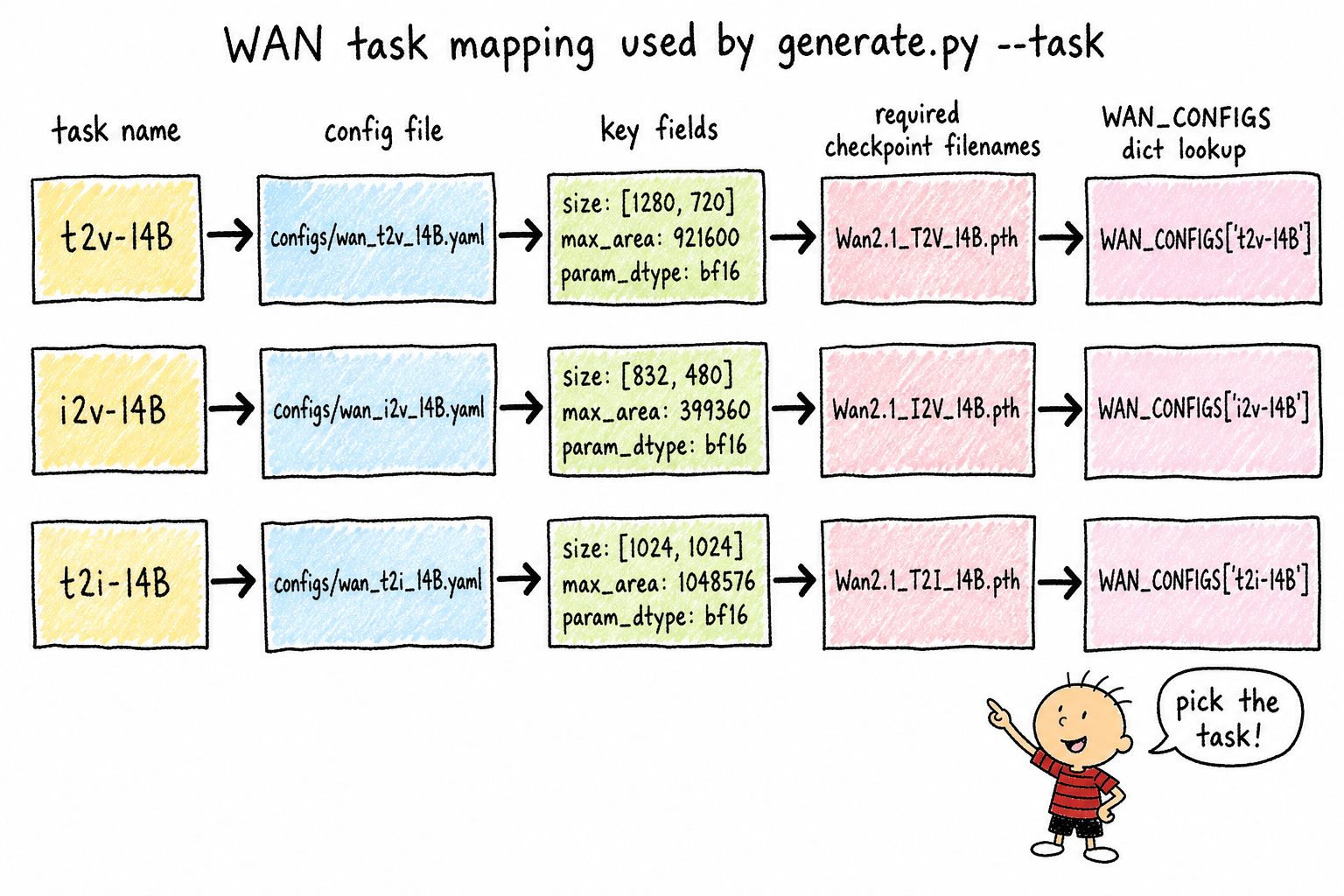
The resolution whitelist is split across three independently maintained tables: SIZE_CONFIGS, MAX_AREA_CONFIGS, and SUPPORTED_SIZES. ti2v-5B uses 704*1280, while other tasks commonly use 720*1280; the two numbers look so similar that README files and community posts often mix them up. If you pass the wrong one, the error is not “resolution unsupported,” but a missing key lookup across the three tables. Adding a new resolution means changing all three tables at once, and if you miss one, there is no static check to warn you.
A Shared Pattern
Put the nine analyses together, and a pattern emerges: most of the traps in this codebase are not logic errors, but safety fallbacks that were implemented and then not used by the main path. The fallback in attention(), the inconsistent assertions in _validate_args, the mismatch between the documented frame_num requirements and the code validation, and the two effective paths for shift are all variations of the same pattern. Documentation, defaults, and actual code paths are out of sync. The deeper you go into the pipeline, the more hidden the cost becomes: CLI errors degrade into runtime errors, then further degrade into no error at all while quality quietly gets worse.
One practical lesson when taking over this code for secondary development: trust the paths that actually take effect in the code, not the literal meaning of docstrings or field names. When the same field or function has different semantics across tasks, verify it separately; do not assume it is shared across tasks.
 WeChat Pay
 Alipay
Comments
Replies are public immediately and may be moderated for policy violations.