
Obviously Fake, Lost on Rhythm
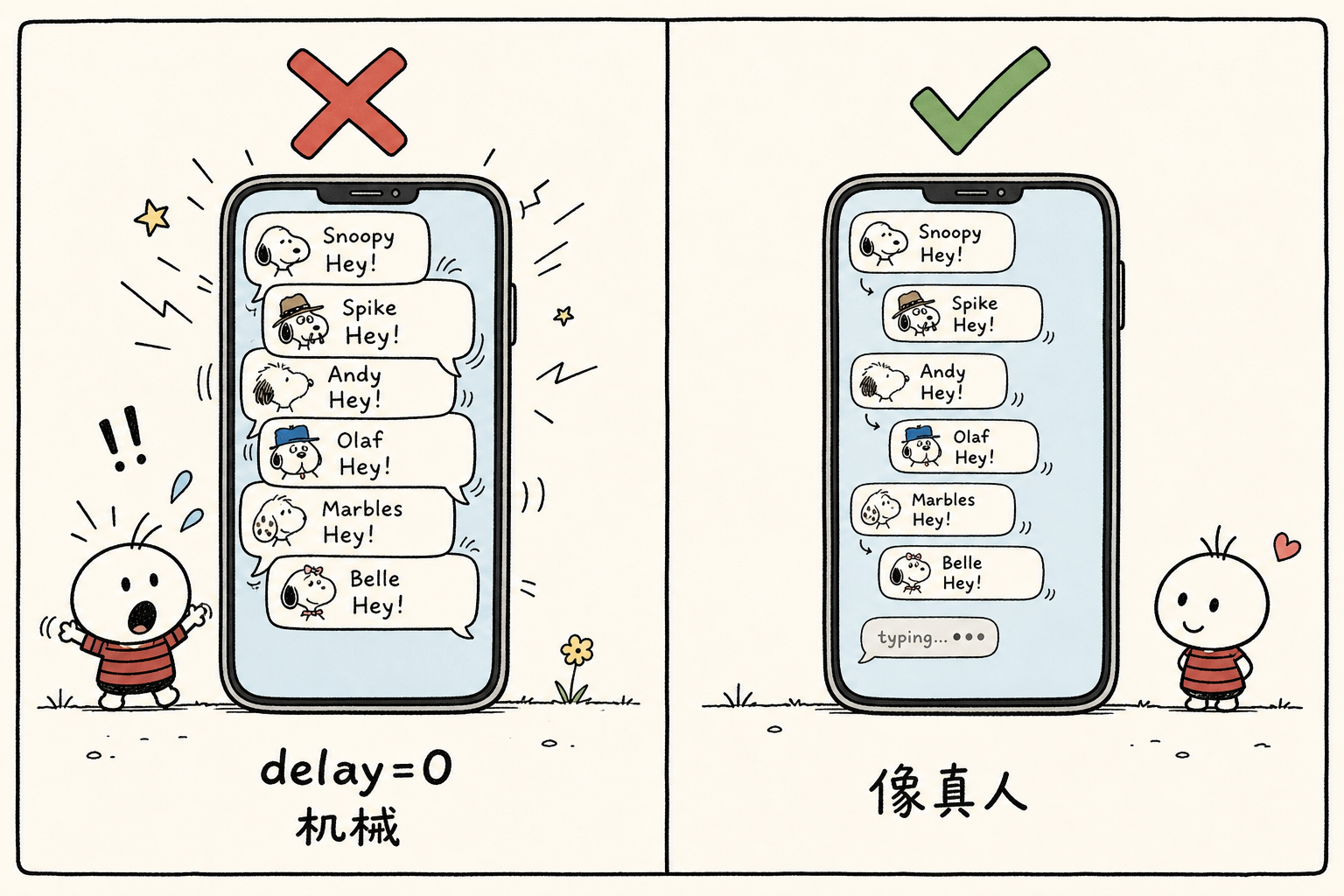
An integration partner sent over a screenshot. The user had asked about a sensitive topic, and our AI girlfriend replied with six chat bubbles: "Haha," "Why are you suddenly asking about that~ I don't really understand politics," "I don't really follow that stuff either," "For example, what are your plans today?" "Talk about something else, okay?" and "😅". About 50 characters in total, with zero spacing, flooding the screen at the same instant. It did not look like chatting; it looked like batch output.
Three Layers of Problems in One Screenshot
Taken apart, those 50 characters contained three layers of problems. The most obvious was rhythm: every delay field sent downstream was 0, so all six messages appeared on screen at the same time. The splitting was wrong too. The point of splitting bubbles was to imitate how real people break one thought into several messages, but the splitting logic followed punctuation, cutting at every comma and period. An ordinary reply was chopped into six pieces, with even the 😅 occupying its own message. The remaining issue was content: the same "I don't understand politics" was repeated three times in different wording, followed by a forced "what are your plans today" counter-question trying to change the subject. Three apologies were squeezed together, with the information content of a single sentence. The content debt belongs to the prompt, and there is a dedicated chapter later for accounting for it; what immediately broke immersion for the user was the first two layers.
How to Set delay
When a real person is asked about a topic they do not want to answer, they pause for a few seconds first. What the other person sees is "typing," and then the messages arrive one by one. We fixed it in that direction: each message in the callback carries a delay field, and the downstream client uses that value to stagger the bubbles on screen. That leaves one question: what value should each message get?
The first message is always 0. Between the user sending a message and the first reply, model generation already takes time, so that blank space has already performed the role of "she is thinking" for us.
Each subsequent message simulates typing based on content length: a 500 ms base, plus 55 ms per character, clamped between 600 and 2600 ms. Then add random jitter of plus or minus 15%; otherwise, each interval is mechanically equal in length, which is another giveaway. Images are counted separately at 1800 ms. Browsing an album and picking a photo should be a beat slower than typing.
With this set of parameters applied, those six bubbles from the beginning start to look right: "Haha" pops out instantly, the longer sentence takes a while to type, and the 😅 lands lightly. The content has not changed by a single character, but most of the batch-processing feel is gone.
The upper bound also has to be managed. A single message is capped at 4000 ms, and the cumulative delay for the whole reply is kept within 16000 ms. The downstream protocol has a 20000 ms truncation line; delays beyond that line are clamped back inside it, which collectively shrinks and distorts the intervals that were previously arranged by character count.
The Hard Part Is Not Making It Fast, but Making It Slow
Before building this product, we thought the hard part would be making the AI fast. Once we started, we found it was the opposite: the hard part was making it "slow" in a human way. We even wrote an intentional first-response delay: for the first reply in the stranger stage, wait a random 4.5 to 10 seconds before sending it. Someone you have just met will not be staring at the screen waiting for you; their reply timing varies. If every message gets an instant response, it basically broadcasts "always online and standing by," which feels fake instead. How slow it should be, and when it should be slow, has no standard answer. You can only tune it bit by bit against how real chats look.
The three layers of problems after this each have their own fixes, but the principle is the same: building an AI chat companion that does not break immersion is not about the model; it is about engineering details.
More Expensive Models Feel More Fake
When building an AI chat companion, most people’s first instinct is to plug in the strongest model on the market. We thought the same at first. Later, we found that cost, personality, and content boundaries all failed to line up.
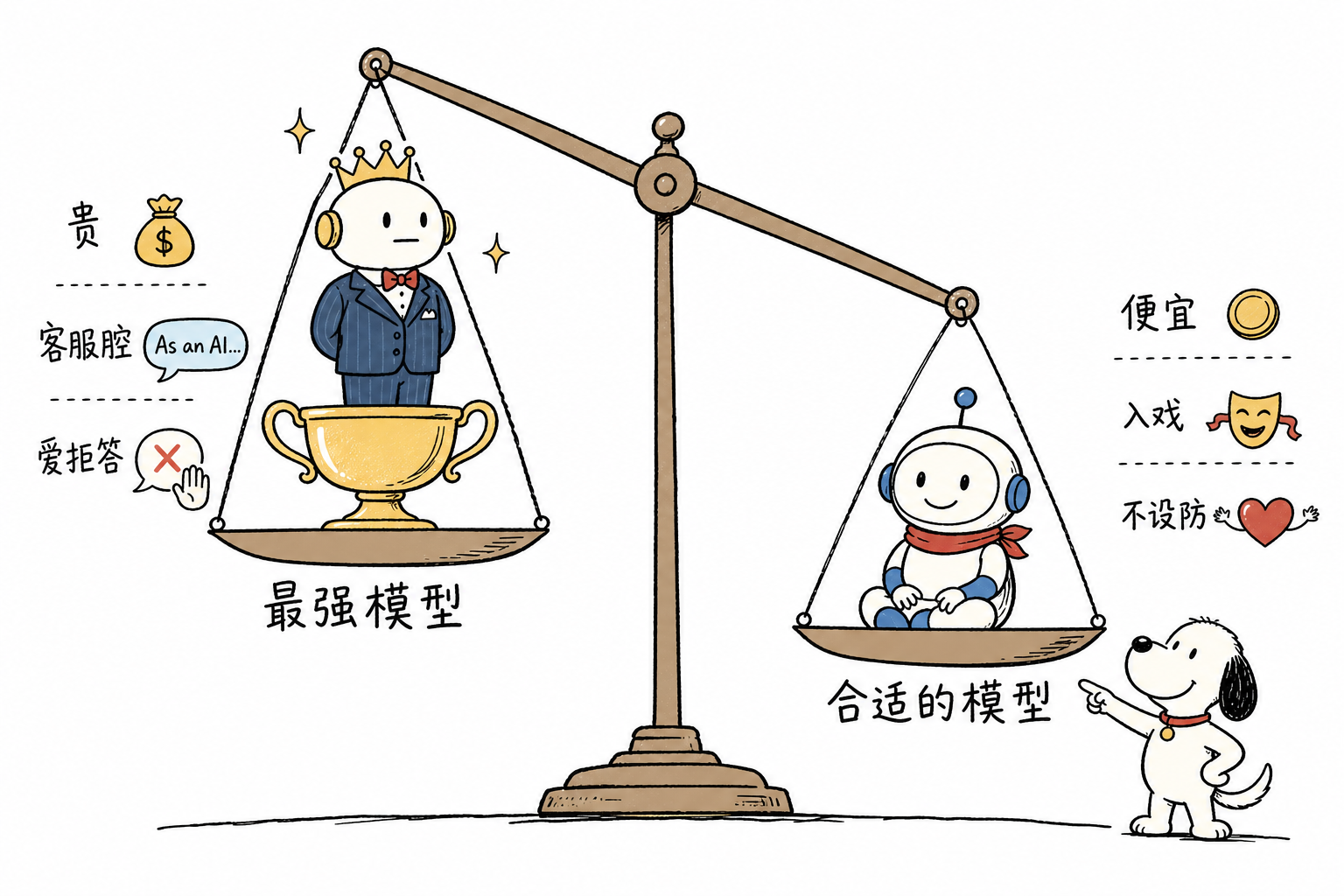
Start with cost. Look at one main chat call: input is 11–12k tokens, while output is only 36–250. Heavy input, light output. Every round resends an almost unchanged system prompt and message history. Our primary model sits at the input price tier of $0.09 per 1M tokens, while frontier assistant models are one to two orders of magnitude more expensive. That price gap is not being spent on “smarter replies”; it is being burned on more than ten thousand tokens of repeated input.
Then there is personality. Frontier models are trained to be “helpful assistants,” and those training traces are all liabilities in a chat-companion scenario: customer-service tone, apologies, disclaimers, and the classic “As an AI, I can’t...” In an office assistant, these are seat belts. In role-play, every one of them breaks immersion. Users do not need her to write code; they need her not to suddenly turn into customer support halfway through a conversation.
The boundary issue is the least negotiable. This category includes adult-oriented content, and adult-oriented dialogue triggers refusals heavily on assistant models. The first two problems can still be suppressed somewhat with prompts, but this one cannot: refusal itself is the biggest immersion breaker, more fatal than any customer-service tone.
Three Switches in Three Months
The first generation used a domestic Mimo-series model, connected directly through the official channel. In the middle we tried MiniMax. In June 2026, we fully switched to deepseek-v4-flash, moving 25 personas over in one pass, with rollback SQL prepared before the switch.
What drove this final migration was a backlog of user complaints on the old model: repetitive AI-flavored responses and conversations drifting off-topic midway. These problems could not be moved at the prompt layer no matter how we tuned it. After testing, the conclusion was that they were model-driven, not prompt-driven: with the same prompt and a different model, a whole batch of previously untunable issues disappeared at once. Fixing prompts means picking through problems one by one; switching models solves them in bulk, provided you first identify which layer the problem is actually in.
This judgment is easy to get backward. After switching to DeepSeek, one persona kept aggressively bringing up “top-ups.” Our first reaction was, again, to blame the model. After tracing it down, we found that the persona override written by operations explicitly required her to be “materialistic”; the model was only following instructions. So do not rush to conclusions: when a reply feels wrong, first check the prompt and persona config. Confirm that they are not asking for exactly that behavior before suspecting the model. Wrongly blaming the model costs you one wasted migration; wrongly blaming the prompt means you will never tune it right.
Two Cheap Levers
After choosing the primary model, there are still two places to save money, neither of which requires sacrificing quality.
One comes from session distribution. Pulling production data showed that 84.5% of sessions ended after just one round. In the first five rounds, dialogue history is short and context is shallow, so a cheap fast model is good enough; switch to the primary model starting from round six. In code, this is just a one-line turn-count threshold config, cutting costs by 30% to 50%.
The other is in quality-check calls. Every reply goes through a small-model audit before leaving the system. What it checks and how it falls back are covered in detail in the chapter on human feel; here we only care about the call shape: around 650 input tokens and an output of only 2 tokens for the verdict. For this kind of heavy-input, light-output call that only needs a “pass or fail,” a flash-level model is cheap enough to run on all traffic, with no need for sampling.
The Gateway Layer
Once the model is decided, there is another choice: connect directly to the official provider, or go through an aggregation gateway. We used a gateway: one key connects to a dozen-plus vendors hosting the same model, so there is no need to sign contracts one by one, and we can pin the desired vendor by order. But this convenience has a cost: you introduce a new failure domain called “vendor routing” into the system. Which provider the request actually lands on, whether the cache still recognizes it—both gain another layer of uncertainty. In the later chapter on cache optimization, half the pitfalls come from this layer.
Prompts Are Layered, and So Are the Lessons
Our system prompt was over 13,000 tokens after assembly, but it was never a single continuous text. It was nested layer by layer. The innermost layer was the red lines hardcoded in code: identity declarations, output filtering, anti-injection. No tenant could change them; changing them meant changing code. The middle layer was the tenant-level “general behavior layer,” a large block of 13,449 characters that governed speaking style, refusal style, how messages were segmented, and so on. All personas shared this layer. Only at the outermost layer did each persona’s own description come in, and that was only four or five hundred characters. Next to the persona sat a structured block of “hard facts”: numeric facts like age, city, and family were listed separately instead of being buried in prose. After that came dynamic blocks, assembled on the fly based on the current state: time, relationship stage, scenario, and conversation memory.
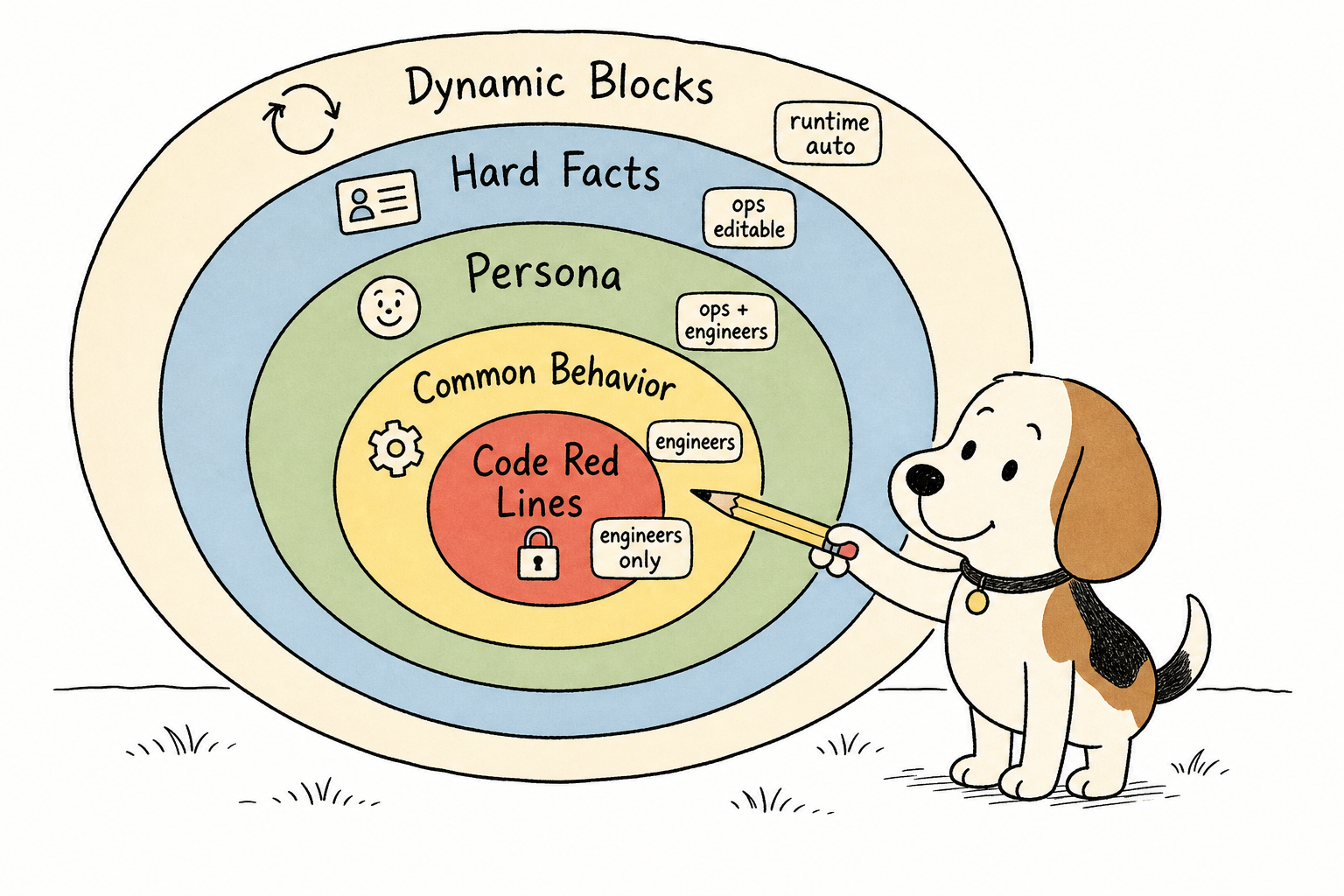
What is worth writing down are the four lessons learned from stepping on each layer.
91% Was Constraints, So New Instructions Sank to the Bottom
For a while, we wanted certain personas to loosen up a bit, so we added instructions to the prompt, but the model’s behavior did not budge. Later, after doing the numbers, we understood why: out of the prompt’s 13,000-plus tokens, constraint-type content made up 91%. A newly added sentence saying “loosen up,” soaked in pages of “must not,” was as good as unsaid.
The fix was to restructure constraints by level: the level number itself was not fed to the model. Instead, code translated each level into concrete instructions and then assembled them into the prompt. What the model saw was an explicitly written behavior description, not a secret code it had to decipher on its own. This lesson landed in the general behavior layer: once text piles up to this scale, the translation work has to be handed over to code.
Example Sentences Get Copied Wholesale
We once put literal example sentences in the prompt, intending them to mean “talk with this kind of feel.” The model treated them as answers and repeated them word for word. Real users noticed within days: “Why does she keep saying the same sentence?”
Later, all examples were replaced with abstract category descriptions and sentence-shape descriptions, letting the model fill in the words itself. Demonstration should stop at the “shape” layer. One step more specific, and the model will copy it.
For Fixed Sentences Repeated Verbatim, Grep the Code Before Blaming the Model
There was a piece of safety code that matched replies with a regex. Once it hit, it replaced the entire sentence with hardcoded copy. In real traffic, 5–8% were false positives: the user’s previous sentence had been perfectly normal, and the next reply suddenly threw out a fixed sentence that had nothing to do with the context. It looked like the model had gone off the rails, but that sentence had actually been swapped in by code.
When investigating this kind of issue, we built up one rule of thumb: whenever a “fixed sentence repeated verbatim” keeps appearing, grep the code for hardcoding first, and only suspect the model after that. Model output is random; even when expressing the same meaning, the wording drifts each time. If something repeats with every punctuation mark identical, it most likely comes from code. After we fixed this false positive, the 5–8% dropped to 0. This lesson sits in the innermost layer: red-line code can make mistakes too.
Hard Facts Can Turn Into Topic Black Holes
We gave one persona a specific occupation and favorite drink. The model treated these facts as available material: whenever it had nothing to say, it talked about them. Users ended up hearing her mention the same drink every day.
Hard facts still need to be provided; personas cannot be hollow. But they need to come with a “topic saturation” constraint: if the same type of persona fact has been discussed recently, it must not be brought up proactively again.
Humanness Is Accumulated
Humanness does not grow out of writing “please chat like a real person” in the prompt. After three months, what we had accumulated was a pile of unremarkable little mechanisms, each responsible for only a small slice of the experience.
She Has to Know What Time It Is
The model has no clock of its own. If you do not tell it, there is no “now” in its world. So we inject three things into the prompt: the current time, the time of the previous message, and how long has passed between them. With those three lines, when the user comes back in the morning, she knows how late they chatted last night, that a whole night has passed in between, and her first sentence can pick up properly.
We stepped on a bug here. One time, “previous message time” was mistakenly written as the current time, so the interval always calculated to zero. The AI therefore always thought the user had just sent a message: you come back after a whole night, and her tone when continuing the conversation sounds as if you had just said the previous sentence. This kind of mistake does not throw an exception. The code keeps running as usual. The only thing that breaks is the feeling of the conversation.
The Relationship Cannot Be Clingy From the Start
First, the crash scene: one time, the model spat “we are still in the stranger stage” back to the user verbatim. That sentence was internal state we fed to it, not dialogue. Once the user saw it, the illusion broke instantly.
This label came from our relationship-stage machine. Stranger, acquainted, familiar, close: four levels, advanced only by number of chat turns, not by chat content. Each level corresponds to a set of wording and intimacy. Counting only turns sounds crude, but it preserves one thing: the very first sentence after meeting someone will not be sticky and overly affectionate. The fix was to add a hard ban in the prompt: labels must never appear in replies; closeness and distance may only be expressed through tone. Any internal state fed to the model should be assumed to eventually be spat back out verbatim.
Messages Need to Be Short
Normal people do not send 100-character mini-essays in one breath when chatting, so there is a length gate at the reply exit: Chinese triggers it above 100 characters, Vietnamese above 200. The Vietnamese threshold is higher not because it is more verbose, but because the words are simply longer for the same meaning.
Once triggered, it runs in two steps. First, a small model compresses it. Compression is not regeneration: the instruction embeds the original draft and asks it to keep only the single most important point. Second, there is a fallback: if it cannot be compressed, truncate at sentence boundaries. Truncation is done by code. The model will occasionally ignore your word-count requirement; code will not.
Every Reply Goes Through an Auditor
Time, stage, and length each handle one segment. At the exit there is one more master gate: before every reply is sent out, it must pass through a small model we call the “auditor.” The input is the reply plus the persona’s hard facts. The output is only a two-token judgment, checking three things: whether it breaks character, whether it leaks the prompt, and whether the facts are confused. If it hits, rewrite once. If the rewrite still fails, use the fallback.
Running quality control on every message has a cost, which we calculated in the chapter on model selection: flash-level models are cheap enough to run on every message. The tiny amount saved by spot-checking is not worth the cost of letting one illusion-breaking reply slip through.
The Silence Mechanism Later Completely Reversed
We originally had a [NO_REPLY] mechanism: if the model output this marker in a round, the system would not send a reply. The design intention was that when the user spammed messages, the AI could choose not to respond, handling it coldly like a real person. Real people do not react to every single thing you send either.
Later, this was connected to a per-message billing scenario. Every message the user sent cost money, so this mechanism immediately became untenable: silence meant the user had paid and received no echo. Customer complaints came straight from there. From then on, only one rule remained: it must reply under all circumstances.
Reply No Matter What
We had an error-reporting group. We pulled three days of data: 50 alerts in total. Runtime CPU limit exceeded and forced resets happened 20 times, storage instance drift 6 times, upstream model API failures 8 times, and the rest were various quality alerts. In the group, they looked like four categories of problems, with four sets of technical causes. But on the user side, they all collapsed into the same path: the message was sent, and the reply never arrived. The synchronous API returned a direct 500; the async pipeline sent an error callback, but the user side displayed nothing, not even an error bubble; the trickiest case was when generation was halfway through and the whole instance got killed, so even the error-handling code never had a chance to run.
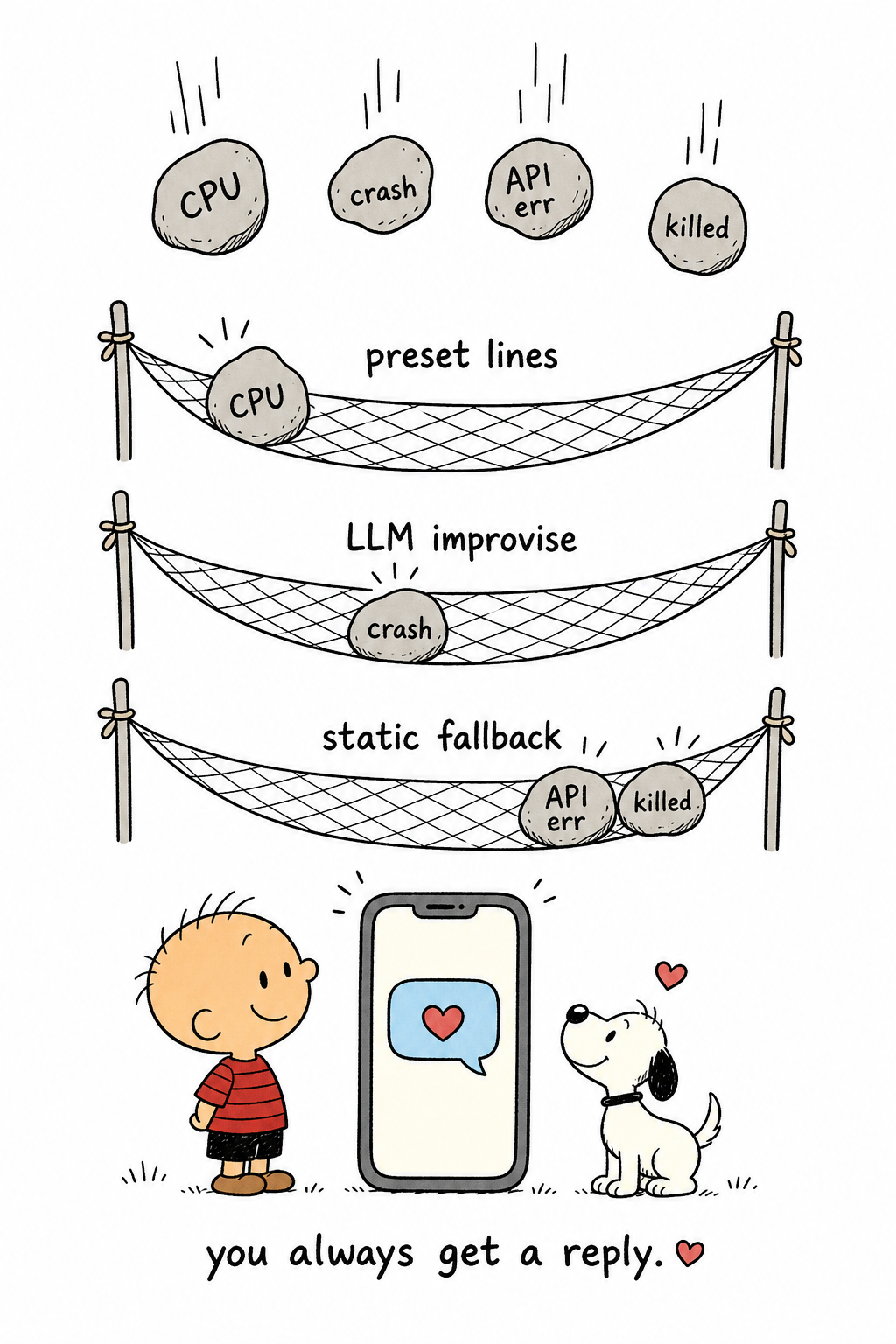
So the direction of the fix was not to first eliminate the four categories of errors one by one, but to guarantee that no matter which category blew up first, the user could still receive a reply.
Fallbacks Have to Press Down Layer by Layer
The fix was layered fallback, one layer pressing down on the next, with the bottom layer not allowed to depend on the LLM. When an error happens, first randomly pick a sentence from a preset phrase pool, with deduplication to avoid picking the same sentence twice in a row. Fallback lines are already short; if the exact same one appears twice consecutively, it feels even faker than not replying. If the pool is empty, ask the model to generate a lightweight topic-shift line on the spot. If the model is down too, randomly pick one from a static short-sentence pool grouped by language, something like, "Hmm? What did you just say? Say it again?" The bottom layer has to be static: one of the scenarios the fallback must catch is "upstream model API failure." Calling the model again at that point means betting everything on the very link that just failed.
There had been an earlier implementation of this final layer: 30% of the time it replied with a question mark, and 70% of the time it simply stayed silent. Later, when investigating customer complaints about "the AI not replying," we traced them one by one, and the source was exactly that 70% silence. That branch was removed entirely and replaced with the short replies that the layers above could fall back to.
What If Even Error Handling Dies?
The hardest scenario was when the instance got killed midway through generation: the whole instance was gone, and the error-handling code died with it. No matter how complete the try-catch was, it did not help. We solved it with leases. When a task starts, mark it as "generating" and attach a lease period. After the instance comes back, scan once. If a task's lease has expired, it means the previous run died halfway through. At that point, do not generate again. Rerunning would mean duplicate billing and duplicate records. Instead, send out a fallback short reply. The user waited a little longer, but they did get a reply.
Two Specific Pits
The head-of-line blocking incident was a painful lesson. Async callbacks were delivered in strict sequence-number order. As a result, one callback that could never be delivered got stuck at the head of the queue, all later messages piled up behind it, and the entire conversation froze for 3.7 hours. Strict ordering has an implicit premise: every item can be delivered. Once that premise breaks, ordering stops protecting the experience and starts dying along with it. The fix was to give up absolute ordering: once the head item has retried up to the limit, let it go, deliver the later items out of order, and let the upstream reorder them by sequence number.
The other pit was buried in the deduplication logic, the "avoid picking the same sentence twice in a row" part of the phrase pool. To determine whether fallback phrases were duplicates, we used longest common substring, O(n²), with no length limit. Usually it was fine, until one abnormally long reply came in and blew straight through the single-instance 30-second CPU budget, causing the platform to forcibly reset the instance. This pit was inside the fallback itself: the deduplication meant to ensure the user received a reply ended up killing the instance instead. The fix was simple: in production, string algorithms need input limits. Do not trust "the input won't be that long."
There was a coincidence on the day the fallback went live. One minute after deployment, we ran a smoke test and happened to hit a transient error caused by an instance reset during a code update. In the past, that would have been a 500. That day, it returned a natural fallback short reply. The fallback verified itself.
Do the Math Before Cutting
We pulled a week of bills: $29.69, 517 million tokens, 63,000 requests. Spread across each user message, the full-chain cost was about $0.0008. 99.9% of the money went to one primary model.
Break it down one more layer. The shape of the main chat call, as covered in the model selection chapter, was: over ten thousand input tokens, at most two or three hundred output tokens. More than 95% of the cost was in input, and 80% of that input was system prompt and history—every turn, we were paying to resend the same pile of nearly unchanged text.
Large model vendors provide prompt caching for this scenario: exact-prefix matching, with matched portions priced at roughly 1/5. This rule has no flexibility at all. If any single character in the prefix changes, everything after it is invalidated. We inspected our own prompt against this rule and found four cache killers.
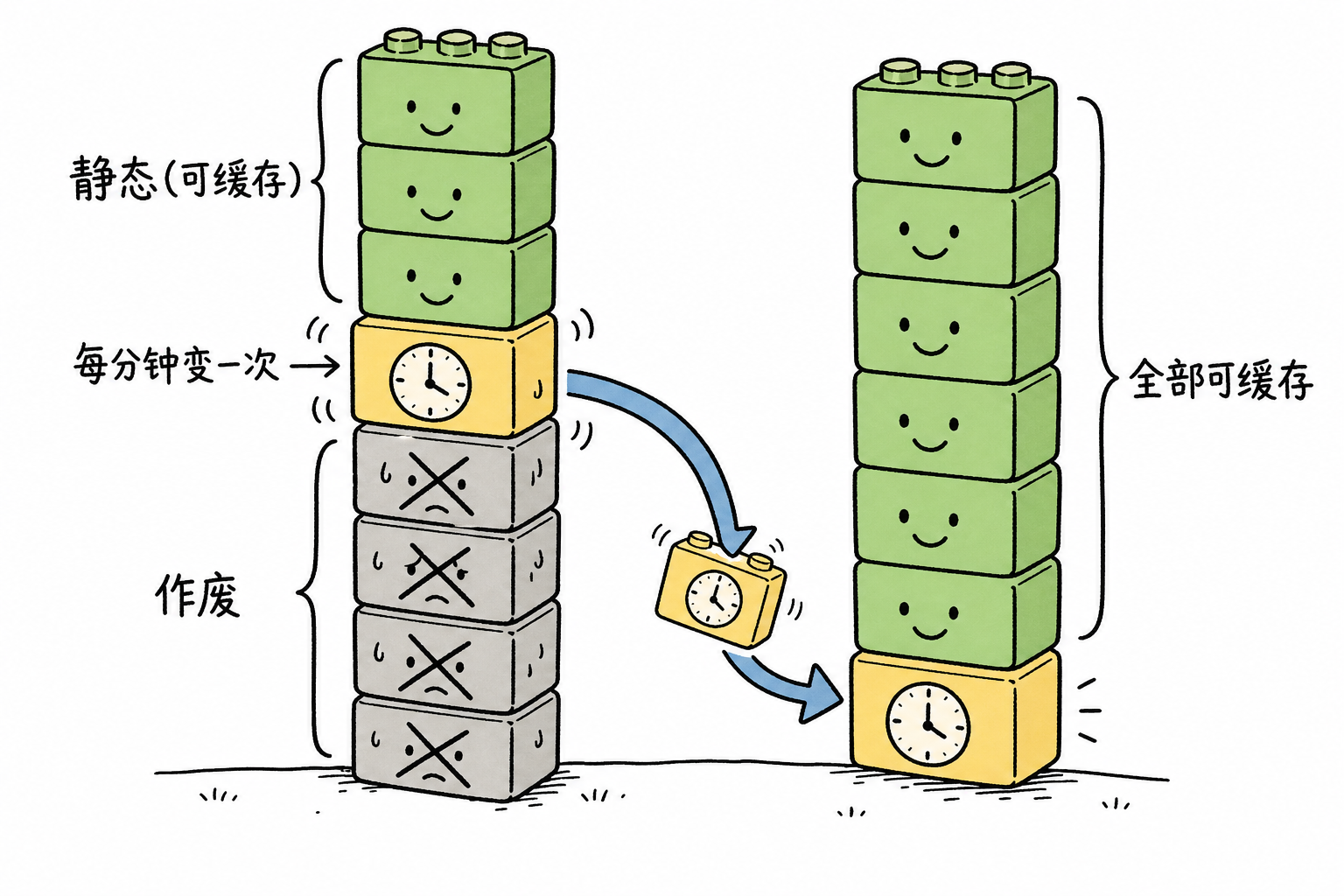
Four Cache Killers
The worst one was the time block. It was precise down to the minute and also included a line like "37 seconds since the last message." It changed on every call, yet sat in front of several thousand tokens of static content, so one change wiped everything out. The fix was to keep time only to the hour and bucket the interval: the model does not need to know whether the user was gone for 37 seconds or 42 seconds. It only needs to know the difference between "just now" and "overnight."
The relationship-stage block contained a literal turn counter, which changed every turn. Advancing the relationship stage by turn count is internal logic; the model only cares which stage it is currently in. Changing it to buckets of ten made it stable.
The third one was hidden deeper: context compression had no hysteresis. Once the window filled up, it deleted middle messages by salience. As soon as the window was full, it re-deleted every turn, and the deletion positions differed each time. The history prefix of deep-chat sessions changed every turn. Deep-chat sessions were exactly the calls with the longest histories and most expensive inputs, so caching was permanently invalidated for them. We changed it to cut a larger batch at once, then leave it untouched for a dozen-plus turns.
The last one was purely an ordering issue: dynamic blocks like time and scene were placed before static content, pushing the large cacheable portion behind the invalidation line. We moved all of them to the end of the prompt.
After these four changes, not a single word of business semantics changed. We were purely making room for the cache.
9 Seconds, or 9%
There was another calculation on the vendor side. The same model was hosted by more than a dozen providers, and their prices and speeds varied wildly: the cheapest one generated at 22 tokens/s, nearly the slowest of the whole field, meaning a 200-token reply took 9 seconds to generate; the second tier generated at 70 tokens/s and cost only 9% more. Making users stare at "typing" for 9 seconds, or spending 9% more—there was no hesitation. We chose speed. That decision also had another benefit we did not pay much attention to at the time: prefix caches are isolated by provider. The more stable the primary provider, the fewer switches, and the higher the hit rate.
Once the Math Was Done, Most Cuts Were Unnecessary
At this point, we ran into a counterintuitive conclusion: the whole thing cost $127 a month. Even cutting it in half would only save $60. Any optimization with a risk of quality regression was negative ROI. Engineers see a 13k-token system prompt and their hands itch, but changing an already tuned prompt to save a few dozen dollars is not worth even the regression testing labor.
So we rejected the two big moves that looked most worth doing: compressing the 13k system prompt, no; changing audit calls to sampling, also no. In the end, we kept only the four cache changes, because they had zero impact on output.
Once the four-piece set was designed, we prepared to ship it. At the time, we thought this work was already wrapped up.
From a 61% to 91% Hit Rate, with Three Reversals in Between
The four-piece set had zero impact on output, so once it shipped, the hit rate should have started climbing. The actual curve was much uglier, with three twists along the way.
Reversal One: On Launch Day, the Numbers Did Not Move
After the four-piece set went live, we watched the dashboard that day, and the hit rate was still hovering in the old 61% to 77% range. The first reaction was that the optimization had not taken effect, and the prompt restructure had been pointless.
The truth had nothing to do with the four-piece set. The same release had bundled another change: we switched the primary provider to prioritize speed. Prefix caches are isolated by provider. The cache you built up with provider A is completely invisible to provider B. Switching providers is equivalent to a full cold start for the entire cache, wiping out the gains from prompt optimization.
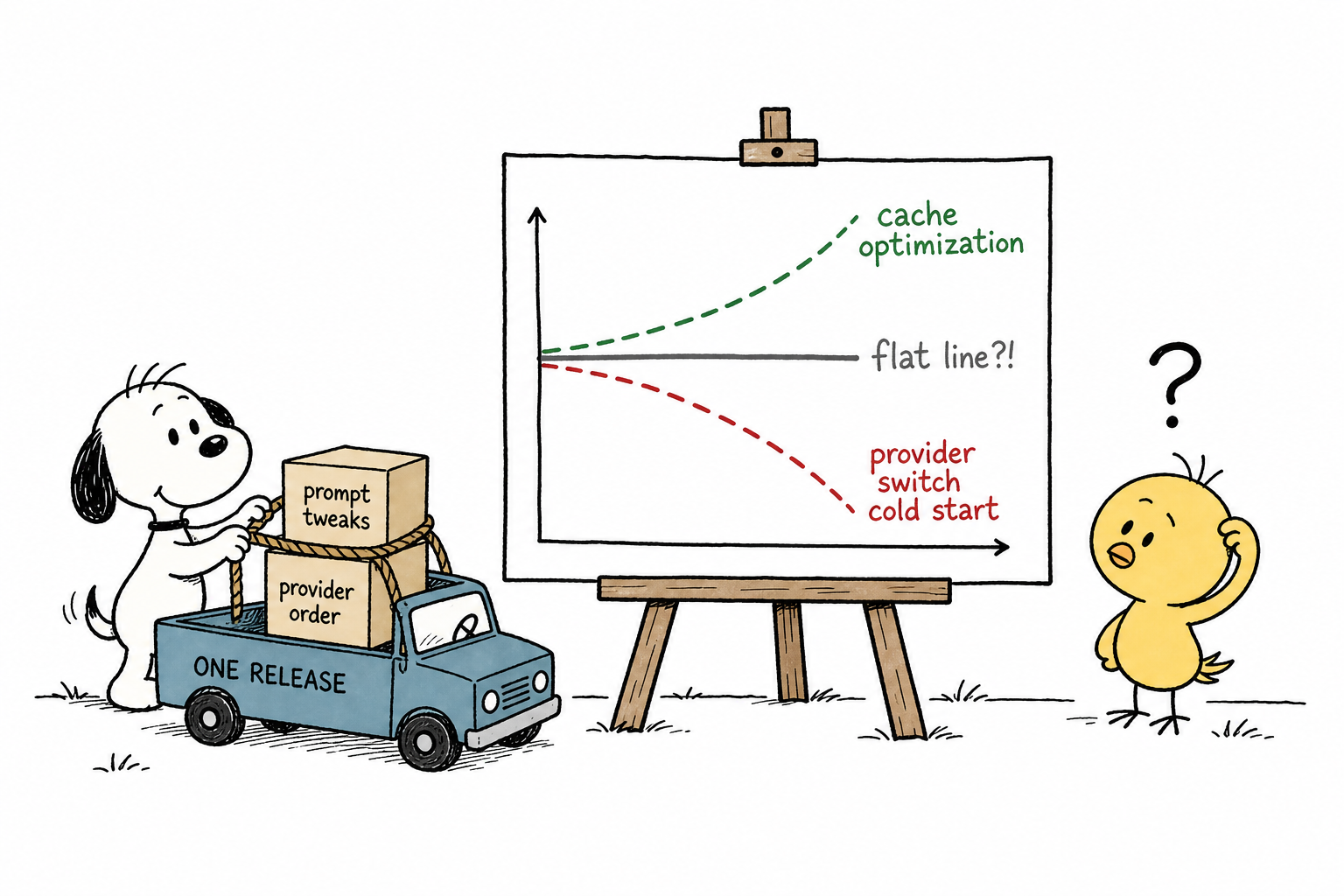
This left us with two rules. First, provider changes and prompt changes must always be released separately; if they are bundled together, attribution becomes impossible. Second, never draw conclusions from a single-hour snapshot. In the first hour after the switch, the provider ranked first in the config got only 4.3% of traffic, and we almost concluded that “routing config was not taking effect.” But when we expanded the window to a full 22 hours, it had actually received 56%. Hourly fluctuation is normal; look at at least 24 hours before saying anything.
Reversal Two: The Provider with the Lowest Sticker Price Was the Most Expensive After Calculation
Once the cold start passed, the next question was which provider to choose. The provider details page in the aggregation layer had an Effective Pricing table, showing the actual cache hit rate for the same model across providers based on 30 days of real-world traffic. The gap was shocking: the best was 81.4%, the worst 11.3%.
The provider with the lowest surface-level price, input at $0.09/1M, had only a 21% real-world hit rate across the network. Plug it into the formula, and it was actually one of the most expensive. The formula is short:
Effective unit cost = hit rate × cache read price + (1 − hit rate) × input price
Use this to choose providers, not the sticker price. Sticker price only covers the second half of the formula. For providers with high hit rates, most traffic goes through the first half: the much cheaper cache read price.
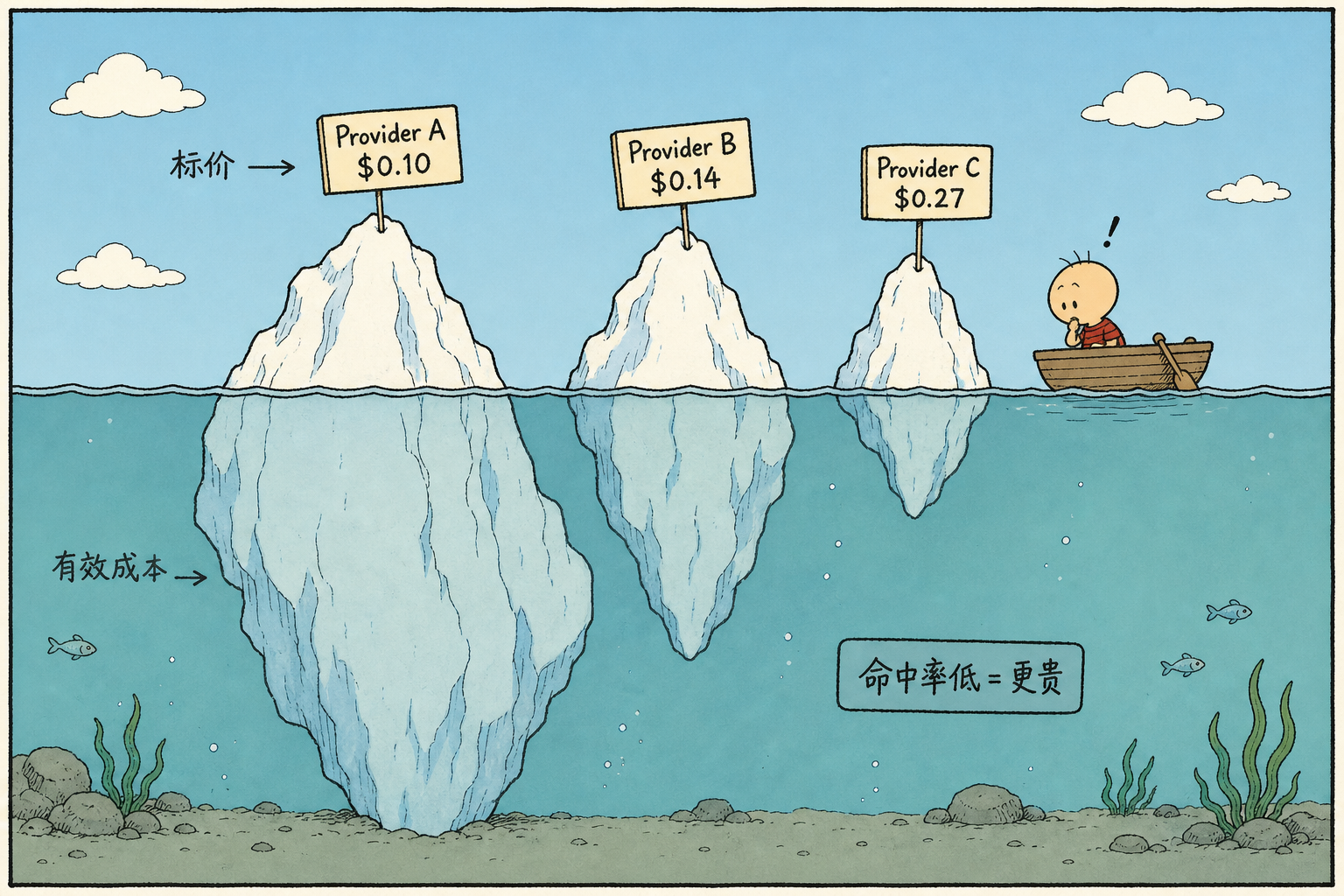
Why do hit rates differ so much? It depends on where each provider stores its cache. One provider uses implicit caching for 5 minutes, with each hit automatically renewing the cache, and its docs state this clearly. Most hosting providers do not disclose TTL; they keep cache in GPU VRAM and use LRU, so under load it can be evicted within minutes. The only long-lived option is the model’s official source, which uses disk cache and can last from hours to days. Companion-chat traffic has exactly this pattern: users come back after a night away and continue the conversation. Long TTL catches these calls; hosting-provider caches at the 5-minute level do not help.
There was also a hidden trap here. Once we manually pinned provider order, the aggregation layer’s sticky routing was disabled — the mechanism that automatically pins the same session to the same provider to preserve cache. The docs mention it in only one small line; we only understood it after stepping on it in production.
Reversal Three: After Switching to the Official Source, Traffic Was Zero
After running the formula, the official source was the best answer: 81.4% network-wide hit rate, cache read price only 2% of input price, and 10× cheaper than second place. We changed the config, shipped it, and watched the dashboard waiting for the hit rate to take off.
Traffic to the official source was zero. All requests landed on the second-priority provider, and retry count was always 1. This was not retry-after-failure; the routing layer had never treated the official source as a candidate at all.
After a long investigation, the issue turned out to be the account’s privacy setting: by default, it blocked “paid endpoints that may use request data for training.” The official source was on that list. This was not a misconfigured setting, but a real tradeoff: user conversation data might be used for training in exchange for cutting cost by 40%. This kind of switch should not be casually flipped by an engineer during debugging; it needs a decision-maker to approve it.
One debugging note: if traffic to a newly added provider is zero, check account-level filters first — privacy settings, blocklists, things like that. Only after checking those should you suspect a bad config.
Final Battle Report
Daily hit rate: before the switch, 61% to 67%; first day after the switch, 80.8%, then 87.2%, 86.5%, with a peak of 91.1%. Unit cost dropped from $0.068/M prompt tokens to $0.026/M, down 62%; by message count, cost per thousand messages dropped from $0.324 to $0.164, down 49%.
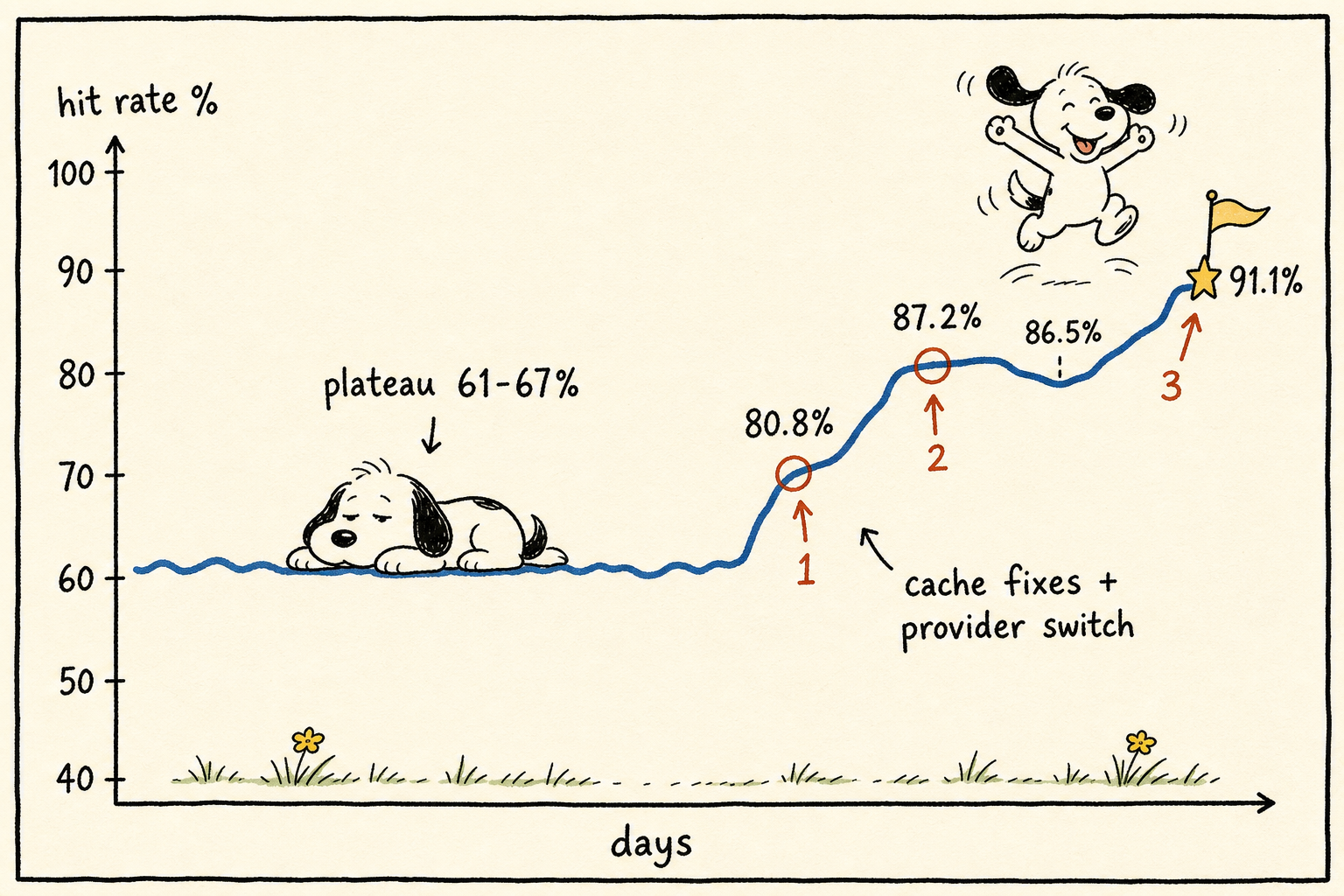
The last task was attribution. Spend = message volume × cost per message. These two factors have to be measured separately, otherwise you cannot answer the question: “Did the bill drop because of the optimization, or because traffic changed?” We ran into this exact issue. During the week when the bill fell off a cliff, we broke it down and found that 89% came from traffic, while the optimization’s real contribution was the 49% drop in unit price. Without that split, this report would have claimed credit for a traffic decline. Then when traffic came back and the bill rose again, we would have had to explain why the “optimization stopped working.”
A Few Rough Troubleshooting Rules
Over three months, we also accumulated a few unwritten troubleshooting rules. Behind each one was a bout of wasted effort.
Error Cards Need Session IDs
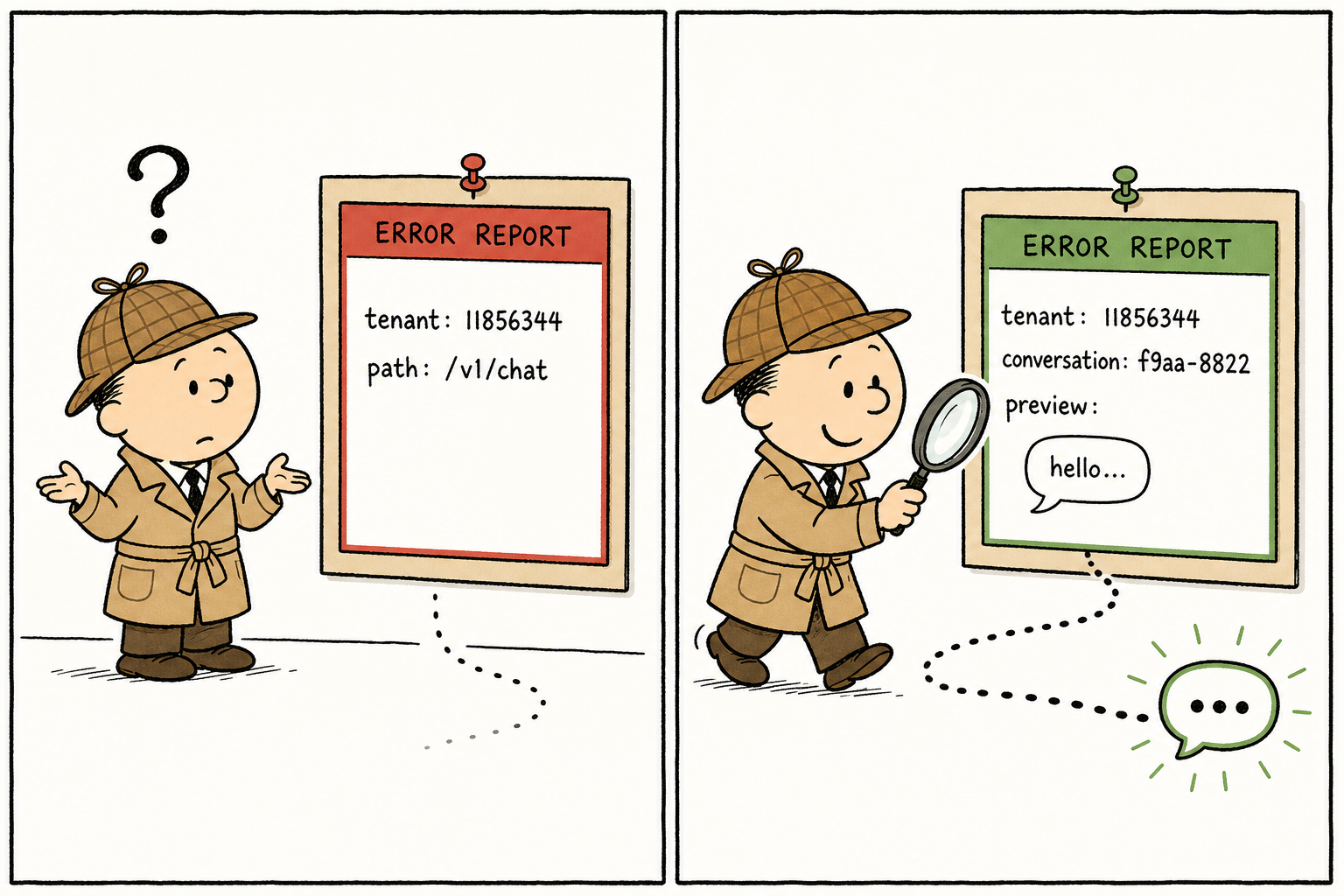
For platform-level errors like CPU limit exceeded, the default alert only includes the tenant and path. You know something blew up, but not which session blew up. So we added a layer to error handling: when throwing an error, include the conversation_id and a preview of the user message. In the first week after adding it, we used it to pin down three “live sample” sessions. The profile was the same: one session kept exploding, then recovered on its own — a typical transient issue.
Check Before Asserting
We tripped up twice, both in the same place: trusting stale memory instead of checking real-time status. Once, we thought “the change hasn’t been released yet,” when it had already gone out. Another time, we thought “the bug hasn’t been fixed yet,” when it had actually been fixed that same day. Both times, we spent half a day investigating from the wrong premise. After that, we made a rule: deployment status is judged only by deployment records. Memory expires. Docs say “what we planned at the time.” Only deployment records say “what it actually is right now.”
Don’t Draw Conclusions From One Smoke Run
The regression suite has 48 cases. Run the same code twice, and a ±3 difference in score is normal — pure noise. Running it once and declaring “it regressed” or “it’s fixed” is like writing a report based on one coin toss. The rule now: run at least 5 times before drawing a regression conclusion. If the score is right on the passing line, run it 10 times. A few extra runs don’t cost much; rework from a wrong conclusion does.
Count Upstream 500s and Empty Replies Separately
When the upstream model has issues, monitoring tends to lump them together, but they’re actually two different illnesses. One is a real API error, finish_reason=error. The other is that the model ends normally, but the content is empty: finish_reason=stop with empty content. The former should alert and retry as usual. The latter has its own temperament: during supplier switching windows, it briefly rises, then falls back on its own after a couple of days. After getting burned by this, we split the two metrics apart and agreed: in the first two days after switching suppliers, don’t rush to fix a “new bug” just because empty replies went up. Most likely it’s turbulence from the switch itself. Wait for it to recover; if it doesn’t, then intervene.
Looking back on these three months: the model changed three times, suppliers changed twice in one month, and the prompt kept changing too. Through all the swapping, what didn’t get swapped out was this set of habits: do the math before cutting, watch the data after release to verify it, bring the session ID when investigating problems, and check deployment status before investigating.
In this business, the model is procured, and the persona copy comes from operations. What engineers truly deliver are the invisible details above.
 微信
微信 支付宝
支付宝
Comments
Replies are public immediately and may be moderated for policy violations.