
A coworker told me that he had saved a lot of money by using furusato nozei, commonly called the “hometown tax” in Chinese. After looking into it, I found that a more accurate way to describe it is: you pay only ¥2,000 out of pocket and receive a pile of rice, meat, and household essentials in return. Below, I’ll explain how it works, how the amounts are calculated, and how to complete the process.
What Exactly Is It?
Every year, you pay income tax and resident tax. Furusato nozei allows you to pay part of those taxes in advance as a “donation” to a municipality of your choice. The municipality then sends you a local gift in return.
This donation is later deducted from your taxes:
- The donation amount minus ¥2,000 is fully credited against your taxes
- By law, the value of the gift cannot exceed 30% of the donation amount
So this does not mean you “pay less tax.” Your total tax burden remains essentially unchanged; part of it simply goes somewhere else, and the extra ¥2,000 you pay gets you a gift in return.
Let’s Do the Math
Suppose you donate ¥60,000:
| Item | Amount |
|---|---|
| Charged to your card now | ¥60,000 |
| Deducted from your taxes later | ¥58,000 |
| Your actual out-of-pocket cost | ¥2,000 |
| Market value of the gift (at the 30% cap) | Up to about ¥18,000 |
The ¥58,000 deduction is not refunded to you in cash. If you use the One-Stop Exception, the entire amount is reflected as a reduction in your resident tax from June of the following year through May of the year after that, with slightly less withheld from your salary each month. In other words, you must pay the money upfront and gradually recover it over 12 months.
This calculation follows the Ministry of Internal Affairs and Communications’ explanation: the income tax deduction equals (donation amount − ¥2,000) × income tax rate, while the resident tax deduction consists of a “basic portion” and a “special portion.” Together, the three deductions equal the donation amount minus ¥2,000. For details, see the Ministry of Internal Affairs and Communications’ Furusato Nozei guide: Tax Deductions.
How Much You Can Donate: The Limit Is Everything
As long as you stay within the limit, your out-of-pocket cost is only ¥2,000 regardless of how much you donate. Any amount exceeding the limit is not tax-deductible—effectively, you are giving it away for nothing.
Your limit mainly depends on three factors:
- Your annual income for the current year—income earned from January through December this year, not last year
- Your household circumstances—claiming a spouse deduction or more dependents lowers your limit
- Other deductions—iDeCo contributions, the home mortgage tax credit, medical expense deductions, and similar deductions also reduce your limit
A commonly used estimation formula is:
Limit ≈ resident tax income-based portion × 20% ÷ (90% − income tax rate × 1.021) + ¥2,000
Calculating it yourself can be complicated, so the easiest option is to use a platform’s simulator. Rakuten and Satofull both offer one, and Yahoo! Furusato Nozei’s simple simulator also works. When using a detailed simulator, be sure to enter your spouse, dependents, iDeCo contributions, and other relevant information.
As a rough benchmark, someone earning around ¥5 million per year who is single or in a dual-income household will have a limit of approximately ¥50,000–¥60,000. Figures may vary by several thousand yen between websites because their tables may use different versions of the deduction rules.
Two recommendations:
- Stop once you reach 80%–90% of the simulated limit. Year-end bonuses, overtime pay, or changing jobs during the year can cause your actual income to differ from the estimate, so leaving some headroom is safer
- If you changed jobs during the year, include the income shown on the withholding tax certificate from your previous employer
Calculate Separately for Each Spouse
If both spouses earn salaries, each person has their own limit and can make their own donations.
Keep the following in mind:
- Place the order in your own name using your own account. Donations made through the husband’s account can only be deducted from the husband’s taxes
- Ideally, pay with a credit card in the donor’s own name
- If one spouse is the other’s dependent and does not pay taxes, they have no available donation limit
Two Ways to Claim the Tax Deduction: One-Stop Exception and Final Tax Return
After donating, you must notify the tax authorities that you made a donation before the deduction can take effect. There are two options:
| One-Stop Exception | Final Tax Return | |
|---|---|---|
| Who it is for | Salaried employees who normally do not need to file a tax return | People who already need to file a tax return |
| Number of donation destinations | Up to 5 municipalities per year | Unlimited |
| What to do | Return an application form to each municipality with proof of your Individual Number | Include the donation certificates when filing your tax return in February–March of the following year |
| Deadline | Must arrive by January 10 of the following year | By the final tax return filing deadline |
| Where the deduction is applied | Entirely deducted from the following year’s resident tax | Part is refunded from the current year’s income tax, and the remainder is deducted from resident tax |
The Ministry of Internal Affairs and Communications highlights an easily overlooked rule: if you file a final tax return, the One-Stop Exception becomes invalid. For example, if you claim a medical expense deduction, update dependent information, or report side-business income the following year, you must also include your furusato nozei donations on your final tax return. Otherwise, you will not receive the deduction.
One-Stop applications can be submitted online or on paper. To apply online, scan your My Number Card with your smartphone. For paper applications, mail the application form and a copy of your Individual Number documentation to each municipality. Note that some municipalities do not automatically send the application form. You must download and print it yourself; the order page will indicate whether this is necessary.
How to Choose the Best-Value Thank-You Gifts
The value of thank-you gifts is capped at 30% of the donation amount, so the actual benefit depends on whether you will use what you choose.
The best value comes from consumables you already buy every month:
- Rice
- Frozen meat and fish
- Toilet paper, tissues, and laundry detergent
These items directly reduce your everyday expenses. Premium fruit and wagyu beef may be enjoyable treats, but they do not represent real savings if you would not normally buy them.
For example, suppose your donation limit is ¥65,000. I checked Rakuten on November 19 and put together the following selection within that budget. The amounts shown are the donation amounts displayed after selecting the listed options and are for reference only:
| Thank-you gift | Municipality | Donation amount |
|---|---|---|
| Sagabiyori rice, 10 kg (2026 harvest) | Kamimine, Saga Prefecture | ¥11,000 |
| Chicken thighs, 3.72 kg | Hikawa, Kumamoto Prefecture | ¥17,000 |
| Kyoto Pork trimmings, 2.8 kg | Kyoto | ¥15,000 |
| Value-grade seared bonito, 1.8 kg | Ainan, Ehime Prefecture | ¥10,000 |
| Kleenex tissues, 20 boxes | Akita | ¥12,500 |
This covers exactly five municipalities, so it stays within the One-Stop Exception limit. Even for the same 10 kg of rice, one municipality may require a ¥24,000 donation while another asks for only ¥11,000, so compare several options before choosing. Ordering too many frozen items at once can overwhelm your freezer, so select different delivery months to stagger their arrival.
Step-by-Step: Make a Donation on Rakuten
The following example uses Rakuten Furusato Nozei, but other platforms such as Satofull follow a similar process.
Step 1: Estimate Your Limit
Open Rakuten's Estimated Deduction Limit Calculator and select the detailed simulation. Enter your annual income, social insurance contributions, and household members based on this year's payslip. When I checked on November 19, Rakuten's calculator was under maintenance, so you can use Yahoo!'s Simple Calculator in the meantime. Take 80–90% of the calculated amount as your budget for the year.
Step 2: Match Your Account Information to Your Residence Record
Log in to Rakuten and check the name and address in your membership information. The checkout page clearly states that the purchaser information (注文者情報) on the order will be treated as the information on your residence record. If your address omits part of the chōme number or your name is written differently, the municipality may be unable to match your information, causing problems with the tax deduction.
Step 3: Choose a Gift and Its Options
Search Rakuten for terms such as "ふるさと納税 米 10kg" and open the gift page. At ① in the image below, select the harvest year, variety, quantity, and shipping date.
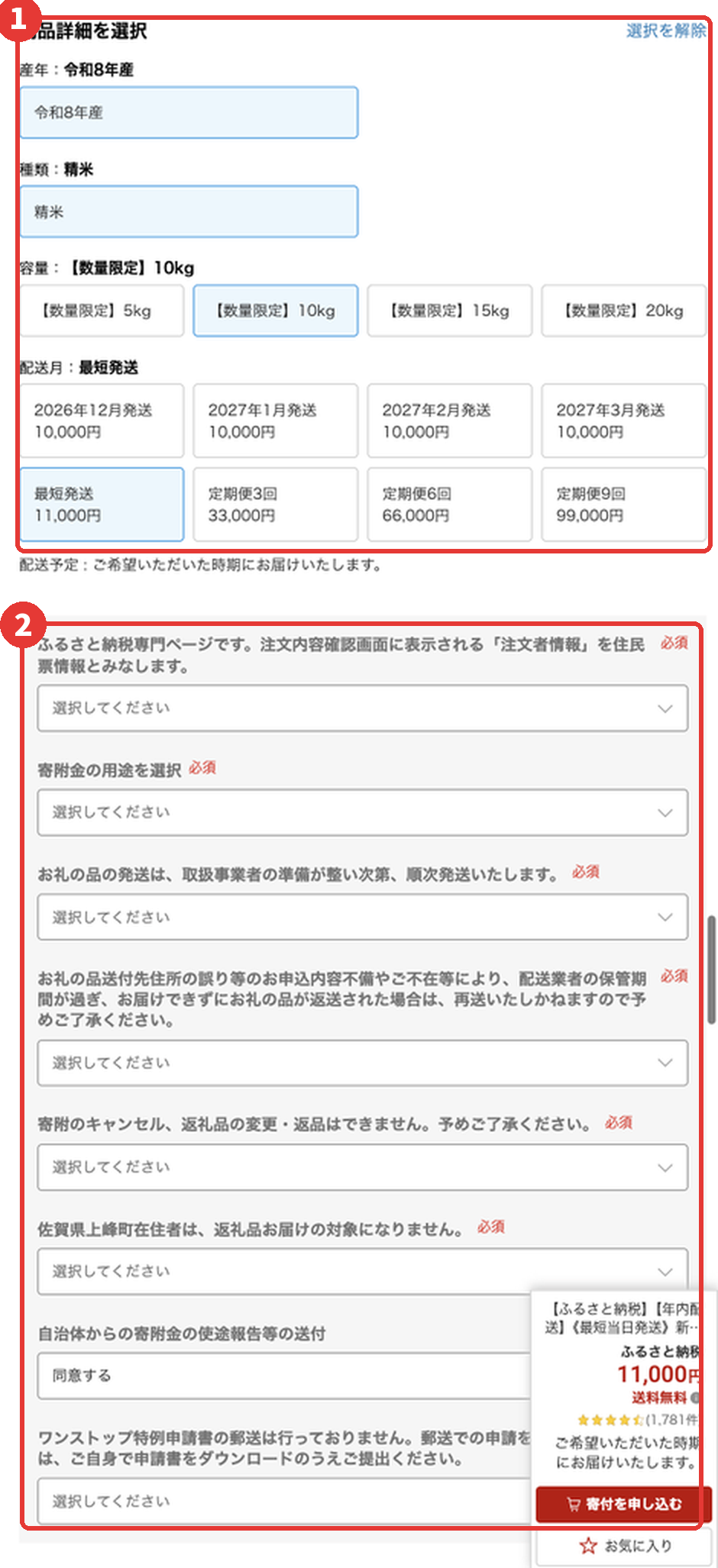
Even for the same gift, the donation amount may vary by shipping date. For the rice shown, "earliest available shipping" costs ¥11,000, while "shipping in December 2026" costs only ¥10,000. If you do not need it urgently, choose the cheaper month.
Step 4: Answer the Required Questions Below
At ② in the image is a series of drop-down menus, all of which must be completed. Most are confirmations: that the order information matches your residence record, how the donation may be used, that the order cannot be canceled, that local residents are ineligible for gifts, and so on. Read each item and select the option indicating your confirmation or agreement.
The final item concerns the One-Stop Exception application form, and it is the most important. In the example shown, it says the form will not be mailed and must be downloaded yourself. Some municipalities let you select "希望する" to request that they mail it to you. Follow the instructions on the page and note which municipalities require you to handle the form yourself.
Step 5: Apply and Pay
Click "寄付を申し込む," proceed to checkout, and pay by credit card. Once payment is complete, the donation counts toward the current year.
Step 6: Submit the One-Stop Exception Application by January 10 of the Following Year
If you do not plan to file a final tax return (確定申告), you must submit a separate application to every municipality you donated to:
- Online: Rakuten provides an online application service called "Furumado" (ふるまど). Scan your My Number Card with your phone to complete the process in a few minutes.
- By mail: Send the application form and a copy of your proof of Individual Number to each municipality. The documents must arrive by January 10.
Rakuten's Tax Deduction Procedure Guide provides detailed instructions for both methods.
Step 7: Keep Your Certificates and Verify the Deduction Next Year
Each municipality will send you a Donation Receipt Certificate (寄附金受領証明書). Keep these certificates, as you will need them if you file a final tax return. Around May or June of the following year, your employer will issue your resident tax determination notice. Check whether your resident tax is lower than it would have been without the donations; if it is, the deduction was successfully applied.
Platform Reward Points Are Gone
Rakuten, Satofull, and other platforms previously offered bonus platform points for furusato nozei donations. However, following a June 2024 revision to the Ministry of Internal Affairs and Communications notice, platforms have been prohibited from using reward points to attract donations since October 1, 2025 (Financial Field’s explanation).
The only rewards still available are credit card points, typically around 1%. There is therefore little difference between platforms, so just use whichever one you find most convenient.
What to Do Before Year-End
- Complete payment by December 31. The year is determined by the payment date, so payments made in January count toward next year’s limit. Websites can become overloaded and popular gifts may run out near year-end, so it is best to finish by mid-December.
- Make sure your registration details exactly match your resident record. If your name or address is incorrect, the municipality may be unable to process your tax deduction.
- Choose your tax deduction method. If using the One-Stop Exception, follow the instructions on the ordering page to obtain and submit the application—by mail, download, or online—and complete the process by January 10 of the following year.
- Keep your donation certificate (寄附金受領証明書). You will need it when filing a final tax return (確定申告).
- Report any change of address. If you move after using the One-Stop Exception but before January 10 of the following year, submit a change notification to each municipality you donated to.
Is It Worth It?
In the example above, a ¥60,000 donation gets you roughly ¥15,000–¥20,000 worth of rice, meat, and daily necessities over the course of a year. Your actual cost is ¥2,000, plus temporarily advancing the money and receiving it back over 12 months the following year.
The higher your income, the higher your donation limit—and the more gifts you can receive. For people earning over ¥10 million a year, the limit can reach well over ¥100,000, which is why some say it saves them a lot of money. For the average office worker, the practical benefit is essentially a free batch of everyday essentials each year. For anyone working in Japan, it is one of the few benefits with virtually no barriers to entry, and the entire process can be completed in a single evening.
Don’t Want to Do It Yourself? Let AI Handle It
Most of the numbers in this article were calculated by AI. In the terminal, I simply told Claude Code, “Help me research furusato nozei.” It then did the following:
- Calculated the limit: It read locally stored documents such as my payslips and withholding tax certificate to estimate this year’s limit. The documents remained on my computer, and sensitive information was redacted by default when the AI accessed them.
- Compared prices: It opened my already logged-in Chrome, checked each reward on Rakuten, selected the relevant options, and recorded the actual donation amounts. That is how the table above was created.
- Wrote the guide: It organized the findings into this article, added screenshots, and published it to the blog.
All I did was ask questions, review the results, and make the final decisions.
This was possible thanks to our open-source use family: a collection of tools for AI coding assistants that lets them interact with real browsers, phones, and your local data. For this project, I used:
| Tool | What It Did |
|---|---|
| profile-use | Manages personal information such as your address, payslips, and ID photos. Everything stays in your own iCloud or on your local device and is never uploaded to a cloud repository. AI reads it from there when filling out forms or calculating taxes. |
| chrome-use | Lets AI browse websites, click buttons, and take screenshots using your already logged-in Chrome. It handled all the Rakuten price comparisons and screenshots. |
The same approach can handle other everyday chores: mail-use can read your emails and find verification codes, while iphone-use can operate iPhone apps that do not have web versions. See the use family documentation for the complete list and one-click installation. In Claude Code, you can install everything with two commands:
/plugin marketplace add leeguooooo/plugins
/plugin install use-family@leeguooooo-plugins
Once installed, you can hand off tasks like “Take care of my furusato nozei for this year” to AI. I still recommend clicking the final payment button yourself.
 WeChat Pay
 Alipay
Comments
Replies are public immediately and may be moderated for policy violations.