
SSH was clearly enabled in Synology DSM, and the port had also been changed, yet it still would not open from outside. At first glance, this looked a lot like an incorrect router port forwarding rule, or a wrong username or password. What we encountered this time was neither of those.
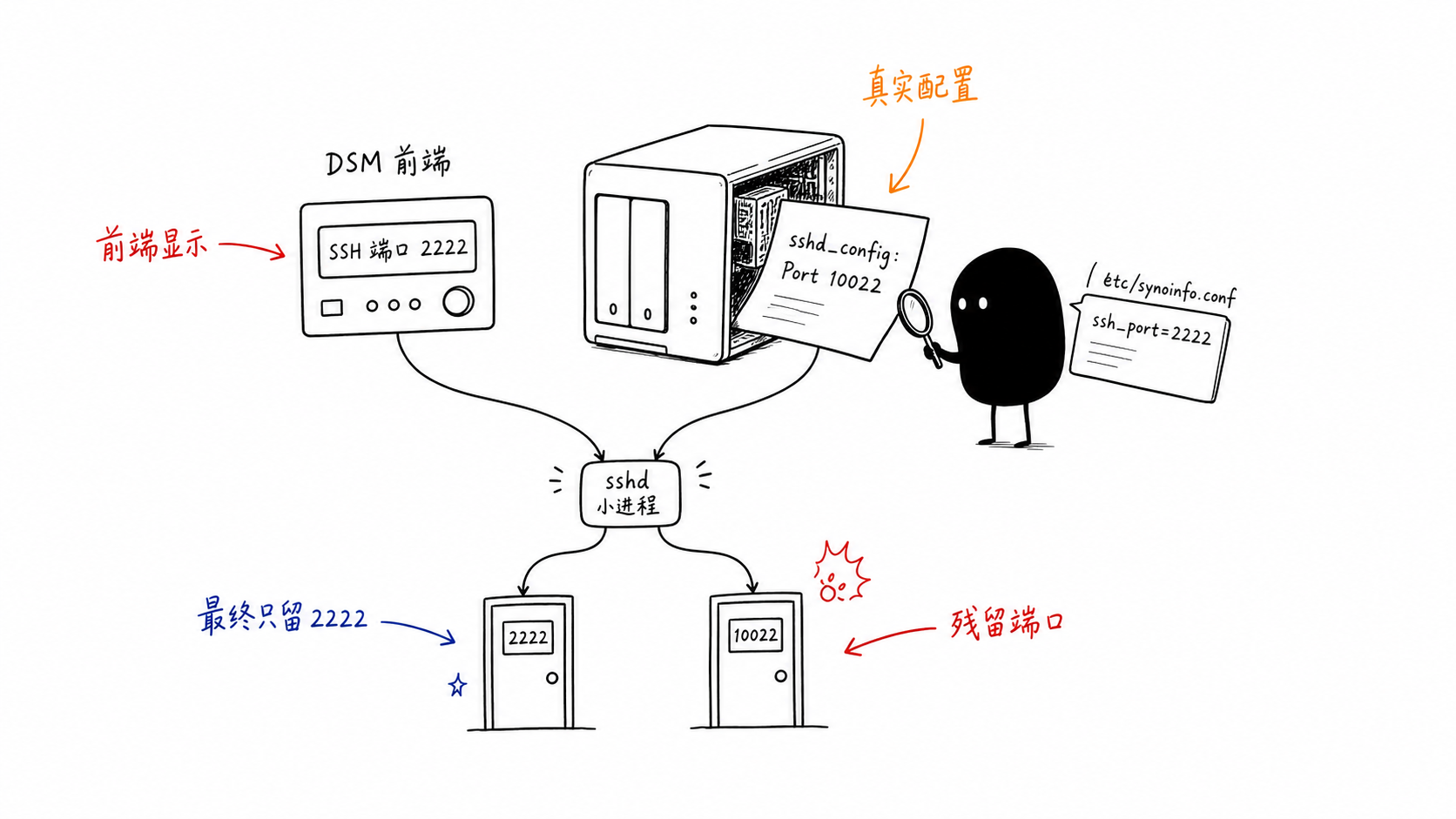
The real trap was between Synology’s own frontend state and the OpenSSH configuration file. The DSM panel showed the new port, but /etc/ssh/sshd_config still had the old port left behind. As a result, the same sshd process was listening on two ports at the same time: one was the new port recognized by DSM, and the other was the old port left over from manual configuration.
What the Scene Looked Like
To avoid publishing private environment details, the real hostnames, accounts, and ports below have all been generalized. The scenario was this:
- SSH was enabled on DSM’s “Terminal” page.
- Connecting from the local machine to
<nas-host>:<old-port>initially returnedConnection refused. - After entering the system through a temporary access path, we found that the OpenSSH configuration file could not pass a syntax check.
At the time, the beginning of /etc/ssh/sshd_config had a block of YAML configuration mixed into it that did not belong to OpenSSH. The content itself was not important. What mattered was that it made sshd parse ordinary YAML as SSH configuration, causing startup to fail.
Bad configuration option: version:
Bad configuration option: services:
This caused /bin/sshd -t -f /etc/ssh/sshd_config to report a series of Bad configuration option errors. So the first root cause was clear: the OpenSSH configuration file was broken, and sshd could not start at all.
We restored the default configuration from /etc.defaults/ssh/sshd_config, then brought SSH back up. I made a small mistake in this step: the first time, I appended Port <old-port> to the end of the file, but the default configuration had already entered a Match block near the end, so OpenSSH reported:
Directive 'Port' is not allowed within a Match block
This error was not complicated. The fix was to place Port in the global configuration area, meaning before Match. After that was fixed, sshd -t passed, and the old port began listening.
The Second Trap: The Frontend Changed, but the Old Configuration Did Not Disappear
Later, we changed SSH to a new port in the DSM frontend. At that point, a more counterintuitive state appeared:
tcp 0 0 0.0.0.0:<old-port> LISTEN sshd
tcp 0 0 0.0.0.0:<new-port> LISTEN sshd
The same sshd process was listening on two ports at once. sshd -T also confirmed this directly:
port <old-port>
port <new-port>
Why was the old port still present when the frontend already showed the new port? The answer was in two files:
/etc/synoinfo.conf: ssh_port="<new-port>"
/etc/ssh/sshd_config: Port <old-port>
DSM stores its own port state in /etc/synoinfo.conf. The Port <old-port> left behind during our manual repair was native OpenSSH configuration. When Synology started sshd, it layered the two together, producing two ports.
This also explains why the frontend looked like it had “successfully changed to the new port,” while the actual network behavior was still not clean. The frontend was not lying; it only displayed the port recorded by DSM itself. The problem was that we had manually written another OpenSSH port configuration, and DSM would not clean it up for us.
Why the Old Port Still Kicked the Session After Authentication
I did not inspect Synology’s source code for this part, so this can only be judged from the evidence at the scene.
The old port did not reject connections completely. It could reach successful authentication. We once ran sshd -ddd for debugging, and the log showed that the public key passed, and the PAM account/session checks also passed. Then the child process wrote a short error to stderr, and the client saw:
Permission denied, please try again.
On the same machine, with the same administrator account and the same key, switching to the new port allowed login. This difference did not look like an account permission issue. It looked more like Synology only recognized the SSH port in /etc/synoinfo.conf during the session stage. The old port was an entry point additionally exposed by OpenSSH configuration, but it was no longer an entry point recognized by DSM.
There is no need to over-explain this judgment. For operations work, the sufficient conclusion is: do not let DSM’s SSH port and sshd_config’s Port both speak at the same time.
Closing the Loop
The fix did only one thing: keep DSM as the port source and remove the manually written leftover.
Back up the original configuration:
cp -a /etc/ssh/sshd_config /etc/ssh/sshd_config.before-remove-old-port
Change this line:
Port <old-port>
into comments:
#Port <old-port>
# Removed local stale override; DSM SSH port is stored in /etc/synoinfo.conf ssh_port.
Then check and reload:
/bin/sshd -t -f /etc/ssh/sshd_config
/bin/systemctl reload sshd
After the fix, the effective configuration had only one port left:
port <new-port>
Verify from another machine:
ssh -p <new-port> <admin-user>@<nas-host>
# ok

nc -vz -G 3 <nas-host> <old-port>
# Connection refused

nc -vz -G 3 <nas-host> 23
# Connection refused
Only then was the issue closed: SSH kept only the new port, the old port was no longer listening, and Telnet on 23 was also closed.
Where My Judgment Was Slow This Time
At first, I focused on the account, password, PAM, shell, and authorized_keys permissions. Those checks were not wrong, but they could not explain why “the same account could log in on the new port, but was kicked after authentication on the old port.”
I should have run these three commands earlier:
/bin/sshd -T -f /etc/ssh/sshd_config | grep '^port '
grep -n 'ssh_port' /etc/synoinfo.conf
netstat -ltnp | grep -E '(:<new-port>|:<old-port>|:23)'
These three commands directly place the “frontend state,” “effective OpenSSH configuration,” and “actual listening ports” side by side. As long as the three are inconsistent, do not start guessing about passwords and PAM.
Another lesson is that when restoring vendor default configuration, do not stop at passing syntax checks. A system like DSM is not a pure Linux server. It has its own configuration database, frontend state, and service scripts. Things manually written into /etc/ssh/sshd_config may be layered with the DSM management panel rather than overriding it.
Check in This Order Next Time
Next time I encounter a DSM SSH port issue, I will follow this order:
- Use
sshd -tto first confirm whether the configuration file can be parsed by OpenSSH. - Use
sshd -T | grep '^port 'to see which ports OpenSSH ultimately recognizes. - Use
grep ssh_port /etc/synoinfo.confto see which port the DSM frontend recognizes. - Use
netstat -ltnpto see the actual listening ports. - Open a new SSH session to verify, and only close Telnet after confirmation.
After this issue was fixed, only one stable entry point remained:
ssh -p <new-port> <admin-user>@<nas-host>
Guess less, inspect the final state more. A NAS is a half-appliance, half-Linux system. The frontend state and underlying configuration exist at the same time, and when the two are inconsistent, the real behavior is determined by the process that actually starts.
 微信
微信 支付宝
支付宝
Comments
Replies are public immediately and may be moderated for policy violations.