

WeChat 4.x locks the local chat database inside SQLCipher. If you want a program to read chat history, images, and voice messages, there is one thing you cannot avoid: first obtaining the decryption key.
Around the task of “getting the key, then reading the database,” the community has developed two mature approaches. One is wechat-use—the macOS toolkit for sending messages, reading databases, and real-time monitoring. The other is the open-source wechat-decrypt—for cross-platform decryption, batch export, speech-to-text, and native MCP support.
The two are often compared, but usually in the wrong direction. The real difference is not “which one has more features,” but how they obtain that key and what they can do after obtaining it. This article breaks both down at the principle level. After writing it, I actually ran wechat-use on my own machine—and ended up correcting two mistaken judgments I made earlier, which I’ll explain later.
First, Let’s Make the Encryption Model Clear
WeChat 4.x’s local databases are standard SQLCipher 4-encrypted SQLite files, stored at:
macOS: ~/Library/Containers/com.tencent.xinWeChat/Data/Documents/xwechat_files/<wxid>/db_storage
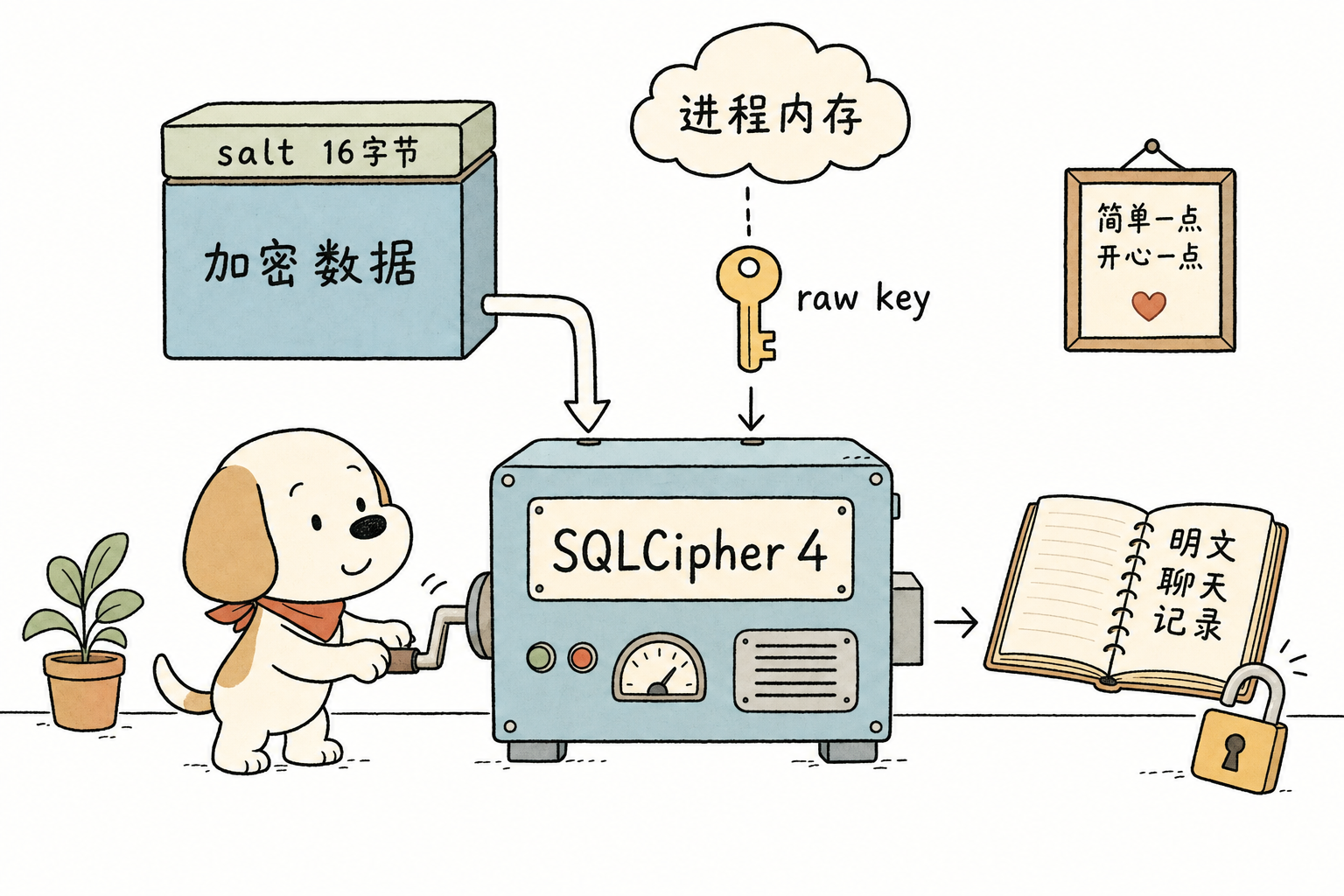
There are three things you must understand first about SQLCipher’s key model. Otherwise, the rest of the article—what exactly the two tools are digging for—will not make sense:
- One database, one key. There is no single global key.
contact.db,message_*.db,sns.db… each database has its own 32-byte raw key. On my own machine, the~/.wx-rs/keys.jsonsaved bywechat-usecontains exactly 19 per-DB entries, each in the form{key_hex: 64 chars, salt_hex: 32 chars}. - The salt is hidden in the file header. The first 16 bytes of each encrypted DB file are a random salt. This is also why an encrypted SQLite file does not start with
SQLite format 3when opened—the first 16 bytes have been occupied by the salt. Inwechat-decrypt’s C code, there is this line:memcmp(header, "SQLite format 3", 15) == 0 → return -1; if it hits a plaintext database, it skips it. - The raw key only lives in memory. The 32-byte raw key is not written to disk. WeChat derives it only at runtime and holds it inside the process memory. Its format is
x'<64-char key hex><32-char salt hex>', which is the raw form of SQLCipher’sPRAGMA key: 96 hexadecimal characters.
So to decrypt a database, you need two things: the raw key, dug out of process memory + the salt, read from the first 16 bytes of the DB file header. The constants in wechat-decrypt’s find_all_keys_macos.c—HEX_PATTERN_LEN 96, key_hex[65], and salt_hex[33]—map exactly to this model.
“The salt is in the file header” is not something I made up; a single hexdump verifies it. The first 16 bytes of my local contact.db are:
$ xxd -l 16 contact/contact.db
00000000: 90f7 c71d 17b5 bfe6 24b1 76ac df40 df7f
A plaintext SQLite file should start with 53 51 4c 69 74 65 … ("SQLite format 3\000"). Here, it is just a blob of random bytes—these 16 bytes are the salt, and encryption has overwritten the original file header. wechat-decrypt uses exactly this check, memcmp(header, "SQLite format 3", 15), to determine whether a database is already plaintext.
One account has a whole set of databases, not just one file. WeChat splits data by purpose into nearly 20 encrypted databases, each with its own key. The 19 entries in my local ~/.wx-rs/keys.json correspond to:
| Database | What It Stores |
|---|---|
message/message_0.db, message_1.db | Chat message bodies, sharded by volume |
message/message_fts.db | Full-text search index for chats |
message/media_0.db, message_resource.db | Media/resources inside messages |
message/biz_message_0.db | Official account/service account messages |
session/session.db | Conversation list, the left sidebar |
contact/contact.db, contact_fts.db | Contacts + contact search |
sns/sns.db | Moments |
favorite/favorite.db, favorite_fts.db | Favorites |
emoticon/emoticon.db / head_image/head_image.db | Stickers / avatars |
hardlink/hardlink.db | File hardlink index |
bizchat, general, solitaire, weclaw | Enterprise account chats / general config / solitaire / etc. |
The hard part has never been decryption—SQLCipher’s standard library can open the database as long as you give it the right key. The hard part is digging that key out of memory. This step is where the two tools truly diverge.
Core Principle: Two Ways to Dig the Key Out of Memory
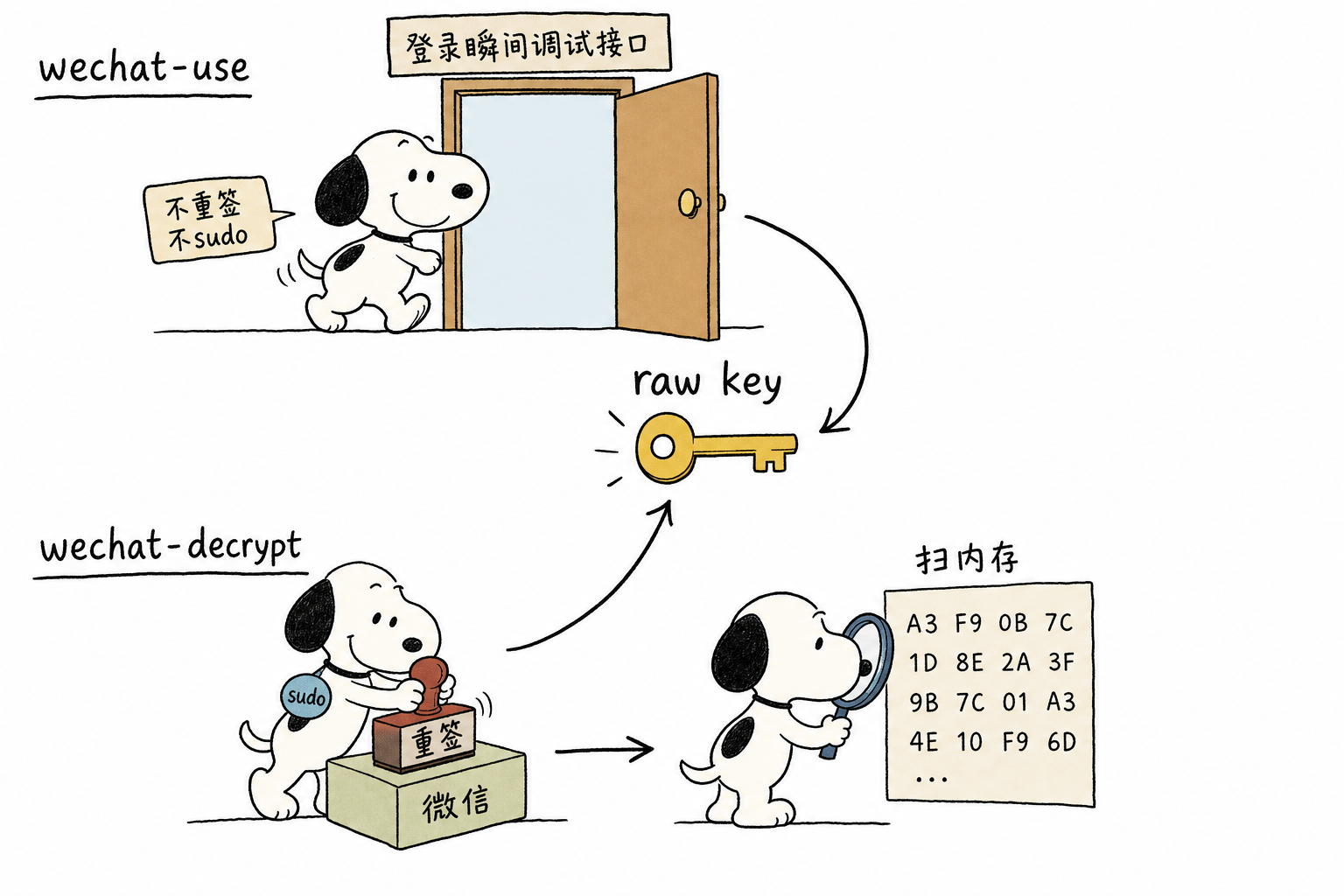
To read the WeChat process’s memory, macOS puts up a barrier: WeChat is signed with hardened runtime, and by default the system does not allow another process to task_for_pid attach to it—even if you are root. The way the two tools get past this barrier is their biggest difference, and also the part where I made the messiest revisions in this article (I’ll explain below how I got it wrong twice).
Route A: wechat-decrypt — Replace-Mode Re-Signing + sudo Memory Scan
sudo codesign --force --deep --sign - /Applications/WeChat.app   # ① replace-mode re-sign as ad-hoc
cc -O2 -o find_all_keys_macos find_all_keys_macos.c -framework Foundation
sudo ./find_all_keys_macos                                        # ② root scans memory
codesign --force --deep --sign - is replace-mode re-signing: it changes the entire WeChat app to an ad-hoc signature, wiping out the hardened runtime along with WeChat’s own entitlements. Then it relies on root to use mach_vm_read to scan memory chunk by chunk (2 MB per chunk), regex-match the 96-hex key+salt pattern, and write hits into all_keys.json. It reads the salt separately from the DB file header. The idea is straightforward, standard practice in reverse-engineering circles, and fully open-source and auditable. The cost: it requires root, and replace-mode re-signing wipes WeChat’s original permissions too (in extreme cases, this can affect WeChat’s own TCC permissions).
Route B: wechat-use — Read the Key Without Re-Signing (Debugging Interface at Login Time)
This was the part I found most twisted at first, so let’s split it into two layers:
Reading the key (init) itself does not require re-signing or sudo. At the instant WeChat logs in, it uses macOS’s public debugging interface to grab the decryption material once, then immediately detaches—no codesign --force --deep, no root. This is completely different from Route A, where the tool first does replace-mode re-signing and then brute-force scans memory as root.
Re-signing is only needed if you want to send messages, and it is merge-mode. The slot_send adapter used for sending needs WeChat to have get-task-allow=true, so it runs one merge-mode re-signing step—only adding the single get-task-allow entitlement while preserving all of WeChat’s original permissions (SKILL explicitly warns not to use replace-mode, because that would wipe WeChat’s TCC permissions). This is where it is more restrained than Route A: even though it also touches the signature, it performs a surgical merge rather than a blanket replacement.
The output of wechat-use doctor on my machine:
✓ wechat_get_task_allow   get-task-allow = true (LLDB can attach)
✓ wechat_codesigned       signer: ad-hoc (locally re-signed, includes get-task-allow)
✓ wechat_dylib_fingerprint SHA-256=fc162db6…  raw_key ✓ (keymap)
✓ wechat_update_guard     ✓ disabled (Tencent cannot write to MacUpdate)
Be careful not to fall into this trap (I did): the “locally re-signed” shown here is because this machine of mine had been configured for sending, so it had already gone through that merge-mode re-signing step. It is not a prerequisite for reading the key—if you only read and do not send, the login-time interface used by init is enough. Two other details: wechat_dylib_fingerprint means it selects a keymap based on the WeChat dylib fingerprint to locate the raw key (more resistant to upgrades than brute-scanning a fixed pattern), and wechat_update_guard: disabled means it makes the MacUpdate directory unwritable so the re-signing will not be wiped out by an update.
One-sentence comparison for key extraction: wechat-decrypt key reading = replace-mode re-signing + root brute-force memory scan; wechat-use key reading = login-time debugging interface, no re-signing and no sudo (only sending messages requires a separate merge-mode re-sign). For the key-reading step, wechat-use is clearly lighter and more restrained; wechat-decrypt is rougher, but fully open-source and consistent across platforms.
A Clever Trick Worth Copying: Image Keys Do Not Need Memory Scanning
There is a pretty clever detail in wechat-decrypt: image keys are not taken from process memory, but derived from the on-disk kvcomm cache (find_image_key_macos.py). WeChat stores the key for image .dat files in the disk cache, so decrypting images does not require attaching to the process or using root at all. If you want to implement image decryption yourself, this route is clean and worth copying directly.
Decryption Itself: Identical on Both Sides, Just a Few Manual Lines
Once you have dug out the raw key and paired it with the salt from the file header, there is no mystery left—it is all standard SQLCipher 4. After obtaining the key, manually decrypting a database only takes these few lines (key masked):
$ sqlcipher contact/contact.db
sqlite> PRAGMA key = "x'<64-character key hex…>'";   -- raw key dug from memory
sqlite> PRAGMA cipher_compatibility = 4;             -- declare SQLCipher 4
sqlite> .tables                                      -- can list tables = decrypted
If the key is correct, .tables lists the contact tables; if the key is wrong, it directly reports file is not a database. You do not need to manually feed the salt—it is in the first 16 bytes of the file header, and SQLCipher reads it by itself. What both tools do is automate these few lines; all the previous work around re-signing/attach/memory scanning is only for obtaining that x'…'. Nobody has a proprietary decryption algorithm; “which one decrypts better” is a false question. The difference is entirely in the earlier key-extraction step.
After You Get the Database: Capabilities Diverge

Extracting the key is the entry ticket; after you have it, the two tools go in different directions. This table is my corrected version after hands-on testing (the crossed-out parts are where the first version was wrong):
| Dimension | wechat-use | wechat-decrypt |
|---|---|---|
| Sending messages | Headless, zero UI flash, with delivery status | Cannot send; read-only |
| Reading databases (sessions/contacts/history/images) | Supported (local test: sessions returned normally) | Fully decrypts into plaintext SQLite |
| Speech-to-text | ✅ Also supported (v1.17: silk-decoder + whisper-cli + ggml-medium) | ✅ SILK → WAV → text |
| Key extraction method (macOS) | Reads key via debug interface at login time; no re-signing, no sudo (message sending separately uses merge-mode re-signing) | replace-mode re-signing + sudo mach_vm brute-force memory scan |
| Upgrade adaptation | dylib fingerprint keymap + probe-build self-adaptation | Fixed memory patterns; waits for author updates |
| Platforms | macOS only | Win / Mac / Linux |
| WeCom | No | 5.x tested only on Windows |
| For Claude (MCP) | Via HTTP/gRPC; you need to wrap it yourself | Native MCP, one-line integration, 20+ tools |
| Real-time listening | daemon RPC → SSE | Web UI SSE / CLI / MCP |
| Remote access | Exposes REST via Cloudflare Tunnel | Mainly local |
| Cost | Paid activation code | Free and open source |
This is exactly where hands-on testing matters—and I was wrong more than once. In the first version, based on the docs, I wrote: “wechat-use does not re-sign and does not transcribe voice.” After running it, I saw doctor display “local re-signing,” thought I had caught an error, and changed it to “both sides must re-sign to read.” But that was an overcorrection: that re-signing was configured for sending messages; reading the key does not require re-signing at all. Only after reading the full SKILL docs and source code did the picture come together: reading the key does not re-sign; only sending messages uses merge-mode re-signing; transcription already existed in v1.17. I got it wrong once by reading the docs, then wrong again by looking at only half the evidence. Only after running the tools end to end and reading both the docs and source did I dare draw a conclusion.
One-sentence reading of this table: wechat-use is an all-in-one bot platform for “sending + reading + transcription + real-time” (paid, closed source, macOS only), while wechat-decrypt is an open-source data tool for “decryption + export + transcription + native MCP” (free, cross-platform, supports WeCom, but cannot send messages).
Each Workflow
wechat-use (send + read + real-time)
① Subscribe to the TG channel to get an activation code
② wechat-use init          # Hooks the debug API at login to extract the key; no re-signing, no sudo (message sending separately uses merge-mode re-signing); daemon starts on demand
   ├─ Read: wechat-use sessions / history / contacts / search / image  (YAML, low-token)
   ├─ Send: wechat-use send "text" <name or wxid>                         (zero-flash in background)
   └─ Real-time: wechat-use listen  or  wechat-bridge → HTTP /messages/stream?since=
③ Remote: wechat-use tunnel setup → expose REST via Cloudflare Tunnel
④ Upgrade: wechat-use probe-build → adapt to new builds
wechat-decrypt (decryption + export + MCP, macOS)
① python venv + pip install -r requirements.txt + brew install whisper-cpp
② Quit WeChat → sudo codesign re-sign → cc compile → sudo ./find_all_keys_macos   # root scans memory to extract key
③ python decrypt_db.py            # full decryption → plaintext SQLite (-i for incremental)
   ├─ Export: python export_all_chats.py -t  # JSON/CSV/HTML + voice transcription + incremental/date windows
   ├─ Real-time: python main.py                 # Web UI localhost:5678 (SSE)
   └─ For Claude: claude mcp add wechat -- python mcp_server.py   # 20+ query tools
mcp_server.py plugs into Claude with a single line; get_chat_history / search_messages / decode_voice query directly. When parsing XML such as Moments, it also adds XXE protection (rejecting DOCTYPE/ENTITY + size limits), which is more rigorous than many similar tools.
Combining Them (real scenario: agent connects to WeChat)
Sending messages / real-time replies / group @ bot ──────────→  wechat-use   (mature, already in use)
Bulk history pulls / WeCom / native Claude queries ──→  wechat-decrypt MCP  (adds MCP + cross-platform)
They don’t conflict, but don’t run them at the same time — both need to attach to WeChat, and both touch its signature and DB. Running both stacks on one machine will make signing and attachment fight each other.
Two Easily Overlooked Points
Voice-to-text works the same on both sides. WeChat voice messages aren’t MP3; they’re SILK (Skype’s open-source narrowband voice codec). So transcription is a three-stage pipeline: SILK → decode to WAV → send to Whisper for text. wechat-decrypt includes a SILK decoder plus whisper.cpp/OpenAI; wechat-use v1.17 also packages silk-decoder + whisper-cli + ggml-medium, so voice messages are automatically transcribed when reading group history. This chain is basically the reverse of doing TTS welcome messages — that side is text → voice, this side is voice → text — but both rely on Whisper.
Personal WeChat and WeCom don’t use the same lock. Personal WeChat 4.x uses SQLCipher 4 (the setup described earlier: file-header salt + in-memory raw key). WeCom 5.x is a different system: wxSQLite3 AES-128, with different encryption parameters and a different key location. That’s why wechat-decrypt has a separate find_wxwork_keys.py, and it has only been tested on Windows. wechat-use simply doesn’t touch WeCom. If you want to decrypt WeCom right now, the only practical path is wechat-decrypt + Windows.
Risks and Boundaries (This Is a Decryption Tool, So It Needs to Be Clear)
- Both may modify WeChat’s signature, but in different ways and at different times.
wechat-decryptuses replace-mode re-signing just to read the key (wiping WeChat’s original entitlements) + root;wechat-usedoes not re-sign when reading the key, and only addsget-task-allowin merge mode when sending messages (preserving the original entitlements), while also proactively disabling auto-updates to keep it that way. Either way, ad-hoc re-signing changes WeChat from an official signature to a local signature, which theoretically may be detectable or trigger Gatekeeper warnings. Know what you are changing before you do it. - Only decrypt your own account and your own data. The legitimate use case for tools like this is exporting/backing up your own chats, not reading someone else’s.
- Do not leak keys or chat contents. Once the raw key leaks, anyone can decrypt your database. All real keys and chat contents in this article are redacted — and that is what you should do when writing articles like this or posting logs.
- Developer Mode / attach permissions are required.
wechat-userequires macOS Developer Mode +get-task-allow;wechat-decryptrequires root. These are both “can read arbitrary process memory” level permissions, so think carefully before granting them.
So, Is His Implementation Better Than Ours?
Looking at it separately:
- Key extraction:
wechat-useis lighter and more restrained. It does not re-sign at all when reading the key (debug interface at the moment of login, nosudo); it only uses merge-mode re-signing when sending messages (adding onlyget-task-allowwhile preserving WeChat’s original permissions).wechat-decrypthas to use replace-mode re-signing + root hard scanning just to read the key, which is rougher and also wipes WeChat’s original permissions along the way — but it is fully open source, auditable, and uses one cross-platform approach. - Decryption itself: the same. Both are standard SQLCipher 4; nobody has any black magic here.
- Capability coverage: each has its own strengths.
wechat-useuniquely supports “sending messages”;wechat-decryptuniquely supports “native MCP + cross-platform + WeCom.” Both support voice transcription (I got this wrong at first).
The accurate way to put it is: this is not “whose implementation is better,” but two different paths. wechat-use wins on the elegance of key extraction and the ability to “send messages”; wechat-decrypt wins on being open source, free, cross-platform, and native MCP.
Selection Conclusion
- If you need to send messages, you can’t do without
wechat-use.wechat-decryptsimply cannot send messages, so it cannot replace it. - What makes
wechat-decryptworth introducing are the two gaps it fills: free native MCP (letting Claude connect in one line and directly query chat history), plus cross-platform support + WeCom. Voice transcription is no longer its unique selling point—both sides have it. - Deployment: keep
wechat-useas the main tool for sending + real-time + database reading; when you need “Claude to natively query WeChat data” or “read WeCom / run on Linux,” addwechat-decrypt’s MCP. Don’t run both stacks on the same machine at the same time.
Technically, two things can be copied from the other side: deriving image keys from the on-disk kvcomm cache (no need to attach to the process), and using the x'key+salt' 96-hex in-memory format with a keymap for locating keys (more upgrade-resistant than brute pattern scanning). If you ever want to build your own or harden the system, these two tricks are ready-made.
One final methodological note: the most valuable part of this piece is not the comparison table, but the process of being wrong twice—I got it wrong once after reading the docs, then overcorrected once after seeing half a piece of evidence (doctor’s re-signing), and only dared to draw a conclusion after running the tools thoroughly and reading the SKILL and source code in full. The most dangerous part of writing comparisons is not failing to read; it is writing after reading only halfway—and the source of the misleading claim was precisely the tool’s own documentation line about no re-signing, which failed to distinguish between “reading keys” and “sending messages.”
 微信
微信 支付宝
支付宝
Comments
Replies are public immediately and may be moderated for policy violations.